


TL;DR
- Pricing starts at $8 per seat per month on the Workforce Analytics plan, rising through a five-tier ladder to custom Enterprise pricing. The free trial is 7 days.
- Screenshots are a base-plan feature, and Insightful offers a covert stealth mode alongside a visible mode. This is the source of most privacy complaints.
- Insightful does not log keystroke content. Its own documentation states it does not track keystrokes, so keystroke logging is not a concern here.
- For regulated industries, screenshots are the compliance question. A real G2 reviewer asked whether Insightful can keep protected health information out of screenshots, and that is the issue healthcare, finance, and government buyers need to resolve before rollout.
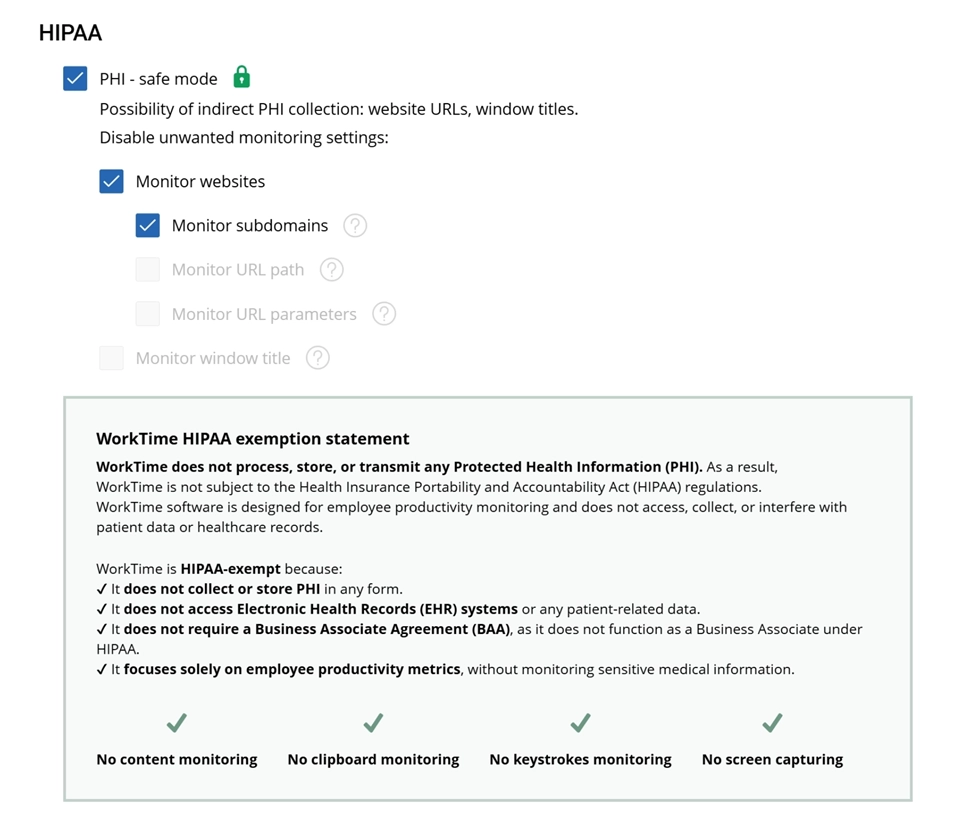
- WorkTime is designed for privacy-conscious and regulated environments, combining non-invasive productivity analytics with GDPR-, HIPAA-, and GLBA-safe modes and 80+ reports - all without relying on screenshots or screen recording.
In this article
What is Insightful (formerly Workpuls)?
Insightful is a workforce analytics and employee monitoring platform that tracks time, activity, app and website usage, and productivity trends automatically. It rebranded from Workpuls in 2021, so older reviews and forum threads still use the Workpuls name. The product targets operations leaders, COOs, CFOs, and CIOs who run remote or hybrid teams and want objective data on how work time is spent. For managers, Insightful answers one question: where does the workday actually go? It converts raw activity into dashboards, capacity reports, and utilization scores, and it layers screenshots and stealth monitoring on top for teams that want visual proof of activity. That combination is its strength for some buyers and its liability for others.Insightful at a glance
| Attribute | Detail (as of August 2026) |
|---|---|
|
G2 rating |
4.6 / 5 (376 reviews) |
|
Capterra rating |
4.8 / 5 (156 reviews) |
|
Trustpilot rating |
4.1 / 5 (68 reviews) |
|
Entry price |
$8 per seat per month, billed annually |
|
Free trial |
7 days, no credit card |
|
Deployment |
Cloud and on-premise; Windows, Mac, Linux |
|
Screenshots |
Yes, on the base plan; stealth and visible modes |
|
Keystroke content logging |
No |
|
Best for |
Desktop-based remote and hybrid teams that want productivity analytics |
|
Weak for |
Field and mobile teams; organizations uneasy about screenshots of sensitive data |
Insightful pros: what reviewers praise
Insightful earns its high manager ratings on clarity, automation, and support. The praise below reflects recurring themes from G2 and Capterra reviewers.- Clean, intuitive interface. Reviewers consistently call the setup fast and the dashboards easy to read. Google's own overview of Insightful reviews highlights "easy setup, clean time-tracking dashboards, and data-driven performance metrics."
- Accurate, automated time tracking. The platform tracks time in the background and segments it by app, website, and project, which removes manual timesheet entry for desktop teams.
- Exportable, well-segmented reports. G2 reviewers describe the reports as easy to read while still granular, and one noted their productivity tracking is "far superior" to other tools they had used.
- Responsive support. Support quality is a standout in reviews, with G2 users praising response times and product knowledge.
- Real remote and hybrid visibility. Work Location Insights compares remote and in-office productivity, which helps distributed operations spot where output slips.
Insightful cons: common complaints
The complaints cluster around privacy, cost at scale, and a few reliability and coverage gaps. None of these sink the product for its core audience, but each one matters to a specific buyer.- Privacy pushback from employees. Screenshots and stealth-mode monitoring draw the most criticism. Reddit discussions summarized in Google's overview show some employees view background tracking as "overly controlling or invasive," while others accept it when management is transparent.
- Cost climbs at scale. Per-seat pricing plus add-ons adds up for larger teams. G2 reviewers note the subscription can feel expensive relative to the feature set once you move past the base plan.
- Occasional reliability gaps. Idle-time tracking draws occasional accuracy complaints, and some reviewers report time not being captured as expected. Google's own overview of Insightful reviews lists "occasional idle-time tracking inaccuracies" among the tool's cons.
- Desktop-only, weak mobile. Insightful tracks on desktop only, with no meaningful mobile app and no GPS. That makes it a poor fit for field, construction, or other teams whose work happens away from a computer.
- Short free trial. The 7-day trial gives less time to evaluate than many competitors offer, which is tight for a tool you plan to roll out across a team.
Insightful features
Insightful bundles automatic time tracking, productivity and activity monitoring, app and website usage tracking, real-time dashboards, and exportable reports into one platform. It integrates with project and HR tools, including Asana, Jira, ClickUp, GitLab, and BambooHR, plus payroll systems on higher tiers. For desktop teams, the feature depth is real, and the analytics are the reason managers rate it well.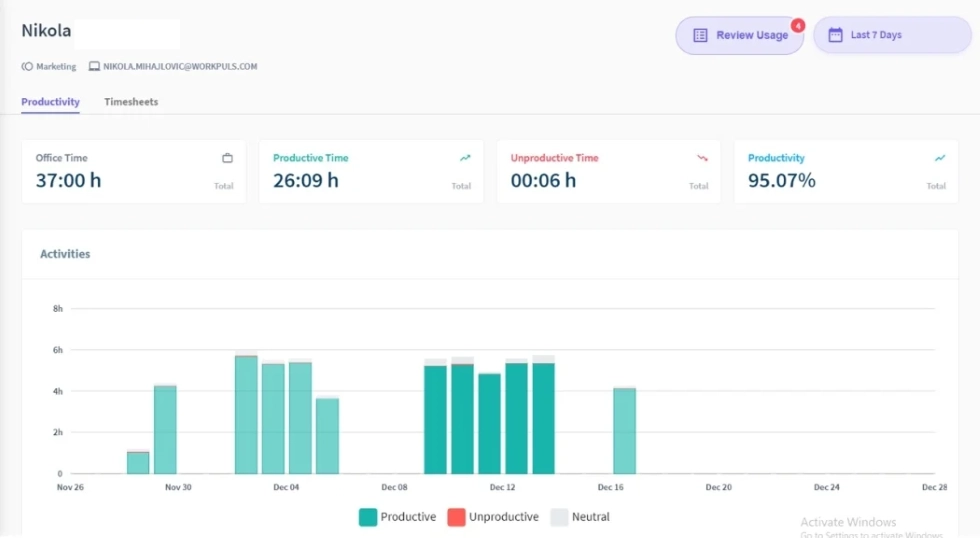
Screenshots and stealth mode
Insightful takes screenshots on its entry Workforce Analytics plan, and it offers a covert stealth mode. Screenshots feed a dashboard that admins can sort and filter by employee, app, project, and screenshot type. Insightful's own employee-monitoring page markets "stealth mode to monitor discreetly" alongside a visible mode, so the software can capture activity either openly or without the employee seeing it. Admins can disable screenshots or exclude specific apps, but the capability is on by default on the base plan. This is the clearest line between Insightful and a non-invasive tool. We built WorkTime the opposite way. It takes no screenshots, makes no screen recordings, and has no covert mode. Instead of capturing images of what people do, we use a Screen Productivity Score that measures active screen use without storing the content. The practical difference shows up in storage and reporting overhead. By our own benchmark, this non-invasive approach stores 0 GB of screenshot data versus 9.5 GB for screenshot-based monitoring and pulls a productivity report in about 5 minutes instead of the days spent reviewing captured images. For buyers weighing invasiveness, that architecture is the decision, not a setting.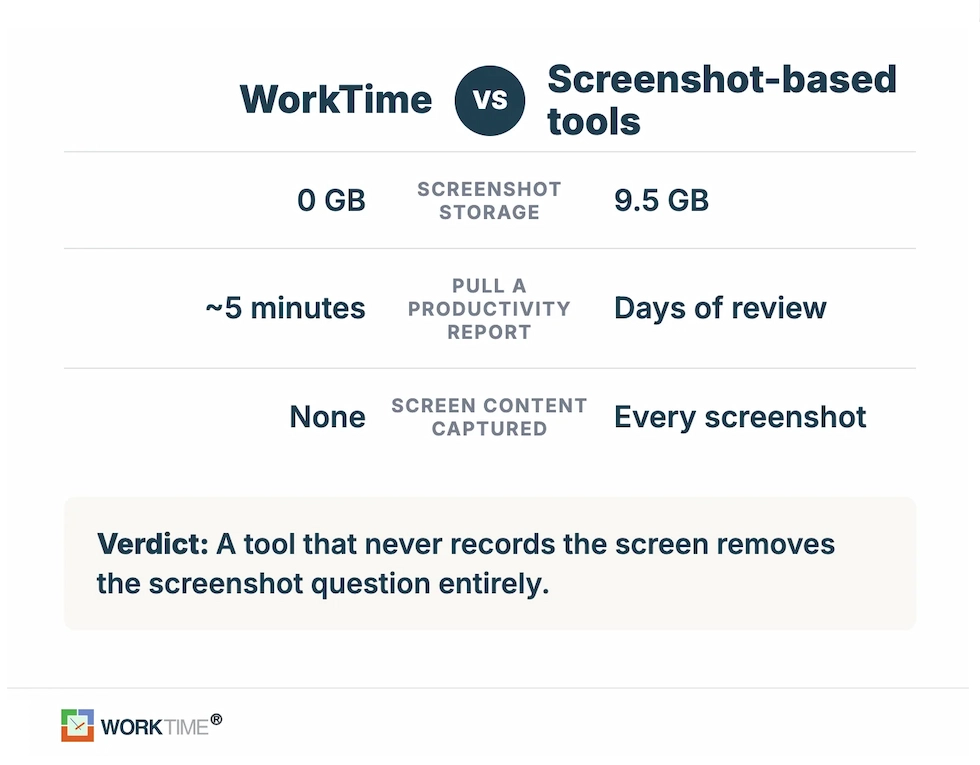
Insightful pricing (2026)
Insightful uses a five-tier pricing ladder, verified on its pricing page in August 2026. All per-seat prices below are billed annually.| Plan | Price (billed annually) | Built for |
|---|---|---|
|
Workforce analytics |
$8 per seat/month |
Core analytics, app and website usage, screenshots |
|
Workflow optimization (Beta) |
$12 per seat/month |
Process mapping and workflow tracking |
|
Combo (analytics + optimization) |
$16 per seat/month |
Both toolsets; marketed as "Best Value," save 20% |
|
Enterprise |
Custom |
SSO, audit logs, insider threat detection |
|
Hyperscaler |
Custom |
Very large or highly variable workforces |
Insightful and privacy compliance
Insightful carries the security certifications enterprise buyers expect: SOC 2 Type II, ISO 27001, HIPAA, GDPR, and CCPA compliance, with AES-256 encryption at rest and TLS 1.2 in transit. Admin controls let teams exclude apps from tracking, disable screenshots, anonymize data, set role-based access, and give employees a view of their own productivity data. On paper, the compliance posture is solid. The open question is screenshots. Certifications govern how data is stored and handled, not what a screenshot happens to capture. One G2 reviewer raised this directly, asking whether Insightful can detect protected health information and block it from screenshots to be fully HIPAA-compliant and noting they were unaware of such a feature. For a hospital, a bank, or a government office, a screenshot taken at the wrong moment can surface a patient record, an account number, or classified data, and that becomes a compliance exposure regardless of how securely the image is stored.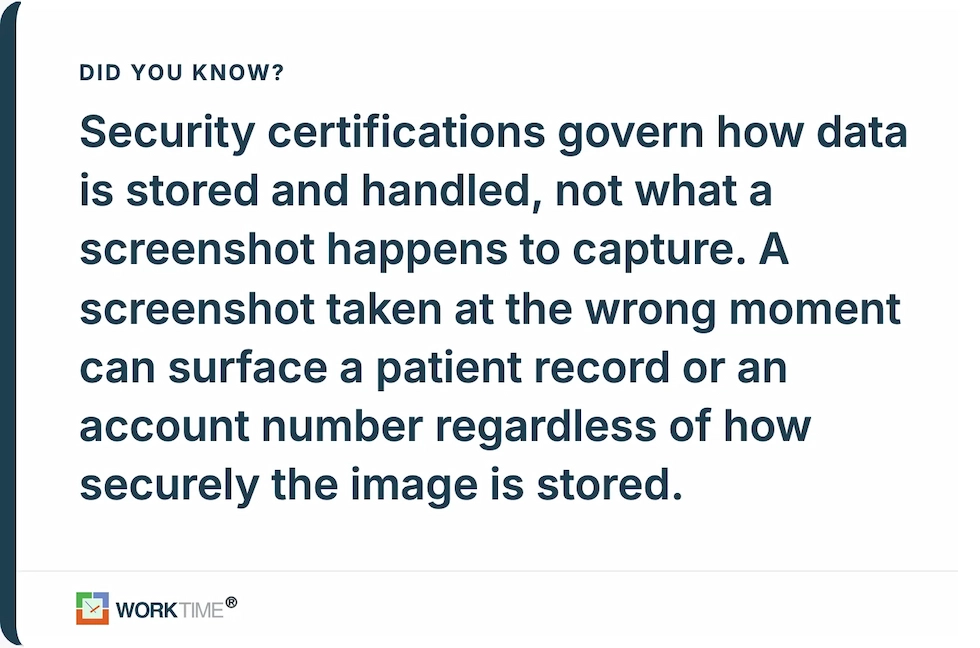
Manager view vs. employee view
Insightful reads very differently depending on which side of it you sit on. That split is the honest way to judge any monitoring tool. Managers and buyers tend to like it. The data brings objectivity to performance reviews, replaces guesswork about remote output with numbers, and makes capacity planning concrete. This is why its buyer ratings sit in the 4.6 to 4.8 range. Employees are more divided. Background tracking and screenshots read as controlling to some staff, while others accept monitoring when it is disclosed and transparent. The dividing line in almost every discussion is not whether the company measures productivity, but how much it collects and whether people know it is happening. Tools that avoid covert capture and screenshots tend to draw far less resistance, which is worth weighing before a rollout that could trigger pushback or grievances.


Insightful alternatives
If you like Insightful's analytics but want to avoid screenshots and covert monitoring, it is worth comparing non-invasive options. We keep a full breakdown in our guide to Insightful alternatives. WorkTime combines in-depth productivity analytics with a non-invasive approach, giving managers the visibility they need without turning monitoring into surveillance. We deliver productivity scores, attendance, active and idle time, and remote-versus-in-office comparisons without screenshots, screen recording, or stealth monitoring. With more than 28 years of experience developing privacy-focused monitoring technology and 9,500+ organizations relying on WorkTime, the platform brings proven workforce analytics to teams that want visibility without intrusion.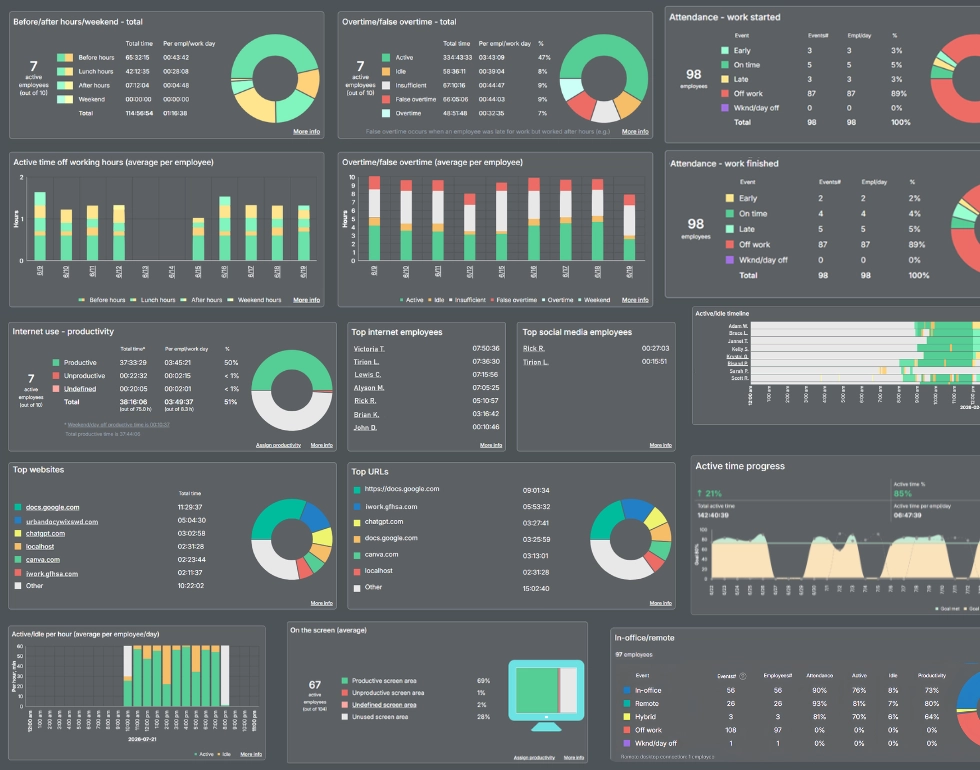

Get a clearer view of workforce performance with 80+ WorkTime reports. Track productivity, attendance, focus, and other key metrics without collecting personal content.
Start free trialThe bottom line
Insightful is a genuinely capable workforce analytics tool. Managers rate it well for clean dashboards, automated time tracking, and strong support, and for desktop-based remote teams that are comfortable with screenshots, it does the job. The deciding factors are narrow and clear: your comfort with screenshots and stealth monitoring, and whether your workforce is desktop-based, since the mobile and field coverage is thin. WorkTime is non-invasive employee monitoring software for regulated-industry teams that want productivity data without covert monitoring, with HIPAA-safe and GLBA-safe Enterprise modes and no screenshots at any tier. We report on productivity, attendance, and remote output while capturing no screenshots and no screen content, which keeps clear of the screenshot-and-compliance question that regulated buyers run into with visual monitoring. If that balance matters to your team, compare the two on your own workflow with a 14-day free trial.