• Deutsch

    Deutsch

  • English

    English

  • Español

    Español

  • Français

    Français

  • Italiano

    Italiano

  • Português

    Português

Call center time tracking software - WorkTime

WorkTime employee monitoring for call centers.
Amika
School district
Dukascopy
Toyota
Coutts
Universal

26

Years of experience

Trusted by 9,500+ global brands and organizations

Call center time tracking software, no screenshots

Call center time tracking software tracks how agents spend logged-in time: active and idle minutes, attendance, and app use. WorkTime does it non-invasively: no screenshots, keystroke content, or screen recording.

WorkTime

WorkTime is non-invasive, socially responsible monitoring for call centers: it captures no screenshots, no keystroke content, and no screen recording, only the productivity data managers act on.

It is green monitoring software for call centers, the only non-invasive option on the market.

HIPAA/GDPR/GLBA-safe

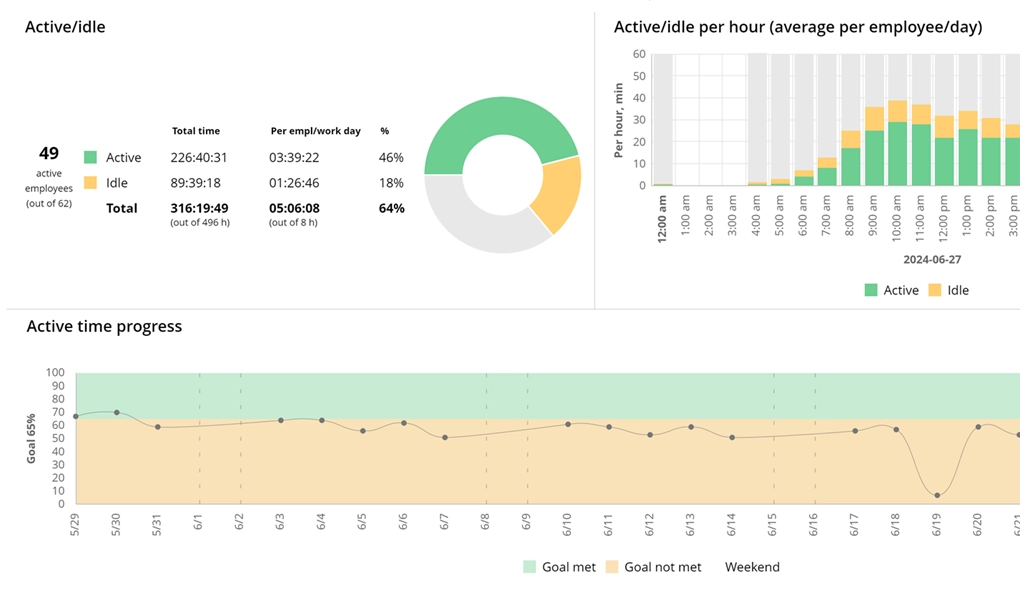
WorkTime monitors call center agents' active and idle time

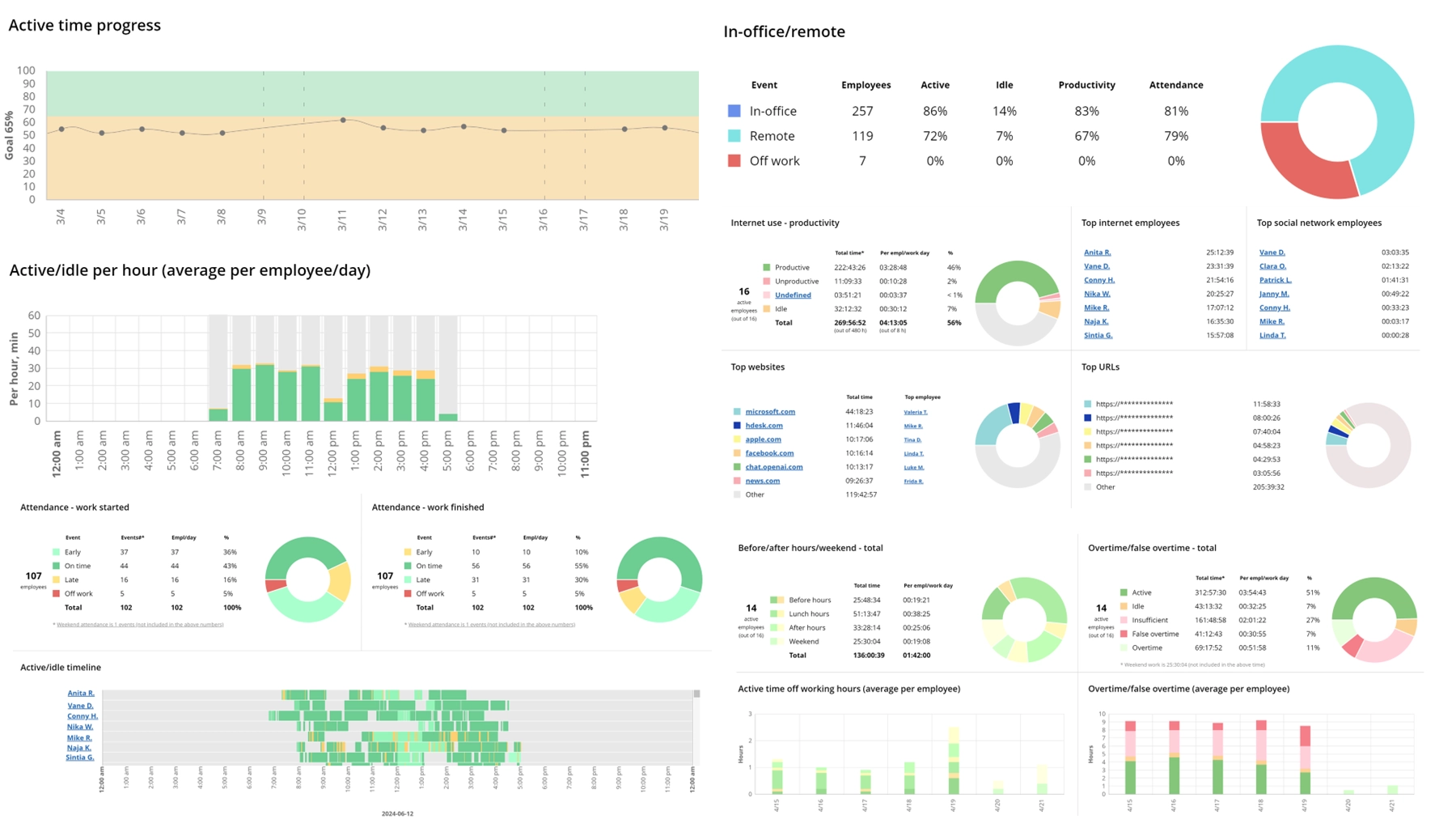
WorkTime employee monitoring for call centers

WorkTime monitors call center agents' active and idle time

WorkTime monitors call center agents' active and idle time at their computers, including away-from-keyboard periods.

Try now 14 days free

WorkTime monitors call center agents' computer activity

WorkTime monitors what call center agents do on their computers: which apps and websites they use, when, and for how long.

Monitor computer activities of call center employees

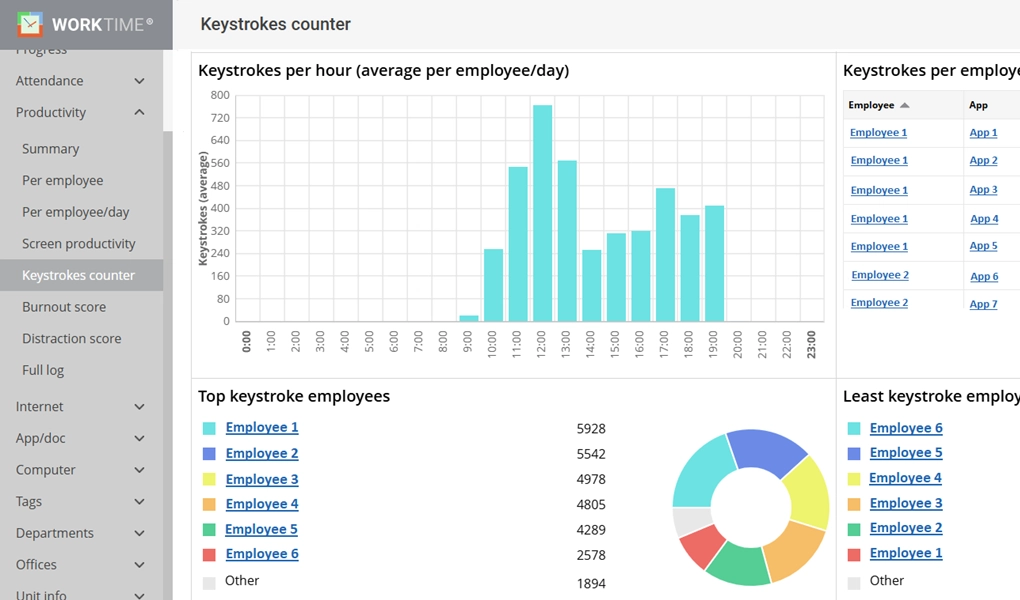
WorkTime keystrokes report.

Increase call center employee engagement

There are many ways to increase agent engagement in call centers with WorkTime. You can use WorkTime leaderboards, schedule regular reports, or give agents access to their own performance reports.

Track call center attendance

With WorkTime, track call center attendance to see whether agents arrive on time, late, or absent, and catch false overtime.

Start free trial
WorkTime
WorkTime monitoring software for call centers.

Begin monitoring time of your call center now!

Start free trial
  • WorkTime

    Sign up

  • WorkTime

    Run monitoring agent

  • WorkTime

    View reports

KPIs to monitor and manage call agent performance

Before starting monitoring, it’s important to consider the types of call center monitoring. Everything depends on what company or customer needs are addressed by call center employees. Here are the main ones:
  • Inbound call centers. They handle customer problems and questions;
  • Outbound call centers, used mainly for sales and marketing research;
  • Virtual call centers with cloud-based operations allowing remote work;
  • Omnichannel call centers that apply multiple channels, including email, SMS, live chats, etc.
The choice of software for call centers depends on the types of data used in call center monitoring. For instance, software designed for inbound and outbound teams will fit the omnichannel call centers. Customer service & call center employee monitoring software are typically designed to monitor different types of KPIs. What performance indicators to consider?
  • Average call abandonment rate;
  • Average speed of answer (ASA);
  • Average wait time (AWT);
  • Average handle time (AHT);
  • First contact resolution (FCR).
The same data drives call center metrics like occupancy, shrinkage (paid time agents are unavailable, including breaks), and service level. A call center quality monitoring can help evaluate these metrics. It is also important to assess performance metrics to ensure high productivity levels across all teams. WorkTime employee monitoring for call centers is a perfect solution to monitor computer activities of call center employees non-invasively and analyze their productivity during the day. Additionally, we offer various features designed to boost employee performance in the short term.

6 must-have WorkTime features for call centers

Real-time monitoring

WorkTime real-time dashboard is an effective tool to monitor and manage call agent performance immediately. This feature fits perfectly if you need to discover
  • Who is at work now;
  • Current employee activity;
  • Who is on time or late;
  • Who is remote or in-office;
  • Current status of an employee or the whole team;
  • Individual/team productivity at the moment.
Our call center monitoring software provides valuable updates on what is going on in the company right now. Measure call center productivity at a glance and make adjustments to enhance call center productivity and performance.

Non-invasive call center screen monitoring

Our non-invasive employee monitoring software for call centers offers an alternative to screen monitoring. Instead of screen content recording, WorkTime employee monitoring for call centers evaluates the productivity of apps and websites on the screen. This way, you can measure call center productivity in a safe and respectful manner. Enhance call center management and maintain open communication with a transparent monitoring approach.

Remote call center management

WorkTime remote employee monitoring offers call center monitoring tools for effective remote call center management. You can monitor call center productivity and performance regardless of team location. WorkTime is designed for in-office, remote, and hybrid contact center monitoring. Compare productivity in different teams and analyze where employees perform better.

Call center employees’ computer activity monitoring

Monitor computer activities of call center employees and ensure you pay for productive time. Our call center monitoring tools for computer use monitoring analyze web and app use, categorizing them as productive or unproductive. Gain effective call center management with our non-invasive insights into employee activity and work patterns during the day.

Attendance tracking

Track attendance in call centers and evaluate its effects on employee productivity. What are the benefits of our employee attendance tracking? Here are the main points:
  1. Track call center agent hours and log them;
  2. Get the employee's current status (at work, off work, late, on time);
  3. Track arrival and departure time for each employee;
  4. Look through the timeline report to compare employee attendance;
  5. Detect false overtime and save money;
  6. Observe the attendance progress.

Call center productivity and performance monitoring

Monitor computer activities of call center employees and evaluate their productivity levels. Our employee productivity monitoring software for call centers provides comprehensive reports on individual employees and departments. With WorkTime, you can
  • Find out whether all employees are present;
  • Analyze screen productivity at the moment;
  • Evaluate apps/websites productivity;
  • Track attendance in call centers to reduce absenteeism's negative impact on productivity;
  • Get the list of the top productive and unproductive employees;
  • Monitor productivity outside the working hours;
  • Observe individual/team productivity progress;
  • Engage employees with productivity leaderboards.
Increase productivity levels effortlessly with WorkTime call center quality monitoring.

Benefits of call center screen monitoring

Non-invasive approach

Increase employee engagement in call centers in a way that does not harm a friendly work environment. Our tools for tracking call center agent productivity and time are safe and non-invasive. Measure call center productivity with our green employee monitoring, a safe and effective replacement for invasive screen content recording.

Increased productivity

Track key performance indicators and improve agent productivity. WorkTime can be used as a call center performance management software. Make sure that employees remain focused during their workday. Comprehensive reports help analyze call center agent performance and minimize unproductive time. What’s more, our software fits for remote call center management. Monitor and manage call agent performance from any corner of the world.

Better workforce management

Call center workforce optimization software is an effective solution for balancing the workload. With call center monitoring tools, it is easy to provide accurate performance reviews. Constructive feedback and recommendations will help improve agent productivity. Try our on-premise or cloud-based call center solution for free right now!

Cost efficiency

Call center performance management software helps optimize resource allocation in many ways:
  1. Identifying and addressing employee dissatisfaction early can lead to better retention rates;
  2. Contact center monitoring eliminates idle time and ensures employees remain focused. This way, you reduce costs paid for unproductive time;
  3. Employee monitoring helps track attendance in call centers and reveal the signs of absenteeism on time;
  4. Monitoring helps identify call center agent performance challenges early. Stay proactive with WorkTime insights and provide timely support or training. This approach is effective for decreasing turnover and saving money on recruitment and onboarding.

Enhanced quality

Managers can use our contact center quality monitoring data to provide actionable feedback. WorkTime tracks time spent on specific applications or tasks, helping managers spot inefficiencies or unproductive habits. Our call center quality monitoring reports are also useful for employees. They can review their performance data to understand and correct their mistakes. Provide constructive feedback to elevate call center performance with productivity insights.

FAQ

What is call center time tracking software?

Call center time tracking software is agent-focused time and productivity tracking: it logs active and idle minutes, attendance, and app and website use, then turns them into per-agent and per-team reports supervisors use for staffing and adherence. WorkTime is the non-invasive option, tracking productivity without screenshots, keystroke content, or screen recording.

What is monitoring in a call center?

The main purpose of employee monitoring for call centers is to evaluate call center productivity and performance. KPIs for assessment depend on the type of call center. For instance, contact center monitoring focuses on the quality of customer-agent conversations, call center employees’ productivity, attendance, and more.

Why is call center monitoring important?

Monitor computer activities of call center employees to ensure high-quality services. Call tracking software helps reveal areas for improvement and respond to challenges immediately. Improve agent productivity to increase customer satisfaction.

What are the benefits of call center monitoring?

Call center performance management software has many benefits, including enhanced agent performance, increased efficiency, and higher customer retention. Monitoring call center employees helps to reveal their potential and boost their metrics. Try WorkTime now to boost employee productivity and customer service quality.

How to monitor call center performance?

You can monitor call center agent performance with the help of tracking software. WorkTime is a safe and reliable solution to monitor computer activities of call center employees, analyze their performance levels, and reveal areas for improvement. Set your call quality standards & key performance indicators (KPIs) and track goal achievement over time.

What are the main call center productivity metrics?

The most frequent call center KPIs used for call center management involve customer satisfaction scores, first call resolution, response time, and agent utilization rate. Still, employee monitoring for call centers offers a more solid approach to analyzing employee performance. Such tools evaluate productivity levels, app/website productivity, engagement levels, and more. Measure call center productivity with privacy-conscious, non-invasive employee monitoring software.

How do you measure productivity in customer service?

Tracking software can help evaluate productivity based on key performance indicators such as response time, resolution time, and customer satisfaction scores. Employee monitoring for call centers helps managers analyze each employee's real-time activity. Also, contact center performance management software offers insights into team productivity. Additionally, call center agent monitoring & time tracking tools assess how agents utilize their working hours. These tools provide a comprehensive view of employee or department performance.

Is it possible to track phone calls?

WorkTime does not record phone calls, call audio, or call content. As non-invasive call center time tracking software, it monitors agent computer activity instead: active and idle time, attendance, login and logout, and the apps and websites agents use and then reports productivity from that data. Dedicated call-recording and speech-analytics tools handle audio capture, and many call centers run one alongside WorkTime for quality scoring while WorkTime covers the time-tracking and workforce side.

What software do most call centers use?

Most call centers combine a workforce or time-tracking tool with productivity monitoring to see agent hours, attendance, and how logged-in time is spent. Choices range from simple time-and-attendance clocks to deeper activity monitors. WorkTime fills the non-invasive middle: full productivity analytics and attendance for in-office, remote, and hybrid agents with no screenshots or screen recording, plus HIPAA, GDPR, and GLBA-safe modes on the Enterprise plan. See the pricing page for what each plan includes.

What is the 80/20 rule in call centers?

The 80/20 rule in call centers is a service-level target: answer 80 percent of incoming calls within 20 seconds. Hitting it depends on having the scheduled agents actually logged in and available, which is where real-time attendance and adherence tracking matter. WorkTime shows who is present, active, and on time right now, so supervisors can close staffing gaps before service level slips.