• Deutsch

    Deutsch

  • English

    English

  • Español

    Español

  • Français

    Français

  • Italiano

    Italiano

  • Português

    Português

Employee absence tracking software - WorkTime

Monitor employee absenteeism, vacations, days off with WorkTime non-invasive employee monitoring

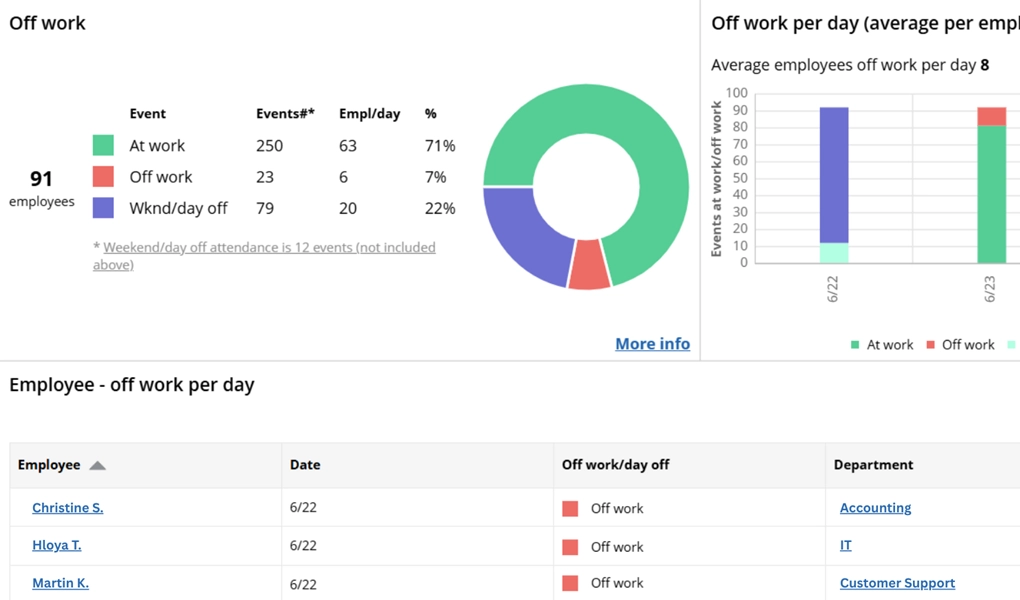
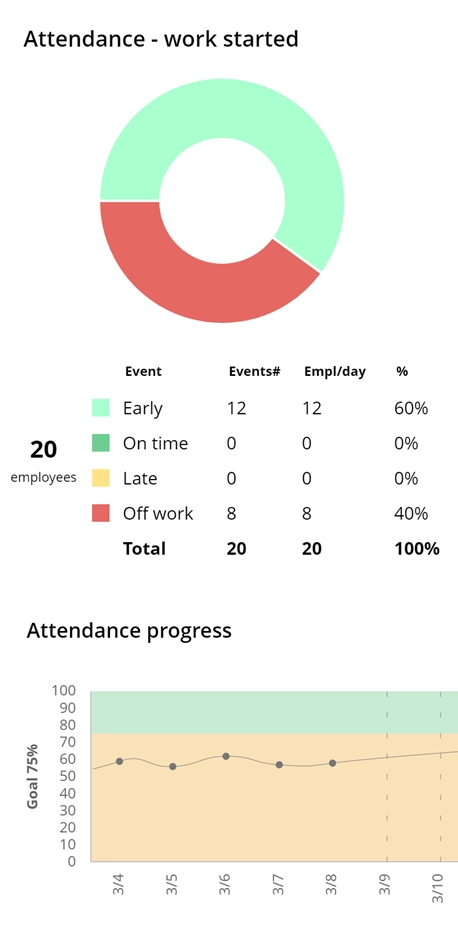
WorkTime shows when employees are off work.
Amika
School district
Dukascopy
Toyota
Coutts
Universal

26

Years of experience

Trusted by 9,500+ global brands and organizations

Track employee absenteeism

Non-invasive employee absences monitoring

WorkTime is Green socially responsible employee absences monitoring.

WorkTime is non-invasive employee absence tracking software for teams with in-office, remote, and hybrid staff. It monitors attendance without screenshots and keystroke logging, so you see who's at work without collecting personal content.

HIPAA-safe mode

GDPR-safe mode

WorkTime remote employee absence tracking

Keep track of in-office and remote employee absences

Who's off work?

Track absent employees

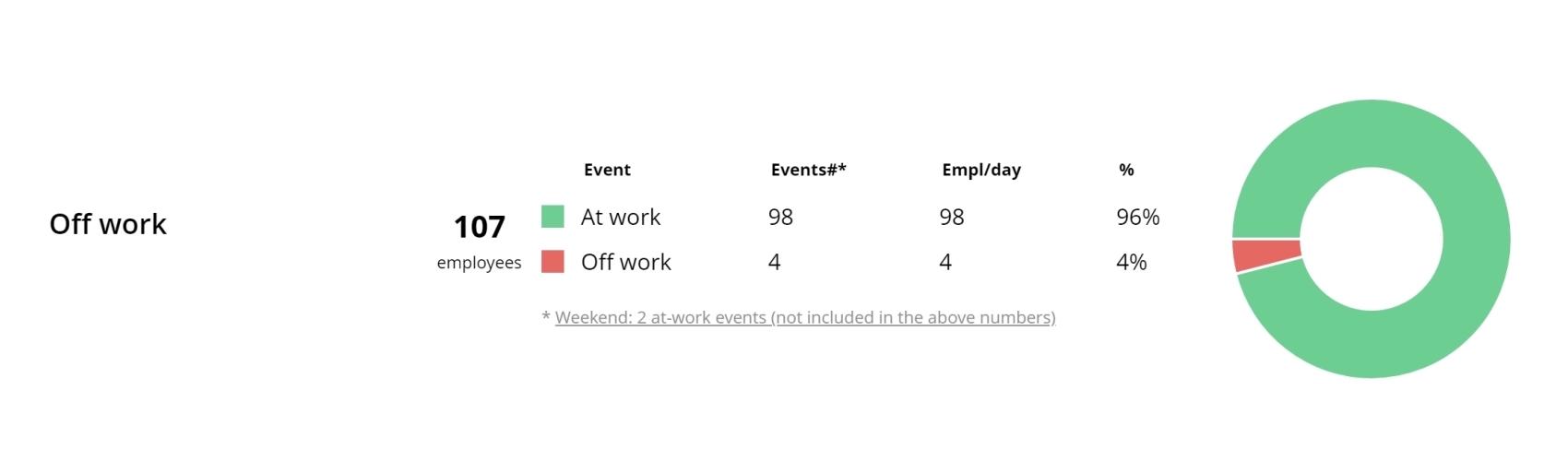
View reports to see who is not at work during scheduled working hours.

WorkTime. Employee absenteeism monitoring

Absenteeism per day

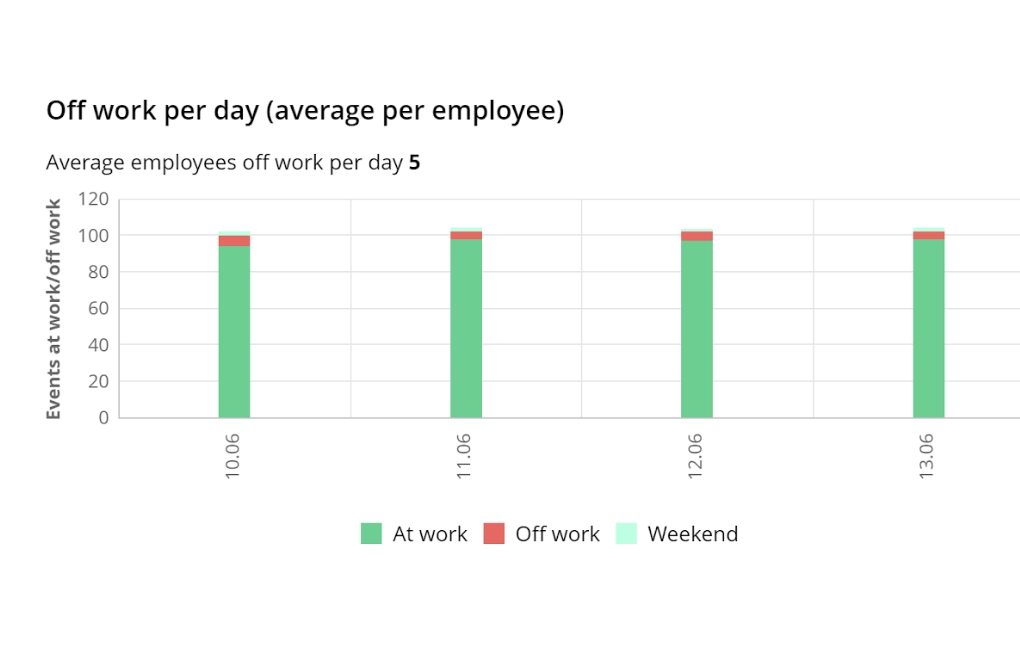
Track employee absences daily, whether due to vacation, day off, or out-of-office events.

Absenteeism per day

WorkTime employee absenteeism tracking software

Absences per employee

WorkTime employee absences monitoring

Absences per employee

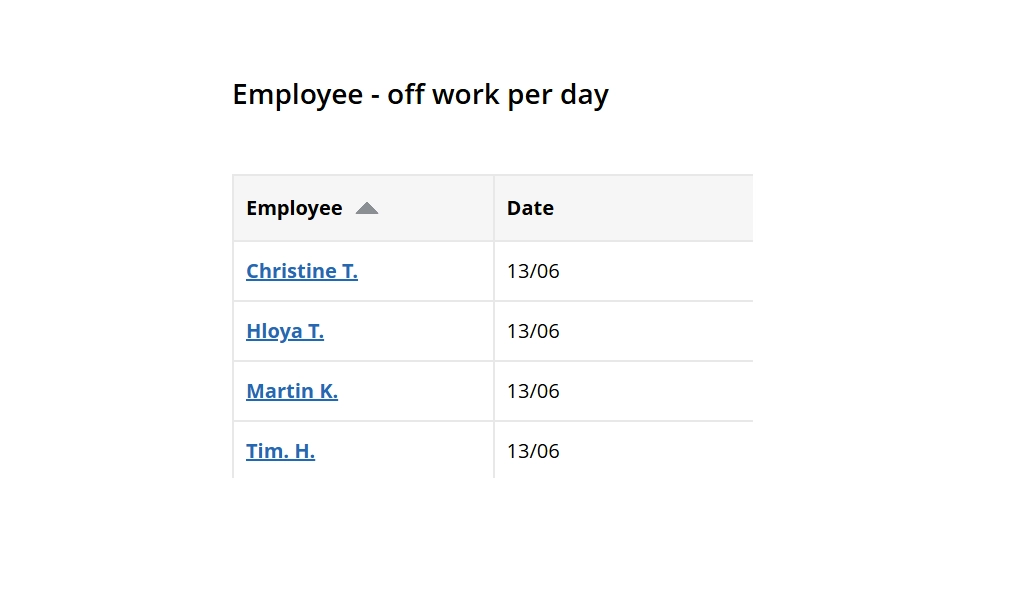
Monitor absences per employee for any period of time: day, week, month, year.

Success story

WorkTime tracks banking sector staff activity.
Industry

Banking

Employees

170

WorkTime improves attendance in remote employees!

A UK-Japanese bank with 170 employees raised active time by 46% in three days with WorkTime. Improved remote employees' attendance without screenshots or screen recording! Read the story.

Read more
No unauthorized off-work events!
WorkTime employee attendance report.

Try WorkTime 14 days free

WorkTime trial is all inclusive:
all features, unlimited employees.
No credit card required.

Basic

$6.99

/ employee / month billed monthly

Premium

$8.99

/ employee / month billed monthly

Enterprise

$10.99

/ employee / month billed monthly

Compare plans

What is absenteeism in the workplace?

Workplace absenteeism is a pattern of employee absence beyond the level an attendance policy treats as acceptable, whether scheduled or unscheduled. Unplanned absences are the hardest to manage because they disrupt schedules without warning.

Impact of absenteeism in the workplace

Absenteeism raises costs and drags down output well beyond the wages paid for time not worked. The most common effects:
  • Coworkers absorb the missing workload and burn out
  • Overtime and temporary-cover costs climb
  • Deadlines slip and work quality drops
  • Team engagement and motivation fall
  • Recruiting and replacement expenses rise.
Left unmeasured, these costs compound because no one can see the pattern forming.

Employee absenteeism and its impact on productivity

Absenteeism costs employers in two ways: direct costs like wages for time not worked, and indirect costs like lost productivity across the team. Frequent absence pulls down both individual and team output, and it often spreads as coworkers cover the gap. WorkTime absence tracker software shows how attendance affects your team's performance so you can act on the pattern instead of guessing. It ties attendance to active time and productivity scores, giving HR a clear before-and-after view. Book a personalized demo to see it on your own data.

How to deal with employee absenteeism?

Dealing with employee absenteeism works best as a strategy, not a punishment. Firing an employee for absence is often the least effective response, and it can backfire in ways that make attendance worse:
  • Lower morale across the team
  • More stress and anxiety for remaining staff
  • New absence incidents
  • Reduced motivation and engagement.
Absence and employment laws vary by country and by state, so review the rules that apply where you operate. A better path is to find the root cause, set a clear attendance policy, track attendance accurately, and recognize employees who show up consistently. WorkTime gives you the attendance data to do that fairly.

Find out the root cause of employee absenteeism

To reduce absenteeism, find the root cause first. Gather regular employee feedback and look for the common drivers:
  • Stress or burnout
  • Injury or illness
  • Low morale or lack of engagement
  • Bullying or harassment.
Absence is usually a symptom, so addressing the cause works better than counting the days alone. WorkTime reports help you spot the signs early. A high distraction score combined with excessive overtime often points to burnout, which is a leading driver of rising absence. Catching that pattern lets you step in before absence becomes chronic and starts pulling attendance down across the team.

Build an effective absenteeism management strategy

Build an attendance policy that makes clear why consistent attendance matters and what counts as an unplanned absence. Your HR team can own the policy and keep it consistent across departments. Regular check-ins help raise awareness about frequent absence without a justified reason and give employees a place to flag problems early.

Implement absence monitoring software

Teams track absence three ways: free spreadsheet templates, dedicated HR software, and non-invasive monitoring software like WorkTime. Spreadsheets are free but manual, easy to fudge, and blind to why absence happens. Dedicated software automates the work, but most tools capture screenshots or keystrokes to do it. What matters is how the software collects data. WorkTime automates absence and attendance capture without screenshots or keystroke logging, calculates the absenteeism rate, and exports timesheets and reports for automation without invasive data collection.

Recognize employee efforts in dealing with work absenteeism

Monitoring attendance is only half the job. Recognizing employees who show up consistently keeps the policy from feeling punitive. Set attendance goals and track progress with WorkTime, then reward the results. Quarterly attendance bonuses, public recognition, or extra time off all reinforce the behavior you want. Employees respond better to being rewarded for good attendance than to being penalized for bad.

Effectively manage the excessive absenteeism cases

Managing excessive absence starts with data, not discipline. Instead of jumping to termination, use attendance statistics, reports, and timesheets to see the full picture: who is absent, how often, and what pattern it follows. WorkTime turns that data into a plan. By analyzing attendance trends and their effect on productivity, you can find the employees and causes driving most of the absence, then focus your effort there. A handful of chronic cases usually account for the bulk of lost time, and data is what tells you which cases those are. That is how you reduce absenteeism without guessing or overcorrecting across the whole team.

Prevent excessive absenteeism with WorkTime

WorkTime gives you the tools to monitor attendance and prevent absenteeism: live status, attendance goals, and reports.

1. Monitor employee absence and attendance.

WorkTime monitors attendance in real time, so you always know who is in and who is out. Track:
  • Each employee's status: late or on time, at work or off work
  • Who is working right now
  • Progress against attendance goals
  • Login and logout times.

2. Get 80+ reports on employee attendance and productivity.

WorkTime gives you 80+ reports covering attendance, active time, productivity, vacations, days off, and holidays. It analyzes screen activity in numbers, so no screenshots or content capture is needed to measure attendance or productivity. Schedule the reports you need and have them delivered automatically, so absence data reaches managers without anyone building a timesheet by hand.

3. Maintain transparency with non-invasive WorkTime employee monitoring.

Prevent absenteeism without going too far. WorkTime uses green monitoring technology as a safe alternative to invasive features like screenshots or keystroke logging. It measures attendance without capturing what employees type or view, so you keep visibility, and employees keep their privacy. Transparency like this is what keeps monitoring from damaging trust.

4. Motivate employees with leaderboards.

Leaderboards recognize the employees who keep to attendance policies and hit their goals. Friendly competition encourages teams to improve attendance and productivity together, which lowers the number of unplanned absences. Public recognition turns good attendance into something people want, not just something they are told to do.

5. Compare in-office and remote attendance.

Absence is harder to catch when your team works from home. WorkTime tracks attendance across every location, so remote work does not become a blind spot. You can compare in-office and remote attendance rates side by side and see where absence is concentrated. IP-based location detection shows who is working from where, without any screen recording. That makes it easy to spot absenteeism whether an employee is in the office, remote, or hybrid and to hold every location to the same standard.

Benefits of WorkTime absence tracking software

WorkTime absence tracking software gives HR a single view of who is off, why, and how often, without collecting any personal content. What you get:
  • One place to see who is off today, this week, or this month
  • Vacation, sick leave, day off, and holiday tracking per employee and team
  • Absence-pattern detection that flags chronic issues early
  • Scheduled reports on attendance, active time, and productivity
  • Automatic absenteeism-rate calculation, so no one fills out timesheets by hand
  • Fewer unplanned absences and less unplanned overtime.
Start a 14-day free trial and see your own attendance data in the first week.

FAQ

What is an employee absence tracker?

An employee absence tracker is software that monitors attendance, time off, sick leave, and vacation days, then reports absence patterns and the absenteeism rate. WorkTime is a non-invasive absence tracker: it monitors login and logout times, active time, and attendance without screenshots, keystroke logging, or screen recording and delivers scheduled reports so managers see absence data without building timesheets by hand.

How does WorkTime document absences fairly?

Yes, it is possible to dismiss an employee for frequent absenteeism in the workplace. But you need to be sure that you follow all legal regulations, such as the Family and Medical Leave Act (FMLA) and the Americans with Disabilities Act (ADA), which cover different types of absences.

Does WorkTime track absences without screenshots or keystroke logging?

Yes. WorkTime tracks login and logout times, active versus idle time, and attendance without screenshots, keystroke logging, or screen recording. It monitors when employees work, not what they type or view. That non-invasive design lets regulated teams in finance, healthcare, and government run it without capturing sensitive data.

How to calculate absenteeism rate?

To calculate an absenteeism rate, divide the days absent by the available workdays in the period, then multiply by 100. Available workdays exclude weekends, holidays, and approved leave. WorkTime tracks scheduled and unscheduled absences and runs this calculation automatically, so you skip manual timesheets.

How to calculate absenteeism percentage?

The absenteeism percentage is the same calculation applied across a team: total days absent divided by the total available workdays for all employees, times 100. Doing that by hand across departments is slow and error-prone. WorkTime calculates it automatically for any employee, team, or period, and updates as new attendance data comes in. That gives HR a live absenteeism percentage instead of a month-old spreadsheet figure.

Does WorkTime track PTO, sick leave, and vacation balances?

WorkTime tracks vacations, scheduled days off, holidays, and off-work days for every employee and team across any period: day, week, month, or year. You can see who is off at a glance and pull it into attendance reports. WorkTime focuses on tracking and reporting absence rather than running payroll accrual approvals, so it pairs with your HR system instead of replacing it.

Can WorkTime replace spreadsheets for absence tracking?

Yes. WorkTime captures attendance automatically, so HR stops maintaining manual spreadsheets. You get real-time absence data, absenteeism-rate calculations, and exportable reports without the errors a shared spreadsheet invites.

How to reduce absenteeism in the workplace?

The most effective way to reduce absenteeism is a clear strategy: understand the causes, set an attendance policy, and track attendance consistently. WorkTime absence monitoring software supports each step, from spotting early burnout signals to measuring whether your policy is working.

How to discipline an employee for absenteeism?

Handle absenteeism with a consistent process, not one-off penalties. Understand the cause first, apply the same attendance policy to everyone, and base any conversation on accurate records rather than impressions. Recognize and reward good attendance instead of leading with punishment. WorkTime gives you the attendance data to keep the process fair and consistent for every employee. Absence and employment rules vary by jurisdiction, so review the ones that apply to you.

How to talk to an employee about excessive absenteeism?

When you talk to an employee about excessive absence, avoid pressure and lead with the cause. Ask what is driving the absences, whether it is workload, burnout, or something outside work, and treat it as a problem to solve together. Then set attendance goals and track progress with WorkTime so the conversation is about improvement, not blame.