• Deutsch

    Deutsch

  • English

    English

  • Español

    Español

  • Français

    Français

  • Italiano

    Italiano

  • Português

    Português

Keystroke counter with WorkTime

Try non-invasive alternative to keylogger software

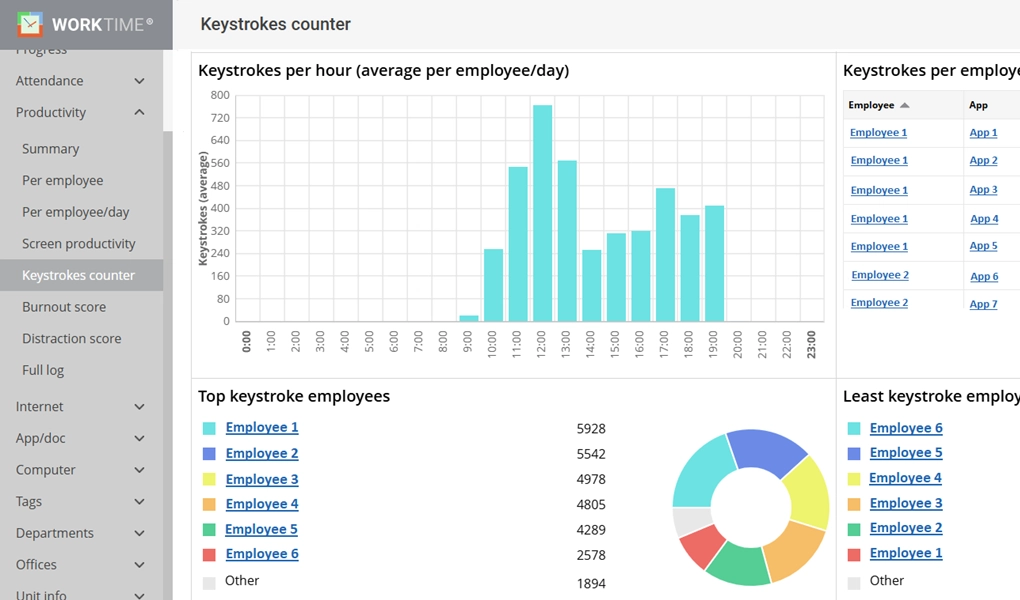
WorkTime keystrokes counter report
Amika
School district
Dukascopy
Toyota
Coutts
Universal

26

Years of experience

Trusted by 9,500+ global brands and organizations

Non-invasive keystroke counter

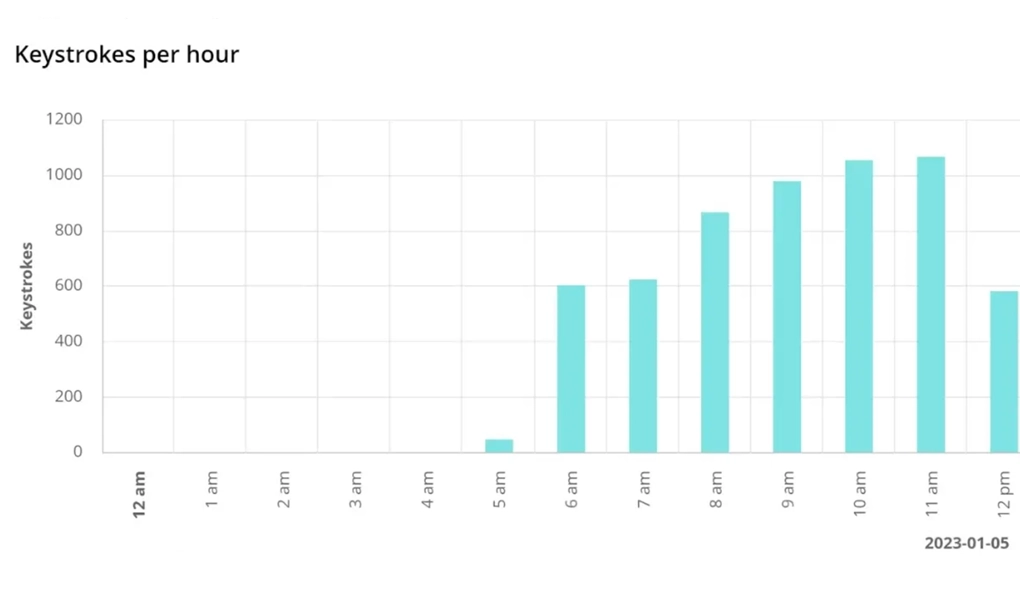
Keystrokes per hour

Compare employees by their hourly keystroke count during work hours, or track one employee's daily productivity trend over time. WorkTime charts both so managers can spot who is engaged and when output dips.

Try now 14 days free

Keystrokes per hour

WorkTime keystrokes per hour report.

Keystrokes per website

WorkTime counts keystrokes per website, showing an employee's web browsing habits, including time spent and intensity of engagement.

Keystrokes per application

WorkTime keystrokes monitoring.

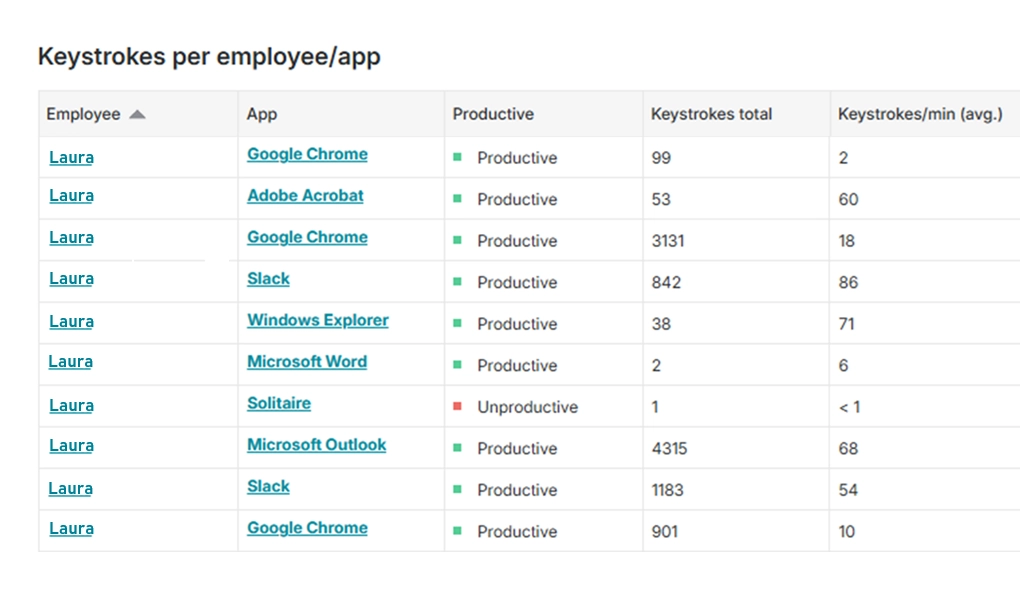
Keystrokes per application

WorkTime counts keystrokes per application. Intuitive app reports display an employee's work intensity and efficiency within specific applications, enabling a more detailed assessment of workflow.

Try now 14 days free

Benefit more from WorkTime

1. Keystroke counter in business

A keystroke counter measures how much an employee types. It counts keystroke volume by the hour, by application, and by employee, and it never captures the words themselves. WorkTime built its keystroke counter as a non-invasive way for employers to see typing activity without logging content, taking screenshots, or recording the screen. A keylogger records the actual keystrokes and the content behind them. A keystroke counter reads only the count, which is enough to manage productivity in privacy-sensitive fields without the security and trust problems that content capture creates.

2. Transparency in keystroke monitoring

Transparency is the basis of ethical keystroke monitoring. If the employer is monitoring someone, the staff should know about it, and it should be made clear what the monitoring is for. Telling employees what the monitoring measures and what it does not keeps the program honest. Even though people come to work, they also care about rest time, so during breaks it is worth leaving the staff unmonitored. The more pressure the employer puts on employees, the more they will resist any monitoring. WorkTime keystroke monitoring analyzes typing patterns to improve productivity, and its privacy-compliant modes keep employees informed.

3. Workplace monitoring

Employers monitor work with several methods, from electronic activity monitoring to attendance tracking. The goal is to confirm work standards are met and to prevent absenteeism and inefficient timekeeping without invading privacy.

4. Monitoring on personal devices

Sometimes employees use personal devices for work, in which case the employer must respect the personal space on that device, as it is also used in their free time. A keystroke counter fits this case well: the employer can monitor work activity only, without affecting the employee's confidential information.

5. Communication while monitoring

Employers sometimes review how teams coordinate to gauge collaboration on shared tasks. A keystroke counter takes a lighter path: it measures typing activity per application without reading the messages employees exchange.

6. Is the keystroke counter a spy tool?

No. A keystroke counter is not a spy tool because it counts typing activity and never captures content. WorkTime keystroke counter measures the number of keystrokes, typing speed, and keystrokes per application and per employee, with no view of the words behind them.

7. Why do employers want to use a keystroke counter?

Employers use a keystroke counter to see productive engagement without surveillance. It reports keystroke volume by application and by employee, so managers see who is actively working and where output drops, without capturing personal data. At one UK bank of 170 employees, WorkTime's productivity monitoring lifted active time by 46% within three days of adoption. Because the tool counts activity, not content, no private information is exposed and there is no leak risk.

Options for keystrokes monitoring data:

1. Keystrokes data per hour

WorkTime shows keystrokes per hour in convenient browser-based charts. In these reports you can see which employees are the most productive and which are the least, as well as the highest and lowest keystroke hours across the day.

2. Keystrokes per application/website

WorkTime counts keystrokes per application and per website, then labels each as productive or unproductive. A manager can see the most actively typed-in programs and sites, the typing speed inside each one, and the same view broken out per employee. That turns raw keystroke volume into a clear picture of where the workday actually goes. Read together, the per-application and per-website reports answer three questions at a glance: which tools drive real output, where typing activity leaks into distraction, and how one employee's engagement compares with the team. Because the data is application-aware, a spike in keystrokes inside a work tool reads very differently from a spike inside a social site, and WorkTime separates the two automatically. The per-employee view is where the report earns its keep. A manager can rank a whole team by keystroke activity inside the applications that matter for their role, spot the person whose engagement dropped after a schedule change, and compare a new hire against the team average during onboarding. None of that requires reading a single word the employee typed. This is the difference between a keystroke counter and a keylogger in practice. A keylogger would capture the text typed into each of those applications, including passwords and private messages, which creates a privacy and security liability. WorkTime measures only the volume and speed of typing per application, never the content. Employers get the productivity signal they need to manage a team, and employees keep the privacy that keeps monitoring fair and legal. For deeper analysis, keystroke data lines up with WorkTime's software use monitoring, so a manager can move from "how much did they type" to "what did they spend the day in" without ever reading a keystroke of content. The reports run in any browser and refresh on a schedule, so the picture stays current without manual work.

Keylogger vs keystroke counter?

A keylogger captures the actual text a person types, including every word, password, and message. A keystroke counter measures only how much someone types, never the content. That single difference decides everything else about the two tools. A keylogger records keyboard use, speed, and the value of each key, then stores what was typed. Because it captures content, a keylogger can pick up private information and messages, which creates real security exposure, and it is hard to detect once installed. Keyloggers are also used as spy tools, sometimes as viruses that hack computers and sometimes as surveillance software aimed at employees. Keystroke logging is legal in the United States when it is used for legitimate business reasons, but employers still have to meet the relevant notice and consent laws. A keystroke counter does not capture content, so it never crosses the privacy line. Employers use it to monitor productivity and to obtain clear data on computer activity, such as the number of keystrokes pressed per application and per employee. Both tool types track keyboard use and calculate typing speed. Only the keylogger goes further and records what people type. That is why a keystroke counter is the safer default when the goal is productivity rather than surveillance. WorkTime offers a keystroke counter for employers as part of its socially responsible, non-invasive monitoring approach that protects employee privacy while improving productivity. WorkTime is employee monitoring software from NesterSoft Inc. with 26+ years of experience in the field, founded in 1998. Its model is monitoring without privacy invasion: measure how much employees type, never what they type.

1. Keystroke logger

A keystroke logger, or keylogger, captures keyboard usage, key pressing speed, and the value of each key. Its defining function is capturing content: it records what a person types. Some deployments also use it to gauge how frequently keys are pressed, but content capture is the point.

Why do employers want to capture content?

One of the reasons employers want to capture the content of emails, chats, documents, and other content is security when they want to make sure no confidential information is misused. Other reasons could be quality assurance or investigation. But instead of protecting, this approach might create security issues. While capturing content you record passwords, private information, and private messages. This information can leak out and potentially be the reason for legal issues. A keylogger built to protect a company can instead become its own security weak point, which is why many employers avoid content capture.

Who else is interested in keylogging except for the employers?

Employers are not the only ones interested in keylogging. Malicious software captures keyboard content to steal passwords, banking details, money, and private information, usually without the target ever knowing it is installed. Keystroke logging of content is a defining trait of malware, one more reason employers should avoid it.

Is keystroke recorder a spy tool?

A keystroke recorder behaves more like a hacking tool than a management tool. It is most often introduced as a virus and far less often used to monitor employee performance. A keylogger can intercept any text, including credit card numbers, passport details, and passwords. When a keystroke recorder is used to monitor employees, it carries a real risk of personal data leakage. Malware favors keystroke logging because it is the easiest way to intercept a victim's bank details, and these loggers are hard to detect and can capture keystrokes even after office hours. Windows 10 ships with a keystroke recorder present by default, which attackers or viruses can misuse. A keystroke counter avoids all of this by never capturing content in the first place.

Is keystroke logging software legal?

In the United States, federal law generally allows keylogging when it is used for legitimate business reasons. Employers who intend to use it must still comply with the relevant standards and state laws, because a keylogger can also be used for surveillance. The safer path for most companies is a keystroke counter, which measures activity without capturing content and sidesteps the stricter consent rules that content logging can trigger. This is general information, not legal advice for your specific situation.

How to detect keystroke logger?

Detecting a keystroke logger is not easy, because it can run as hidden software or as a physical device plugged into the computer. Start by checking the system autorun for suspicious or unfamiliar applications, and disable or remove anything you do not recognize. Installing a reputable anti-spyware program helps find and remove a keylogger that is already running. Check every USB port as well, since a keylogger can be built into a small USB device sitting between the keyboard and the computer. On Windows 10, review the built-in typing and diagnostics settings, because attackers or malware can misuse the keystroke recorder present by default. Detection matters because the risk is serious: a content-capturing keylogger can pass your emails, messages, passwords, and work content outside the computer, where it can be used for malicious purposes. The cleaner answer for a business is to avoid content capture in the first place. WorkTime's keystroke counter measures typing activity without ever capturing content, so there is nothing sensitive to detect, leak, or defend.

2. Keystrokes counter

A keystroke counter captures keyboard usage and typing speed. It does not capture content, so it never crosses the privacy line. WorkTime uses its keystroke counter to help employers evaluate productivity: how fast employees type, which applications and websites see the most keystrokes, and who types the most and least. The keystroke counter is one of many non-invasive productivity functions in WorkTime, not the whole platform.

Why do employers want to use a keystroke counter?

Employers use a keystroke counter to monitor productivity automatically. The tool provides detailed data on employee computer activity, such as the number of keystrokes pressed, keystrokes per application, and keystrokes per employee. Keystroke counters do not invade employee privacy because they capture no personal data, so nothing sensitive can be exposed and there is no risk of information leakage. They capture no content and are used mostly for productivity monitoring, giving a clear read on how much employees type without compromising their privacy. For most teams that trade is exactly right: full productivity visibility and zero exposure of what was actually typed.

Is keystroke counter a spy tool?

A keystroke counter cannot serve as a spy tool because it captures no content of any kind. In WorkTime, the keystroke counter measures the number of keystrokes, typing speed, and keystrokes per application and per employee. There is nothing private to steal because nothing private is collected in the first place.

Is keystroke counter legal?

In general, keystroke counters are permitted under United States law. This tool cannot be considered spyware or used for spying, as it does not intercept information and does not compromise the safety of employees. It also typically avoids the special compliance burden a keylogger carries, and unlike the keylogger, it is easier to implement in a business thanks to its simplicity, security, and the absence of any confidential information leak. WorkTime's keystroke counter counts all keyboard inputs without storing any sensitive or personally identifiable content. This is general information, not legal advice for your specific situation.

3. Content-sensitive industries & employee monitoring

Healthcare, banking, financial, insurance defense, and government – all companies belonging to those industries deal with very important and very sensitive content. They also often have the need to monitor their employees, but not everything, just enough to monitor employee productivity. In the USA, for example, there is special legislation that regulates and protects patients’ health information – HIPAA. The best way to monitor employees and not get into any unnecessary problems is to use employee monitoring software that does not capture any content. There are plenty of functions helping to fulfill employee productivity monitoring needs without going too far.

4. Data security & employee monitoring

In sensitive industries, good data security is crucial. A keylogger is the opposite: it can expose all data that passes through it and raise doubts among employees, since nothing stops the employer from intercepting private messages. It is important that all monitoring tools are secure and that the data collected is protected from unauthorized access or use. That means encrypting data with AES-256, restricting access to authorized personnel, and ensuring stored data meets regulatory requirements such as GDPR or HIPAA. WorkTime collects only activity counts, so there is no captured content to secure in the first place.

5. Employee privacy in the workplace

Workplace privacy now gets close attention from employees and employers alike. Employees reasonably expect some privacy at work, such as protection for personal correspondence, banking data, and personal information. Employers still have the right to monitor work activity, even in areas that touch those boundaries. Some states require employers to inform employees whenever their personal information, correspondence, browsing history, or keylogging is viewed, while others do not. Either way, obtaining the employee's general consent before monitoring is good practice. A keystroke counter makes this straightforward, because it measures work activity and never reads the private content those privacy expectations protect.

6. Ethical concerns around employee monitoring

The legislation is fairly clear, but the ethics are not as simple. Most employees want as much freedom as possible and are against stricter control. They see constant self-monitoring as an intrusion into their personal boundaries, which leads to stress, lower job satisfaction, and ultimately a drop in performance or even dismissal. Look at the whole picture and the main problem becomes clear: the fear of being watched at all times and everywhere. But look more closely, and competent monitoring is not perceived as tight control at all. WorkTime does not use invasive methods such as keyloggers, screenshots, or screen recording, and it never captures the content of what employees type. The main advantage of WorkTime monitoring is respect for the personal boundaries of employees. Handled with transparency, respecting employee privacy while monitoring is really not a difficult task, and it is what keeps a monitored team productive instead of resentful.

There are three simple guidelines by which you can establish appropriate and ethical monitoring of employees:

1. Transparency.

If the employer is monitoring someone, the staff should know about it, and it should be made clear what the monitoring is for.

2. Rest time.

Even though people come to work, they also care about rest time. During breaks, it is worth leaving the staff unmonitored and giving them a break.

3. Softness.

The more pressure the employer puts on employees, the more they will resist any monitoring. Therefore, it is necessary to respect everyone’s opinions and wishes when integrating them into the monitoring system.

7. Keystroke counter & keylogger in business

Keyloggers and keystroke counters are used everywhere in business because they are convenient: they do not require managers to be around employees all the time, and you can apply these tools to many employees at once, which makes it much easier to manage a large staff. But companies do not choose between a keylogger and a keystroke counter at random. The choice is influenced by many factors, from the business sector to security concerns about capturing content the company may not need.

8. Keylogger in business

Using a keylogger to monitor employees is a controversial choice. On one hand, it can confirm that employees do not violate company confidentiality and show how they work. On the other hand, it puts the company itself at risk. A single wrong choice of keylogger can compromise company security and the personal data of employees, and few employees are comfortable with a tool that intercepts their private correspondence. For that reason, keyloggers are chosen mainly by organizations that place an extreme value on confidentiality or feel they must track every action, such as some support departments, financial firms, or government agencies. Even there, a non-invasive keystroke counter covers most productivity needs without the exposure, which is the approach WorkTime takes.

9. Keystroke counter in business

A keystroke counter is a non-invasive tool that cannot intercept text or compromise the security of the company and its employees. The main difference between a keylogger and a keystroke counter is that the counter only reads the number of keystrokes, while the keylogger reads the content. This makes the counter a versatile option for businesses, usable across many industries without alarming employees that they are being watched. It measures how actively employees work by counting their keystrokes, so WorkTime uses it to monitor productivity without the privacy cost that content capture creates.

10. Alternatives to keystroke logging for employee monitoring

The strongest alternative to keystroke logging is a stack of non-invasive signals that measure output without capturing content. A keylogger is closer to a spy tool than a management tool, and while a few regulated situations may still call for one, in most workplaces it mainly erodes trust and pressures employees. Several monitoring methods deliver the same insight with far less intrusion. WorkTime's keystroke counter is the direct replacement. It rates an employee's engagement by the number of keystrokes in each application or site and never intercepts the text typed, so managers see productive engagement without any content capture. Around it, internet use monitoring tracks work versus non-work browsing, and active and idle time tracking shows real engagement across the day. Goal and performance tracking measures output against the specific tasks an employee is assigned, which is non-invasive and reflects overall productivity even though it does not replay the workday keystroke by keystroke. Each of these signals is non-invasive on its own, and together they build a fuller picture of a workday than any keylogger. Together these features form WorkTime's socially responsible, non-invasive monitoring model. They give managers the productivity picture a keylogger promises while protecting the privacy a keylogger destroys. When rolling any of them out, employers should state their monitoring policy clearly and obtain employee consent where the law requires it. Choosing the least invasive method that still protects the workplace is not only safer, but it is also the approach employees accept and keep working under.

11. Keystroke counter for Windows (10, 11)

Windows 10 includes a built-in keylogger, and because of the obvious privacy concerns most employees keep it switched off. To count keystrokes without any privacy invasion, use the WorkTime keystroke counter instead. WorkTime runs its non-invasive monitoring, including the keystroke counter, on Windows 10 and Windows 11, and the browser-based reports open from any device and operating system, including Windows and Apple. Because WorkTime's model is non-invasive, its tools never compromise confidential information or violate employee privacy, which makes the WorkTime keystroke counter a much safer alternative to the built-in Windows keylogger that malware can hijack to intercept typed text.

12. Non-invasive keystroke counter WorkTime

WorkTime is a non-invasive employee monitoring platform, and its keystroke counter is one of the ways it measures productivity without surveillance. The keystroke counter shows keystroke volume per employee and per application or website, flags whether each application or site is productive, and never captures the words behind the count. Managers read it in browser-based charts that open on any device and operating system, including Windows and Apple, and that refresh on a schedule so the view stays current. The reports answer the questions a manager actually asks. Which employees are most and least productive. Which hours carry the highest and lowest keystroke activity. Which applications and websites see the most typing, and whether that typing is productive work or distraction. Every one of those answers comes from counting activity, not from reading content, so WorkTime uses no spy functions to produce them. The keystroke counter is one function inside a broader analytics platform. WorkTime also tracks active and idle time, attendance, application and website usage, and distraction levels, and it compares remote employees against in-office staff so a manager can see whether working from home changes real output. Its report library covers productivity across the workday, and deployments scale from a single computer to more than fifteen thousand, so the same non-invasive model fits a small team or a large distributed workforce. That non-invasive design is the reason privacy-sensitive organizations trust WorkTime. The platform offers HIPAA-safe, GDPR-safe, and GLBA-safe modes on the Enterprise plan, so healthcare, finance, insurance, and government teams can measure productivity without ever risking the sensitive content their regulators protect. The productivity results are real. At M&M Insurance, WorkTime found that 70% of computers were being used for non-work activity and helped the company save $50,000 in one year by eliminating false overtime. Non-invasive monitoring that measures engagement without capturing content is how WorkTime earns that kind of return while keeping employee trust intact. Try WorkTime now!

Keystroke counter FAQ

Can an employer monitor an employee's keystrokes?

Generally yes, though the rules vary by state. On company-owned devices, employers can usually monitor keystroke activity when employees are informed. WorkTime counts keystroke volume per hour, per application, and per employee and never captures the text typed, which keeps the monitoring proportionate and transparent. This is general information, not legal advice for your specific situation.

What is the difference between a keystroke counter and a keylogger?

A keylogger records the actual text a person types, including passwords and messages. A keystroke counter measures only how much someone types, never the content. WorkTime is a keystroke counter and is built so it cannot capture typed content, which removes the security and privacy risks a keylogger creates.

Is a keystroke counter a spy tool?

No. A keystroke counter is not a spy tool because it counts typing activity rather than reading what is typed. WorkTime shows managers keystroke volume and engagement trends per application and per employee, with no screenshots, no screen recording, and no content capture.

Is it legal to count employee keystrokes?

Counting keystroke volume on company devices is generally legal when employees are informed. Because WorkTime measures how much, not what, employees type, it avoids the content capture that triggers stricter consent and data-minimization rules under GDPR and HIPAA. This is general information, not legal advice for a specific situation.

Does WorkTime record what employees type?

No. WorkTime never logs keystroke content, takes no screenshots, and does no screen recording. It measures keystroke volume per application, website, and employee and supports HIPAA-safe, GDPR-safe, and GLBA-safe modes on the Enterprise plan.