• Deutsch

    Deutsch

  • English

    English

  • Español

    Español

  • Français

    Français

  • Italiano

    Italiano

  • Português

    Português

Remote employee monitoring software

Non-invasive remote employee monitoring. Track productivity, attendance, and active time without screenshots or keystroke logging.

WorkTime

For Windows, macOS

Terminal/Citrix

Cloud, on-premise

1 to 15,000+ computers

In-office, hybrid, remote

WorkTime WorkTime
WorkTime WorkTime
WorkTime WorkTime WorkTime WorkTime
Amika
School district
Dukascopy
Toyota
Coutts
Universal

26

Years of experience

Trusted by 9,500+ global brands and organizations

Remote employee monitoring with WorkTime

WorkTime provides non-invasive remote employee monitoring software for organizations from 1 to 15,000+ computers. A mass media company with 2,500 work-from-home employees uses WorkTime to build accurate timesheets from computer activity data. The platform tracks active time, idle time, attendance, productivity scores, and online meeting hours across remote, hybrid, and in-office workers without capturing screenshots, screen recordings, or keystrokes.

WorkTime

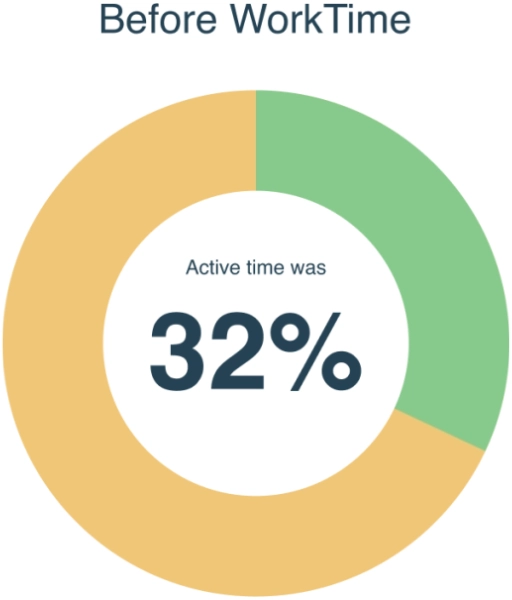
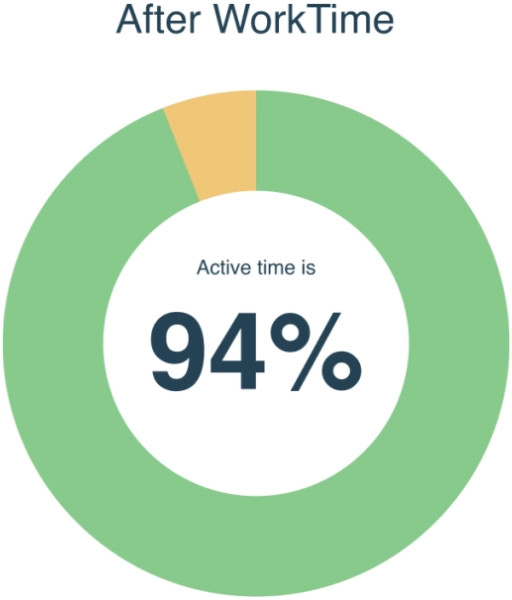
Active time before & after WorkTime

A USA IT company with 20 remote workers saw a 62% active time increase after deploying WorkTime remote monitoring.

chart_image
chart_image
WorkTime

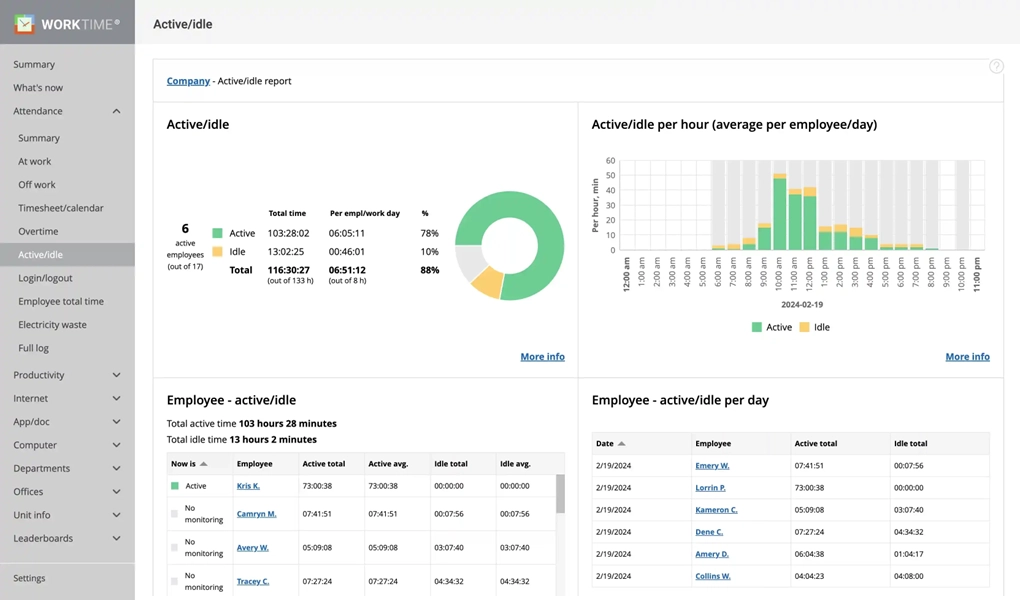
Active time monitoring

  • WorkTime records active and idle time for every remote employee without screenshots.
  • The platform classifies each minute as active or idle based on keyboard and mouse activity.
  • Managers see per-employee percentages, department averages, and daily trends through scheduled reports.

Non-invasive remote work monitoring

WorkTime is architecturally non-invasive.

The platform cannot capture screenshots, screen recordings, keystroke content, or email and chat messages. This is how the software is built, not a setting that can be toggled. For regulated industries, WorkTime offers HIPAA-safe, GDPR-safe, and GLBA-safe modes in the Enterprise plan.

HIPAA compatible

GDPR compatible

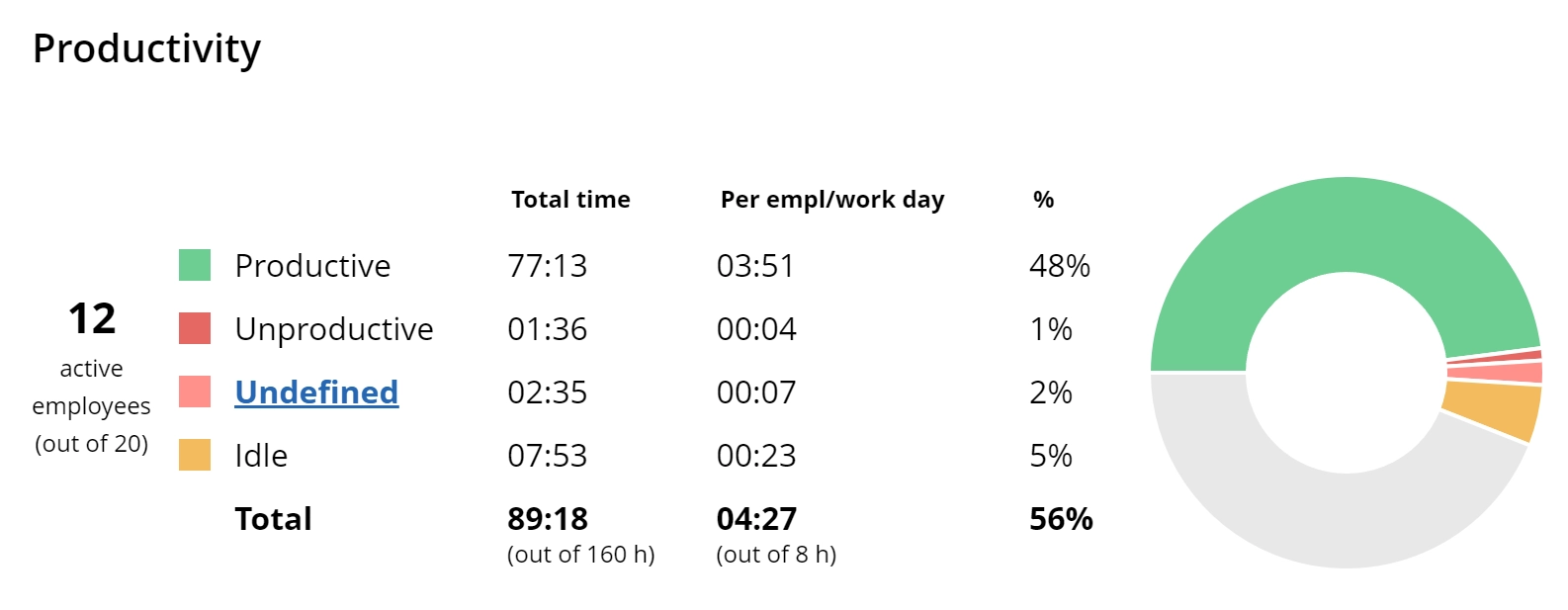
Productivity scoring for remote teams

WorkTime classifies applications and websites as productive or unproductive using AI-assisted categorization.

Each remote employee receives a productivity score. Managers see team averages and distraction levels.

WorkTime
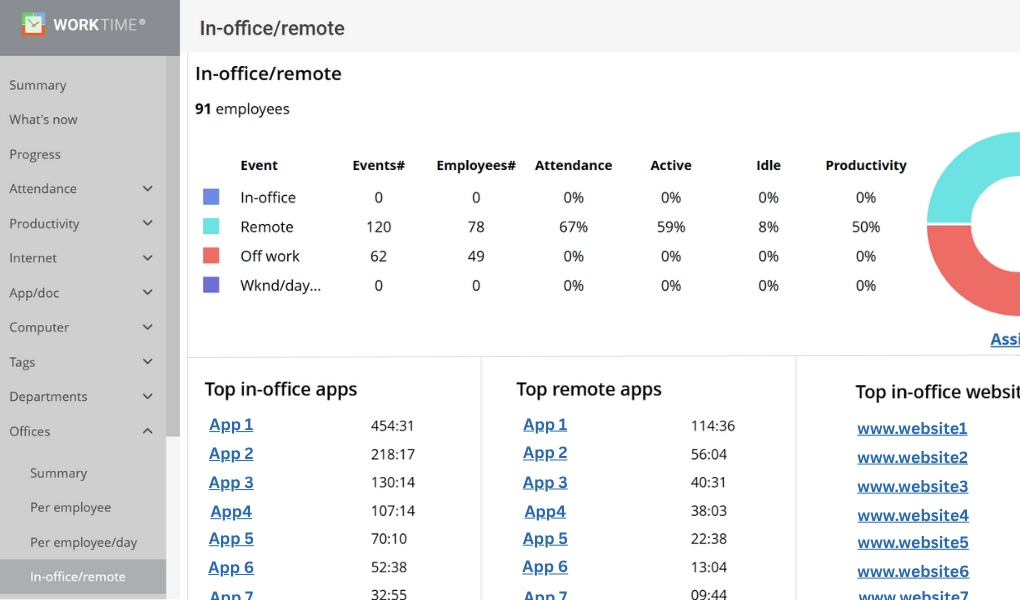
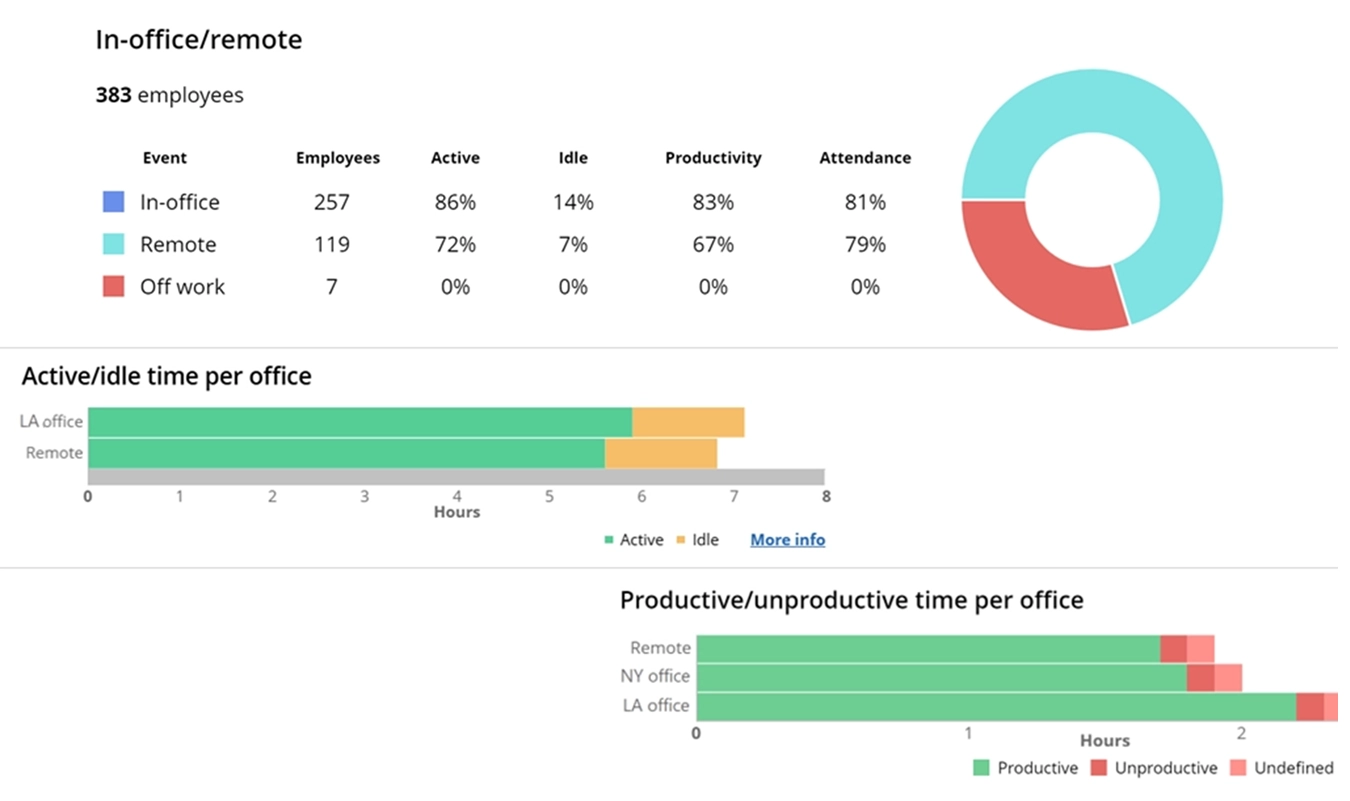
WorkTime compares remote and in-office productivity side by side using IP-based location detection. Track which teams perform better by location, identify attendance pattern differences, and measure overtime across remote and on-site workers.

Remote/from home vs. in-office

WorkTime remote vs in-office productivity comparison.

Track time spent in online meetings

WorkTime monitors the time remote employees spend in online meetings without recording content or audio. The data shows how much of each workday goes to meetings versus focused work.

What are your remote workers doing right now?

WorkTime

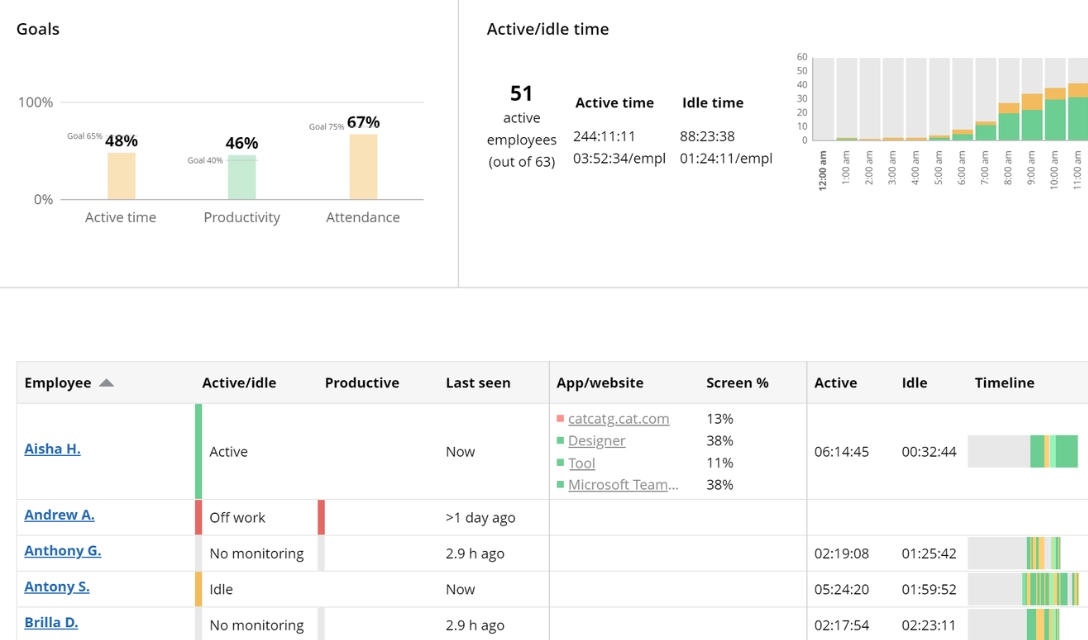
What are your remote workers doing right now?

WorkTime's real-time dashboard shows what your remote employees are doing right now. The What's Now report displays:

  • Currently active employees
  • Time of last activity
  • Attendance, active time, and productivity goal progress
  • Active and idle time per employee

Real-time activity data that shows who is working, without screenshots.

WorkTime

Start monitoring easily

WorkTime features for remote employee monitoring

Boost your remote team's performance instantly!

Why do employers invest in remote employee monitoring software?

Remote employee monitoring tracks how work time is spent across applications, websites, and tasks for off-site workers. Organizations invest for three reasons: productivity visibility, compliance documentation, and management accountability for distributed teams. A Stanford study found that remote workers experience a 10 to 20% reduction in productivity compared to in-office settings. The gap comes from fewer accountability structures, more distractions, and reduced visibility from managers. 80% of remote staff work beyond regular hours, leading to burnout and performance decline. Monitoring closes these gaps by measuring actual computer activity, not by watching screens.
Legal framework for remote employee monitoring

The Electronic Communications Privacy Act (ECPA) permits employer monitoring on company-owned devices when employees provide consent or when monitoring serves a legitimate business purpose. Violations carry fines up to $250,000 and up to 5 years imprisonment. Four states currently require written advance notification before monitoring begins: Connecticut, Delaware, New York, and Colorado. Massachusetts, New Jersey, Minnesota, and Oregon had monitoring bills in committee during 2025-2026. For organizations with remote employees across multiple states, the common practice is written notification for all employees regardless of state requirements. Employers generally have the right to monitor activity on company systems. Monitoring personal devices or activities outside work hours creates legal risk in most jurisdictions.

Best practices for implementing remote monitoring ethically

Effective remote monitoring programs share three characteristics.

  1. A written monitoring policy that explains exactly what is tracked, why it is tracked, and how data is used. Employees should receive and acknowledge this policy before monitoring begins.
  2. Employee access to their own monitoring data. When employees can see their productivity scores, active time, and attendance data, monitoring becomes a self-management tool rather than surveillance. 77% of employed Americans are less concerned about monitoring when employers are transparent about what is collected.
  3. Results-oriented measurement. Tracking engagement levels and productivity trends produces better outcomes than monitoring minute-by-minute activity. Monitoring data should identify burnout patterns and support employees rather than punish short-term inactivity.

Why non-invasive monitoring satisfies legal and ethical requirements

Non-invasive monitoring tools track productivity metrics without capturing sensitive content. No screenshots, no screen recordings, no keystroke content, no email or chat messages. This design satisfies three requirements simultaneously.
  1. Legal teams approve it because the tool cannot inadvertently capture protected data, including health records under HIPAA, financial data under GLBA, and personal data under GDPR.
  2. Employees accept it because their personal browsing, messages, and screen content remain private. Research shows 56% of monitored employees report increased stress and anxiety, but that figure drops significantly when the monitoring tool cannot capture personal content.
  3. Management gets the productivity data they need: active time, attendance, productivity scores, and distraction levels.
WorkTime offers HIPAA-safe, GDPR-safe, and GLBA-safe modes built into the Enterprise plan. These are product modes designed for regulated industries, not add-on features.

Benefits of non-invasive remote employee monitoring

Productivity increase

WorkTime customers consistently see measurable productivity gains after deployment. One USA IT company with 20 remote workers recorded a 62% increase in active time. Another organization saw employee performance increase 40% after implementation and drop 10% when monitoring was temporarily paused, recovering within days of resuming.

Management efficiency

WorkTime provides 80+ scheduled reports covering attendance, active time, productivity, and overtime across every department and location. Managers get the data they need to make decisions about remote team performance without manually checking in on individual employees. Reports that take 5 minutes in WorkTime take up to 5 days with screenshot-based tools that require manual review.

Remote workforce accountability

A mass media company with 2,500 work-from-home employees uses WorkTime to build accurate timesheets from actual computer activity data. When remote employees know their active time and productivity scores are being measured, accountability improves without the need for invasive surveillance.

Employee trust and engagement

Non-invasive monitoring preserves the trust relationship between employers and remote employees. Because WorkTime cannot capture personal content, employees are informed about monitoring without concern over privacy violations. Teams that understand what is being monitored and why show higher engagement and lower resistance to the monitoring program. WorkTime tracks and overtime patterns so managers can intervene before productivity declines.

Cost reduction

Monitoring data exposes hidden costs. A US school board with 2,500+ computers identified significant software license savings by tracking which applications employees actually use versus which sit idle. A rescue medical services organization saved $7,500 per employee per year by identifying time and attendance discrepancies through WorkTime's overtime monitoring.

WorkTime solutions for remote employee monitoring

Evaluate productivity

WorkTime measures productivity for remote employees using AI-assisted app and website categorization. The platform scores each employee's productive time as a percentage, compares it across departments, and highlights distraction patterns. The AI learns your organization's specific application categories and improves classification accuracy over time. Managers see which remote teams are performing at target levels and which need support. Productivity reports can be scheduled and delivered automatically to stakeholders on a daily, weekly, or monthly basis.

Track remote employee attendance

WorkTime monitors when remote employees log in, log out, and whether they are present during scheduled work hours. The system tracks:
  • Start and end times per employee
  • Late arrivals and early departures
  • Absent vs. present status
  • Scheduled vs. actual work hours
  • Overtime hours logged
  • Attendance goal progress
  • Attendance by department and location
Attendance data can be used for payroll verification and workforce planning.

Prevent overtime fraud

WorkTime's overtime monitoring cross-references logged hours against actual computer activity. If an employee claims overtime but shows no active time during those hours, the discrepancy surfaces automatically. This protects organizations from paying for hours not worked.

Get real-time performance insights

WorkTime provides live dashboards and customizable alerts that notify managers when employees fall below productivity thresholds, miss attendance goals, or show signs of burnout. These notifications arrive in real time, so managers can act before small issues become patterns.

Stay non-invasive and business-oriented

Every WorkTime feature operates without capturing personal content. The platform records activity metrics (active time, idle time, app usage, website categories) but never records what is on screen, what is typed, or what is said. For organizations in healthcare, finance, or government, this design passes compliance review because the tool architecturally cannot capture protected information. The technical specification details exactly what WorkTime records and what it does not. This transparency makes it straightforward to explain the monitoring program to employees and gain their buy-in.

FAQ

How to monitor employees working from home?

The most effective approach combines non-invasive monitoring software with clear management practices. Deploy a monitoring tool that tracks active time, attendance, and productivity without capturing personal content. Set measurable goals for each remote employee and share monitoring data with them directly. Pair the software with regular check-ins focused on outcomes, not activity.

What is productivity monitoring software for remote teams?

Productivity monitoring software measures how remote employees spend their computer time by categorizing applications and websites as productive, unproductive, or neutral. WorkTime scores each employee's productive time as a percentage and tracks trends over days, weeks, and months. This gives managers a data-driven view of remote team performance without relying on self-reported timesheets.

How does time tracking work for remote employees?

Remote time tracking software records when employees start and stop working by detecting computer login and logout times. WorkTime captures these timestamps automatically, with no manual clock-in required. The data feeds into attendance reports that show actual hours worked, breaks taken, and overtime logged, verified against real computer activity.

Is remote employee monitoring legal?

Remote employee monitoring is legal in all 50 US states when conducted on employer-owned devices with proper notification. The Electronic Communications Privacy Act (ECPA) provides the federal framework. Four states require written advance notification: Connecticut, Delaware, New York, and Colorado. Additional states have monitoring legislation in progress. Best practice: provide written notice to all remote employees regardless of their state, and limit monitoring to company devices during work hours.

What should a remote monitoring policy include?

A remote monitoring policy should cover five elements: what data is collected (apps, websites, active time, attendance), why it is collected (productivity measurement, compliance, security), how data is stored and protected, who has access to monitoring reports, and how employees can view their own data. Sharing this policy with employees before monitoring begins builds transparency and reduces resistance to the program.

How does non-invasive monitoring differ from screenshot-based tools?

Screenshot-based monitoring tools capture images of employee screens at set intervals, recording personal messages, health information, financial data, and anything else on screen. Non-invasive monitoring like WorkTime tracks activity metrics only: active time, idle time, app usage categories, and productivity scores. No visual content is ever captured. WorkTime generates reports in 5 minutes using structured data. Screenshot-based tools require up to 5 days of manual review and consume 9.5 GB of storage per employee compared to 0 GB for WorkTime.

What can you monitor with remote employee monitoring software?

Remote employee monitoring software tracks multiple dimensions of work activity. WorkTime covers: Attendance. Login and logout times, late arrivals, early departures, absenteeism patterns, and attendance goal progress. Active and idle time. Minutes of actual keyboard and mouse activity versus idle periods. WorkTime reports active time percentages per employee and department. Internet and software use. Which applications and websites employees use during work hours, categorized as productive or unproductive. Productivity. A composite score based on time in productive applications, distraction levels, and goal progress. Overtime. Hours logged beyond scheduled shifts, cross-referenced against actual computer activity to detect overtime fraud. Online meetings. Time spent in virtual meetings, helping managers identify over-meeting patterns that reduce focused work time.

What are the benefits of remote employee monitoring?

Remote employee monitoring provides measurable benefits when implemented with transparency. Productivity increases: one WorkTime customer recorded a 62% active time boost within weeks. Management gains data-driven visibility into team performance across locations without manual oversight. Overtime costs decrease when logged hours are verified against actual activity. Software license costs drop when usage monitoring reveals unused subscriptions. Employee engagement improves when monitoring is non-invasive, and employees have access to their own performance data.

How to start remote employee monitoring?

Start with WorkTime's 14-day free trial at worktime.com/try. The trial includes all features, unlimited employees, and no credit card. Download the monitoring agent, install it on employee computers, and reports begin generating immediately. WorkTime supports Windows, macOS, Terminal Server, and Citrix environments. Cloud and on-premise deployment options are available. The setup takes minutes, not days.

Can remote employees see their own monitoring data?

Yes. WorkTime allows organizations to share monitoring data directly with employees. Remote workers can view their own active time, productivity scores, and attendance records. This turns monitoring into a self-management tool. When employees see their own data, they identify their own productivity patterns and adjust without manager intervention. This transparency is a core best practice for ethical monitoring programs.

Does remote employee monitoring help prevent burnout?

WorkTime tracks overtime patterns, excessive active hours, and declining productivity trends that signal employee burnout. Managers receive alerts when remote employees consistently work beyond scheduled hours or show sustained drops in performance. This data allows intervention before burnout leads to turnover. Non-invasive monitoring makes this possible without the stress and anxiety that come with screenshot-based surveillance tools.