• Deutsch

    Deutsch

  • English

    English

  • Español

    Español

  • Français

    Français

  • Italiano

    Italiano

  • Português

    Português

Employee attendance monitoring software

Track and improve employee attendance with the WorkTime non-invasive monitoring system

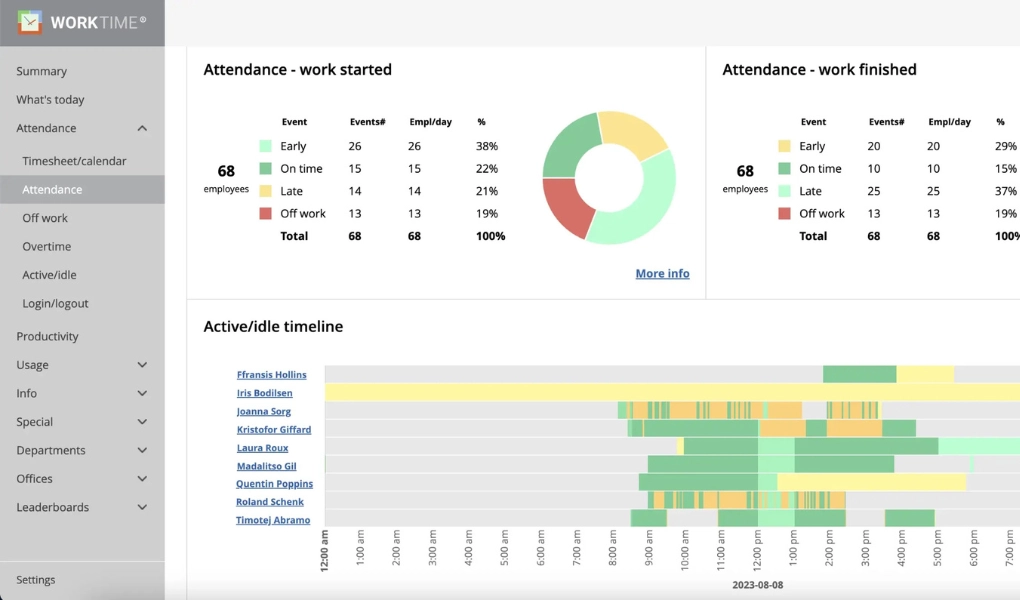
WorkTime employee attendance report.

For Windows, macOS

Terminal/Citrix

Cloud, on-premise

1 to 15,000+ computers

In-office, hybrid, remote

WorkTime WorkTime
WorkTime WorkTime
WorkTime WorkTime WorkTime WorkTime
Amika
School district
Dukascopy
Toyota
Coutts
Universal

26

Years of experience

Trusted by 9,500+ global brands and organizations

Monitor employee attendance

  • Monitor if employees are late or on time, at work or off work
  • Monitor when employees actually use computers
  • Monitor logins and logouts
  • Monitor who is working right now
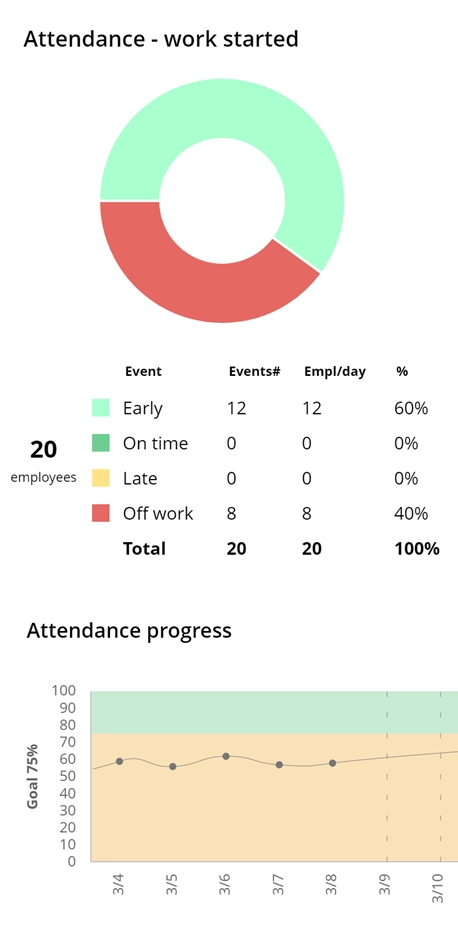
  • Set goal and monitor progress
WorkTime employee attendance report.

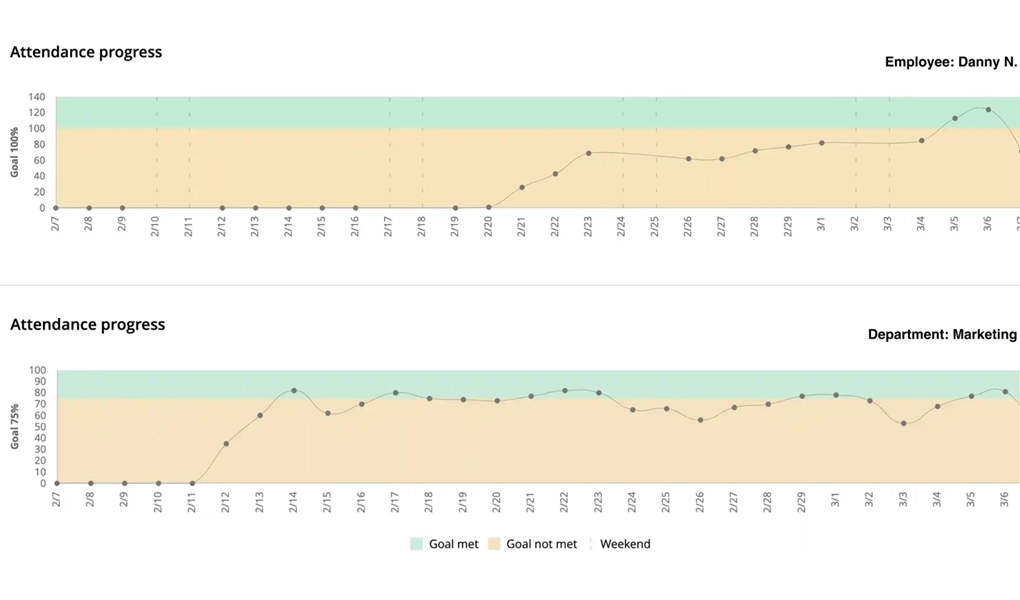
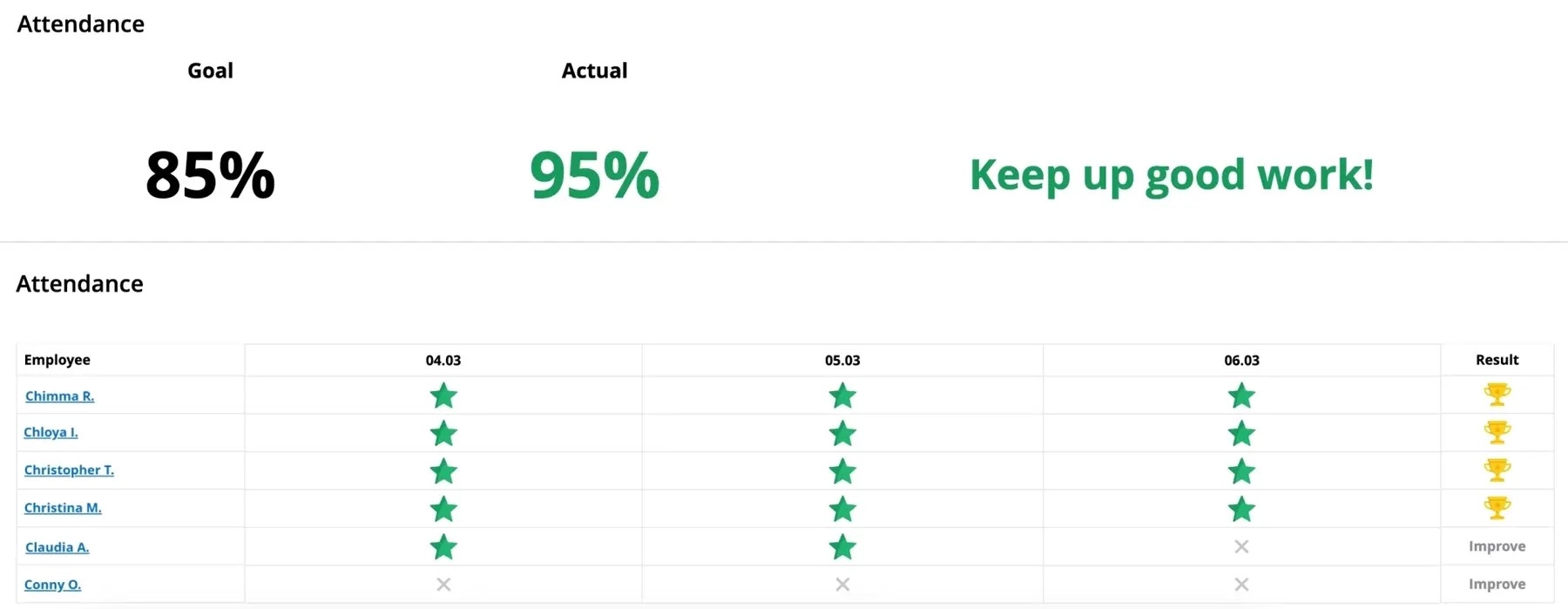
Set attendance goal & monitor progress

WorkTime attendance progress report

Set attendance goal & monitor progress

Define attendance goal and monitor attendance progress for every employee, department, and the entire company.

Try now 14 days free

Success story

WorkTime monitors banking sector.
Industry

Banking

Employees

500

WorkTime improves employee attendance!

Employees at a medium-sized Spanish bank used buddy punching to manipulate the card-based attendance system, causing inaccurate reports and payroll errors. WorkTime attendance monitoring software with login and logout tracking helped the bank accurately verify employee attendance and eliminate fraud.

Read more
Accurate attendance!

WorkTime. Instant attendance improvement.

Green employee monitoring

WorkTime is Green socially responsible employee monitoring. It supports workplace health.

WorkTime Green employee monitoring is the only non-invasive monitoring on the market. All invasive functions are replaced by safe, non-invasive alternatives.

HIPAA compatible

GDPR compatible

GDPR compatible

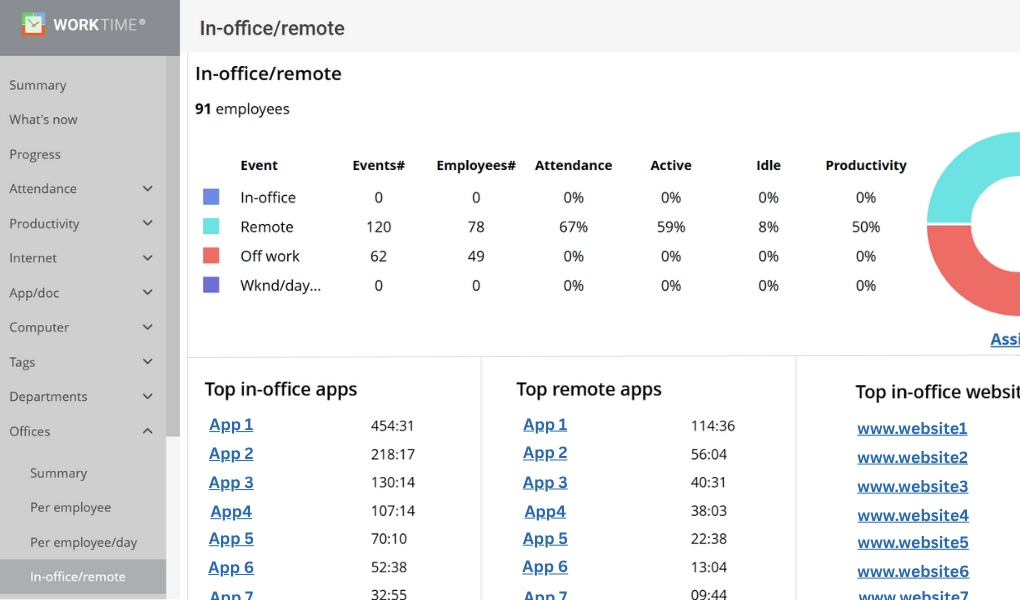
Compare remote & in-office attendance

WorkTime calculates the attendance percentage for every employee, department, and the entire team, whether working remotely or in-office.

remote attendance

42%

in-office attendance

64%

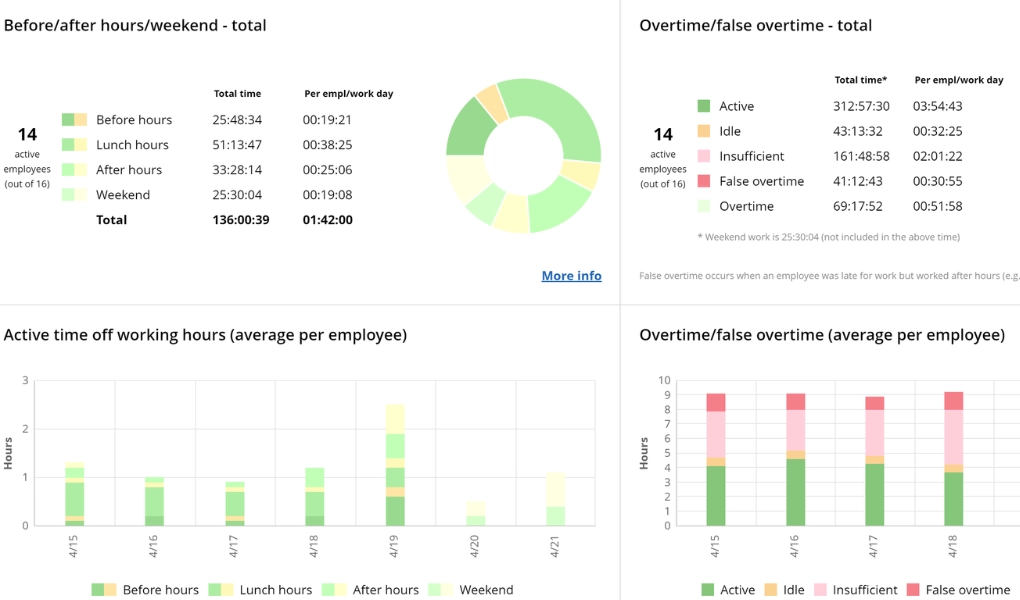
Monitor overtime and detect time fraud

WorkTime attendance overtime monitoring

Monitor overtime and detect time fraud

WorkTime monitors employee hours before and after shifts, during lunch, and on weekends. It detects overtime fraud and false claims.

Try now 14 days free

Motivate & engage employees with the Attendance Leaderboard

Employees perform best when informed!

Use the Attendance Leaderboard to engage your employees: display it on the office wall or schedule regular automatic emails to keep your team informed of the attendance goal and the attendance progress.

WorkTime. Employee attendance leaderboard.

Beyond attendance: Productivity and activity monitoring

Help employees provide more accurate timesheets with WorkTime attendance monitoring!

What is an employee attendance monitoring system?

An employee attendance monitoring system tracks when employees start and end their workdays, logs break times, and records time off. These systems replace manual timesheets and paper logs with automated data collection that feeds directly into payroll processing and compliance reporting. Attendance monitoring software captures clock-in and clock-out times, calculates total hours worked per day and week, flags unauthorized overtime, and maintains an auditable record of each employee's attendance history. Most systems offer multiple clock-in methods: desktop login detection, mobile apps, web-based time clocks, and kiosk terminals for on-site teams. The Fair Labor Standards Act (FLSA) requires employers to maintain accurate records of hours worked, wages paid, and overtime for every non-exempt employee. Records must be retained for a minimum of three years. Non-compliance penalties reach $2,374 per violation, with repeat offenders facing criminal charges up to $10,000 per incident. State labor laws add further requirements. The governing law depends on where the employee physically works, not where the employer is headquartered. A Delaware company with a remote worker in California must comply with California's monitoring and recordkeeping laws for that employee. WorkTime is a non-invasive employee attendance monitoring system that captures all required attendance data without screenshots, keystroke content logging, or screen recording. The software tracks logins, logouts, active time, idle time, and overtime while keeping employee personal data private. HIPAA-safe, GDPR-safe, and GLBA-safe modes are built into the Enterprise plan.

How WorkTime tracks employee attendance without invasive monitoring

Clock-In verification and buddy punching prevention

WorkTime verifies employee attendance through computer login and logout detection. Every login timestamp is tied to a specific machine and user account, which eliminates buddy punching without requiring biometric hardware or GPS tracking. Managers see who clocked in on time, who arrived late, and who is currently at work through real-time dashboards. The What's Going On Right Now report shows live attendance status across the entire organization.

Overtime and break tracking

WorkTime monitors work activity before and after scheduled hours, during lunch breaks, and on weekends. The system flags unauthorized overtime automatically and generates reports that separate legitimate overtime from time fraud. Overtime monitoring helped M&M Insurance save $50,000 in a single year by identifying false overtime claims across their workforce. Break tracking records actual break duration against policy, providing the documentation FLSA audits require.

Remote, hybrid, and in-office attendance

WorkTime detects employee location using IP addresses, not GPS tracking. The system identifies whether each employee is working from the office, home, or another location and calculates attendance percentages for each work environment separately. This makes it possible to compare remote and in-office attendance side by side at the employee, department, and company level.

Attendance alerts and notifications

Managers configure automated alerts for late arrivals, early departures, unauthorized absences, and attendance policy violations. WorkTime sends notifications the moment an attendance threshold is breached, enabling same-day intervention before patterns become problems. Alert rules are customizable by employee, department, or company-wide policy.

Attendance goals and progress reports

WorkTime allows managers to set attendance targets for individual employees, departments, and the entire organization. Progress reports show whether each employee meets their attendance goal over any time period. The platform generates 80+ non-invasive reports covering attendance, active time, productivity, and related performance metrics, all available on scheduled automatic delivery.

PTO, vacation, and days off monitoring

The system tracks time off outside regular hours: vacation days, sick leave, holidays, and personal time. WorkTime records actual working hours per day versus expected hours, which surfaces discrepancies between scheduled PTO and actual absence patterns. Overtime during vacation periods is flagged automatically so managers can verify whether extra hours were justified.

Productivity context for attendance data

Attendance alone does not indicate productivity. WorkTime pairs attendance data with active time tracking, application usage monitoring, and distraction scoring to show whether employees who are present are also productive. This combination reveals patterns that attendance-only systems miss: an employee with perfect attendance but declining productivity may be disengaged or approaching burnout.

Three ways automated attendance monitoring reduces costs

Automated attendance monitoring systems pay for themselves by eliminating three categories of cost that manual tracking cannot address: compliance penalties, inflated labor expenses, and invisible productivity losses.

FLSA and Labor Law compliance

The Fair Labor Standards Act requires employers to maintain accurate, auditable records of hours worked and wages paid for every non-exempt employee. Manual timesheets and spreadsheets fail this requirement in two ways: they depend on employee self-reporting (which introduces errors and fraud), and they lack the audit trail that regulators expect during an investigation. FLSA penalties reach $2,374 per violation for first offenses, with criminal liability up to $10,000 for repeat violations. WorkTime generates continuous, tamper-proof attendance records that satisfy FLSA recordkeeping requirements automatically. Every login, logout, break, and overtime hour is timestamped and stored with no manual data entry. For organizations in regulated industries, WorkTime's Enterprise plan includes HIPAA-safe, GDPR-safe, and GLBA-safe modes that prevent the system from indirectly collecting protected information during attendance monitoring. SOC 2 certification covers WorkTime's cloud infrastructure and data handling.

Overtime and payroll cost reduction

False overtime is one of the largest hidden labor costs in mid-size companies. Employees who clock hours they did not work, extend shifts without authorization, or manipulate manual time records inflate payroll by thousands of dollars annually. M&M Insurance discovered that 70% of their computers were being used for non-work activities before implementing WorkTime. After deployment, the company saved $50,000 in one year by eliminating false overtime claims alone. WorkTime flags overtime automatically based on actual computer activity, not self-reported hours. The system distinguishes between legitimate overtime (active work on business applications) and time inflation (idle machines or non-work browsing logged as overtime). Real-time alerts notify managers the moment an employee exceeds scheduled hours, enabling same-day review before the cost hits payroll.

Productivity insights from attendance data

Attendance records answer whether employees showed up. They do not answer whether those employees were productive while present. Organizations that track attendance without measuring productivity miss the largest driver of labor cost: presenteeism, where employees are physically present but disengaged. WorkTime connects attendance data to active time, application usage, and distraction scoring. This combination reveals patterns invisible to attendance-only systems. A department with 95% attendance but declining output signals a management or engagement problem, not an attendance problem. WorkTime's attendance goal monitoring shows progress over time so managers can measure whether policy changes actually improve both attendance and productive output. A Spanish bank with 500 employees saw immediate improvement in attendance accuracy after deploying WorkTime to replace a card-based system that employees had learned to manipulate. The bank reported higher customer satisfaction as a direct result of having the right staff present during business hours.

Attendance monitoring for every team type

Different teams need different attendance monitoring approaches. WorkTime adapts to four common workforce configurations without requiring separate tools or hardware for each.

Remote and hybrid teams

WorkTime monitors remote employee attendance through IP-based location detection, not GPS tracking or geofencing. The system identifies whether each employee is working from home, a coworking space, or a company office. Remote attendance percentages are calculated separately from in-office attendance, giving managers a clear comparison of work patterns across both environments. No mobile app installation or location permissions required on personal devices.

Multi-office and distributed teams

Organizations with multiple office locations configure WorkTime to recognize each office by IP range. The system assigns employees to their correct location automatically and generates attendance reports per office, per department, and company-wide. Outsourced teams and international offices are supported regardless of time zone. WorkTime scales from 1 to 15,000+ computers.

Shift-based and hourly teams

WorkTime tracks login and logout times against scheduled shifts, flagging early departures, late arrivals, and unapproved overtime. Before- and after-hours monitoring records any computer activity outside of assigned shifts. This data feeds directly into payroll-ready reports that distinguish scheduled work from overtime, reducing manual timesheet reconciliation.

Enterprise and regulated industries

Large organizations in healthcare, finance, government, and defense need attendance monitoring that passes compliance review. WorkTime's Enterprise plan includes HIPAA-safe, GDPR-safe, and GLBA-safe modes that prevent indirect collection of protected information. AES-256 data encryption. Cloud-hosted or on-premise deployment. WorkTime is trusted by 9,500+ organizations, including Fortune 500 companies and government agencies.

Software vs. hardware attendance systems

Employee attendance monitoring systems fall into two categories: hardware-based systems that use physical devices, and software-based systems that track attendance through computer and application activity.

Hardware and biometric systems

Biometric attendance systems use fingerprint scanners, facial recognition cameras, or RFID badge readers to verify employee identity at a physical location. These systems eliminate buddy punching because each clock-in requires the employee's unique biometric data. However, biometric systems collect sensitive personal information, creating compliance risks under state biometric privacy laws. Hardware systems also require installation, maintenance, and physical presence at a clock-in point, which limits flexibility for remote and hybrid teams.

Software-based attendance monitoring

WorkTime takes a non-invasive software approach to attendance monitoring. The system verifies attendance through computer login detection, tying each timestamp to a specific user account and machine. No biometric data is collected. No hardware installation required. No physical clock-in point needed. Remote, hybrid, and in-office employees are all monitored through the same lightweight software agent. WorkTime achieves the same buddy-punching prevention as biometric systems (computer logins are tied to individual credentials) without the biometric data liability or hardware cost.

How HR and IT teams use WorkTime for attendance

WorkTime serves three decision-maker roles within an organization, each with different priorities for attendance monitoring.

HR directors and compliance officers

HR teams can use WorkTime to generate the attendance documentation that audits, investigations, and performance reviews require. Automated attendance records satisfy FLSA recordkeeping requirements without relying on employee self-reporting. WorkTime's non-invasive approach means HR can deploy monitoring without triggering the employee privacy objections that invasive tools cause. Performance improvement plans reference objective attendance data (arrival times, total hours, attendance goal progress) instead of subjective manager observations. HIPAA-safe, GDPR-safe, and GLBA-safe modes ensure the monitoring itself does not create the compliance risk it was deployed to prevent.

IT directors and system administrators

WorkTime claims the lowest system resource consumption among major employee monitoring tools, benchmarked against five competitors. The software supports Windows and macOS, Terminal Server and Citrix environments, and offers both cloud-hosted and on-premise deployment. AES-256 data encryption protects all stored attendance data. For organizations running 1,000+ endpoints, lightweight resource usage means no measurable impact on system performance. Installation and configuration are handled centrally with no per-employee setup required.

Department managers

Managers can use WorkTime for daily attendance oversight. The real-time "What's Going On Right Now" dashboard shows who is at work, who is late, and who is absent across every department. Attendance leaderboards (displayed on office screens or sent via scheduled email) create visibility that improves attendance without requiring direct confrontation. Managers set attendance goals per employee or department and track progress through automated reports delivered on a schedule they define.

Automated attendance tracking vs. manual spreadsheets

Organizations that rely on manual timesheets, paper logs, or spreadsheet templates for attendance tracking face persistent accuracy problems that compound over time. Automated attendance monitoring software eliminates the manual data entry that causes most payroll errors, compliance gaps, and disputes over hours worked.

No more attendance sheets

Paper attendance sheets seem low-cost until you account for the data they miss. A basic sign-in register captures presence or absence, but not arrival times, departure times, remote vs. in-office status, or actual hours spent working. Employees can sign in for coworkers. Data entry errors compound across pay periods. And manual sheets provide no audit trail for compliance investigations. The information organizations actually need from attendance tracking goes beyond a simple checklist: hours spent on tasks, exact arrival and departure times, whether the employee worked in-office or remotely, overtime hours versus scheduled hours, and break duration versus policy. Collecting this manually requires employees to fill in detailed records every day. Most do not fill them accurately, and many do not fill them at all. WorkTime collects all attendance data automatically through computer login detection. Every metric that manual sheets attempt to capture is recorded continuously without employee input. A US-based mass media company with 2,500 work-from-home employees built better, more accurate timesheets using WorkTime attendance data than their previous manual process could produce. The switch from paper to automated tracking eliminated the daily data entry burden on employees and gave management verifiable attendance records for the first time.

Effective alternative to employee attendance tracker Excel templates

Excel attendance templates and Google Sheets trackers are free, which explains their popularity. A typical spreadsheet tracks department affiliation, employee name, dates present and absent, leave type, and work hours per day. For small teams with simple schedules, this approach works well enough to get started. The limitations become clear at scale. Manual attendance tracking consumes significant time for the person maintaining the spreadsheet and for employees filling it in. Employee time theft goes undetected because the data depends entirely on self-reporting. Human errors in data entry cascade through payroll calculations, causing overpayments or underpayments that create legal exposure and employee dissatisfaction. Spreadsheet files stored on shared drives lack the access controls and audit logging that sensitive attendance data requires. And spreadsheets cannot generate real-time alerts when an employee arrives late, leaves early, or exceeds overtime thresholds. WorkTime replaces manual spreadsheets with automated attendance data collection that starts working within minutes of deployment. Every metric that a spreadsheet template attempts to capture manually, WorkTime records automatically and continuously. The transition requires no change to employee workflows. The software runs as a lightweight agent that detects logins, logouts, active time, and idle time without any employee input required. Reports can be exported in formats compatible with existing payroll systems.

FAQ

What is an employee attendance monitoring system?

An employee attendance monitoring system is software that automatically tracks when employees start and end their workdays, logs break times, records overtime, and manages time-off requests. These systems replace manual timesheets with automated data collection. WorkTime is an employee attendance monitoring system that captures this data through computer login detection without screenshots, keystroke content logging, or screen recording.

Is employee attendance monitoring software legal?

Employee attendance monitoring software is legal in the United States, but the governing law depends on where the employee physically works. A Delaware-based company with a remote worker in California must comply with California's monitoring and privacy laws for that employee. Most states require employers to notify employees about monitoring before it begins. WorkTime's non-invasive approach avoids many of the legal risks that come with invasive monitoring tools because it does not capture personal content, biometric data, or screen recordings.

How does attendance monitoring prevent buddy punching?

Buddy punching occurs when one employee clocks in or out on behalf of another, inflating attendance records and payroll costs. Biometric systems prevent buddy punching through fingerprint or facial recognition scans, but these collect sensitive personal data. WorkTime prevents buddy punching through computer login verification. Each attendance timestamp is tied to a specific user account and machine. An employee cannot log in to a coworker's account without their credentials, providing the same identity verification as biometric systems without collecting biometric data.

What attendance records does the FLSA require?

The Fair Labor Standards Act requires employers to maintain records of hours worked each day and each week, total overtime hours, wages paid, and deductions for every non-exempt employee. Records must be retained for a minimum of three years. The FLSA does not mandate a specific tracking method, but records must be accurate and auditable. Non-compliance penalties reach $2,374 per violation. WorkTime generates these records automatically through continuous monitoring of login times, active hours, and overtime.

Can attendance monitoring software work for remote employees?

WorkTime monitors remote employee attendance through IP-based location detection. The system identifies whether each employee is working from home, a coworking space, or a company office and calculates attendance percentages for each environment separately. No GPS tracking, geofencing, or mobile app installation required. Remote and in-office attendance data appear in the same reports, so managers can compare patterns across work environments.

What is the best attendance monitoring system for small businesses?

The best attendance monitoring system for a small business depends on team size, work arrangement, and budget. WorkTime offers a free plan for up to 3 employees, which includes basic attendance monitoring. Paid plans add unlimited data history, usage monitoring, and advanced reporting. A 14-day free trial of all features, with no credit card required, lets businesses test the full platform before committing. Visit worktime.com/pricing for current plan details.

How does WorkTime compare to biometric attendance systems?

Biometric attendance systems use fingerprint scanners or facial recognition to verify identity at a physical clock-in point. They prevent buddy punching but collect sensitive biometric data that creates compliance risk under growing state biometric privacy laws. WorkTime verifies attendance through computer login detection instead. No biometric data is collected. No hardware is required. The software works for remote, hybrid, and in-office employees through the same lightweight agent. Both approaches verify identity, but WorkTime eliminates the biometric data liability and hardware maintenance cost.

Does WorkTime integrate with payroll?

WorkTime generates payroll-ready attendance reports that can be exported for use with existing payroll systems. Reports include total hours worked, overtime hours, break times, and attendance compliance data in formats compatible with standard payroll processing workflows. Scheduled automatic report delivery means payroll teams receive updated attendance data on a regular cadence without manual requests.

How do I track employee attendance without micromanaging?

WorkTime's non-invasive approach tracks attendance through computer login data, not screen recordings or keystroke logging. Employees are not watched. Their productivity is measured through activity patterns and attendance metrics, not surveillance of personal content. Attendance leaderboards and goal-tracking reports create accountability through transparency, not oversight. Employees can view their own attendance data, which shifts the dynamic from monitoring to self-management. This approach is why WorkTime calls its methodology "Green" employee monitoring.

What is non-invasive attendance monitoring?

Non-invasive attendance monitoring tracks employee work hours and attendance patterns without capturing personal content, biometric data, or screen recordings. WorkTime is the only employee attendance monitoring system that is entirely non-invasive by design. The software monitors logins, logouts, active time, idle time, overtime, and attendance goals without screenshots, keystroke logging, or screen recording. For every invasive function, WorkTime provides a non-invasive alternative for every invasive function. HIPAA-safe, GDPR-safe, and GLBA-safe modes are built in the Enterprise plan. Try WorkTime free for 14 days.