• Deutsch

    Deutsch

  • English

    English

  • Español

    Español

  • Français

    Français

  • Italiano

    Italiano

  • Português

    Português

Employee monitoring for law firms with WorkTime

Higher employee performance, better engagement, and increased responsibility

WorkTime
Amika
School district
Dukascopy
Toyota
Coutts
Universal

Employee monitoring for law offices - ensuring employee productivity

Green employee monitoring

WorkTime is non-invasive employee monitoring for law firms.

WorkTime is non-invasive monitoring for law firms, built without screenshots or keystroke logging. It tracks productivity in numbers, so privileged files stay private.

HIPAA-safe mode

GDPR-safe mode

Numbers instead of content

We do not record content

Because it is an invasive privacy breaker and not only

  • We do not capture screenshots
  • We do not log keystroke content
  • We do not monitor social media or chat content
  • We do not monitor document or email content
  • What WorkTime does not monitor

We provide numbers

Effective & safe employee productivity monitoring

  • We provide non-invasive screen analysis
  • We count keystroke speed, not content
  • We monitor time in social media and chats
  • We monitor app and website usage
  • What WorkTime monitors

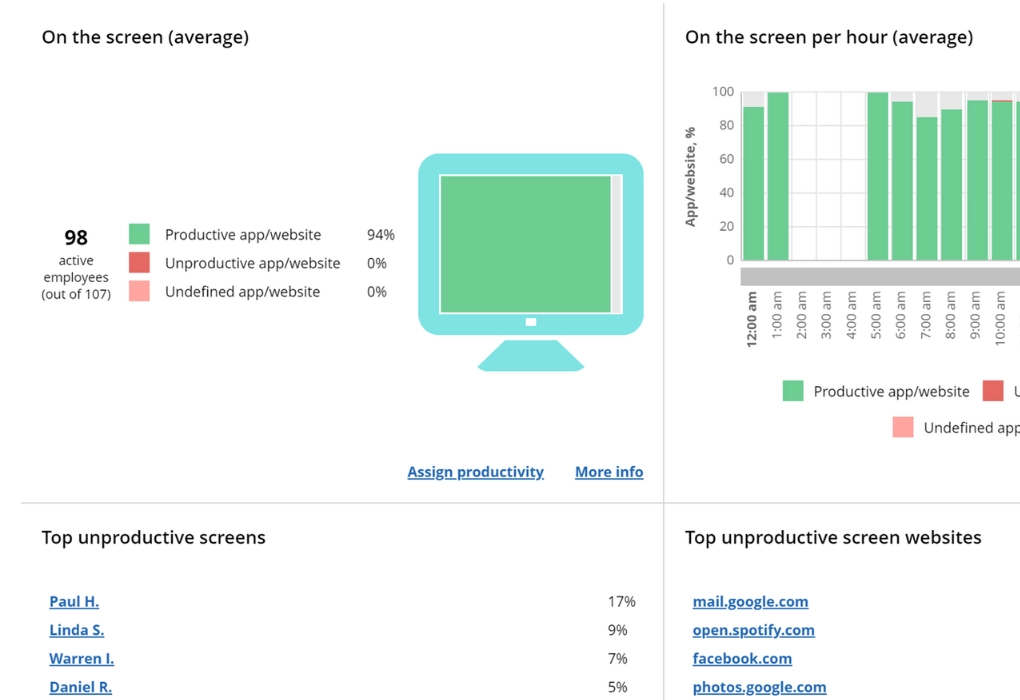
"Screen productivity" report instead of invasive screenshots

WorkTime

"Screen productivity" report instead of invasive screenshots

This report analyzes screen usage numerically. No content is captured.

The Screen Productivity Score measures how actively an employee uses their screen and turns it into numbers without capturing any screen content. It is WorkTime's non-invasive alternative to screenshots, so privileged documents and client communications never enter the record.

Success story

WorkTime
Industry

Law firm

Employees

30-50

Smoke break related losses are effectively minimized

The owner of this US law firm was concerned about smoking breaks, which, along with irregular tea, coffee, and chat breaks, consumed up to 40 minutes of working time daily. This issue has now been successfully resolved with WorkTime.

Read more
Losses minimized!
WorkTime

Try WorkTime 14 days free

WorkTime trial is all inclusive:
all features, unlimited employees.
No credit card required.

Basic

$6.99

/ employee / month billed monthly

Premium

$8.99

/ employee / month billed monthly

Enterprise

$10.99

/ employee / month billed monthly

Compare plans

WorkTime ensures the highest data safety standards

WorkTime
WorkTime

Implement non-invasive monitoring software in your law office now!

Start free trial
  • WorkTime

    Sign up

  • WorkTime

    Run monitoring agent

  • WorkTime

    View reports

5 reasons why you need WorkTime employee monitoring for law offices

1. Accurate time tracking

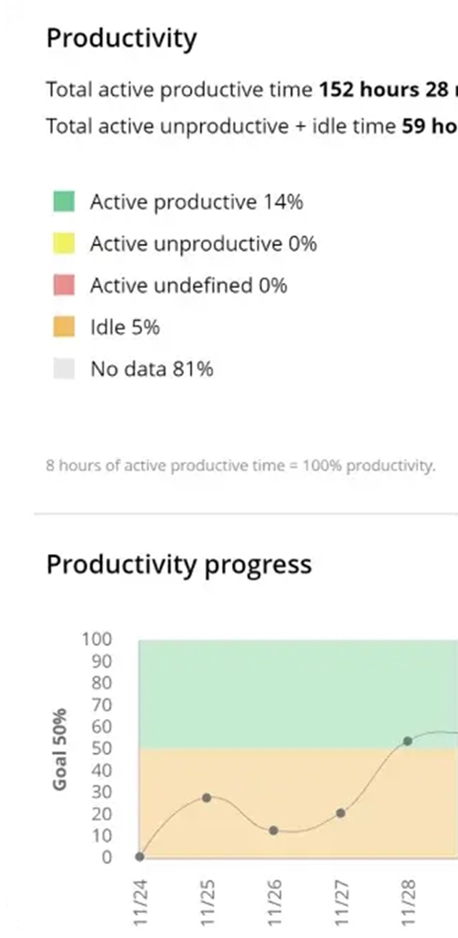
Monitor employee active and idle time with WorkTime. Get reports with the actual numbers, showing timelines per employee and department. WorkTime provides automated timesheet reports for attorneys, so your team spends less time preparing the weekly and monthly attendance reports. What's more, WorkTime analyzes whether your associates are productive during their active time, so you stay confident that you pay for productive hours. WorkTime monitors employee attendance to confirm that all employees arrived on time and were active according to their schedules. Easily detect excessive absenteeism or presenteeism cases with WorkTime attorney time tracking across your firm.

2. Better law firm management

Elevate law firm management with WorkTime. We provide reports with performance metrics. Thanks to our lawyer time-tracking features, you can evaluate performance at a glance and get insights into the current situation in the company.
  • Track time for law professionals and see whether an employee or team achieved performance goals.
  • Use employee monitoring for law offices to define the main challenges and risks right now.
  • Reveal the top productive and unproductive employees with our attorney time-tracking software.
  • Implement attorney time management software to analyze main productivity patterns within a team.
  • Catch the signs of employee burnout early with WorkTime.
  • Look through 80+ reports to understand the current workload and manage it effectively.
Use time tracking data to drive your law firm effectively and address any challenges promptly. In addition to attorney time tracking, you can schedule email reports to get information on what is going on in the company with just a click. Get a free WorkTime trial and its monitoring features for 14 days!

3. Enhanced productivity

WorkTime is a strong assistant for employee productivity monitoring in your law firm. Our time tracking software for lawyers is a feature-rich tool that serves different needs: evaluate law office productivity; spot low performance, lack of engagement, signs of overload, or other inconsistencies and solve issues proactively; catch the signs of burnout and prevent its outcomes with WorkTime; set goals for productivity, attendance, and active time; use the findings WorkTime provides to improve your management strategy; motivate employees to perform better; recognize employees with WorkTime leaderboards.

4. Transparent employee monitoring for law office

WorkTime is transparent, non-invasive monitoring that a law firm can announce to its staff. It is built to keep privileged material out of the monitoring record: no screenshots, no keystroke content, and no capture of documents or emails. WorkTime offers a GDPR-safe mode on its Enterprise plan for regulated teams, so employee privacy stays intact while you measure productivity. Because it is easy to announce, WorkTime shows employees a productivity-focused approach rather than surveillance. You can also grant team members access to self-monitor their own performance, which builds trust. WorkTime gives you sample announcements to share with staff before you roll it out.

5. Optimized resource management

Cut costs on unproductive time, overtime fraud, and excessive absenteeism with WorkTime. Analyze the data in our reports and improve resource allocation based on your law firm's needs. For example, one US law firm discovered significant losses related to smoke breaks thanks to WorkTime attorney time tracking. Implement WorkTime right now to get clear insights that show exactly where your paid law office hours go.

Why choose WorkTime law office productivity monitoring?

WorkTime is a feature-rich and transparent law firm time tracking software. Take advantage of automated attorney timesheets and scheduled performance reports. WorkTime offers a GDPR-safe mode on its Enterprise plan for legal professionals who handle regulated data. Non-invasive and accurate tracking helps keep employees' and clients' private data secure. Choose on-premise installation to keep sensitive data on the law firm's hardware or the cloud option. WorkTime encrypts client data files with AES-256. WorkTime offers employee monitoring for law offices of different sizes, from 1 to 15,000-plus computers. Choose the pricing plan that includes the lawyer time tracking tools you need. Need help or have questions? Contact our team at info@worktime.com or via live chat.

FAQ

How to be more productive as a lawyer?

Lawyers stay productive by prioritizing tasks, minimizing distractions, setting realistic goals, and protecting work-life balance. Firms can add employee monitoring software to measure performance and find the bottlenecks that slow associates down. WorkTime shows where time actually goes, so managers can point each lawyer to the changes that raise output.

Can attorney time tracking improve productivity?

Yes. Time tracking gives managers the performance data they need to lift a team's output. WorkTime monitors active time, attendance, and app usage, then turns it into productivity numbers lawyers and managers can act on. Start a free trial and use WorkTime in your own firm.

How to improve productivity in a law firm with legal time tracking software?

Time tracking software improves law office productivity by making performance measurable. WorkTime is a non-invasive, transparent monitoring tool that tracks productivity without screenshots or keystroke content. Review the performance metrics, address the issues they reveal, and keep the firm running efficiently, all without touching privileged client material.

How do you set up and run a law office efficiently?

A law firm time tracking software helps you manage a legal team efficiently. WorkTime automates timesheets and routine administrative work and generates performance reports on a schedule. Managers review the metrics and take proactive steps before small problems grow. Try WorkTime to set up and run your law office on real productivity data instead of guesswork about how the team spends its day.

How do lawyers measure time?

Lawyers track the hours they spend on each task, and most firms automate that with time tracking software. WorkTime adds the productivity layer on top: it monitors active and idle time, attendance, and app usage across the office, so the numbers behind your workload and staffing decisions reflect the real work being done. The result is better workload management, cleaner resource allocation, and higher team productivity. Try WorkTime now.

How does WorkTime monitor law-firm productivity without capturing confidential client material?

WorkTime monitors numbers, not content. It captures no screenshots, no keystroke content, and no copies of documents, emails, or chats, so privileged case files and client communications never enter the monitoring data. A law firm sees active time, attendance, app and website usage, and productivity scores, while the sensitive material on an attorney's screen stays private. Monitoring rules vary by country and by state, so review the laws that apply where you operate.

Is there free time tracking software for law firms?

WorkTime offers a 14-day free trial with every feature, unlimited employees, and no credit card required. Small firms can also start on a free plan for a small team. Compare the free plan with the paid tiers on the pricing page and pick the one that fits. Every plan uses the same non-invasive method: productivity in numbers, no screenshots or keystroke content.

What does WorkTime monitor for a law firm, and what does it not capture?

WorkTime monitors active and idle time, attendance, app and website usage, and productivity scores for each employee, team, and department. It does not capture screenshots, keystroke content, screen recordings, or the content of documents, emails, and chats. That split is the point: your firm gets the productivity data it needs to manage the office, and privileged client information stays off the record.