
TL;DR
- On-premise means the data stays behind your firewall. You host the software on your own servers, so employee activity logs never sit in a third-party cloud. This is the core reason regulated and security-sensitive teams choose it.
- The biggest names cannot self-host. ActivTrak and Hubstaff are cloud-only, so they are off the table the moment on-premise is a hard requirement.
- WorkTime is the non-invasive on-premise pick. It self-hosts, carries HIPAA, GDPR, and GLBA-safe modes, and measures productivity without capturing screens or keystroke content.
- Verify deployment before features. Some vendors gate on-premise behind enterprise plans and seat minimums, so confirm a tool can actually run on your infrastructure before you compare anything else.
In this article
Presented by WorkTime, a transparent productivity monitoring solution that delivers in-depth workforce analytics through flexible cloud and on-premises deployment options.Below are the seven best on-premise employee monitoring tools for 2026, each with its real deployment model, pricing at the time of writing, and the buyer it fits. We also flag the popular tools that are cloud-only, so you do not shortlist software that can never meet an on-premise requirement.
What is on-premise employee monitoring software?
On-premise employee monitoring software is installed on a company's own servers or local infrastructure rather than a vendor-managed cloud. All productivity and activity data stays behind the corporate firewall, under the organization's direct control.
Why companies choose on-premise monitoring
Teams choose on-premise monitoring when control over the data outweighs the convenience of a hosted service. The reasons cluster into four:- Data sovereignty. Activity data never leaves your network, so you decide who can access it and how long it is kept. Nothing is scattered across a vendor's data centers.
- Compliance. Keeping monitoring data local simplifies meeting strict data-residency and privacy mandates. Hosting it yourself means sensitive records stay inside controls you already run, protected with measures like AES-256 data encryption.
- Security. Storing data inside your own perimeter shrinks the external attack surface and removes a third party from the chain of custody.
- Retention control. You set how long logs are stored, scaling local drives or a private cloud for as much history as you need.
The catch most buyers miss
Two facts narrow the on-premise field faster than any feature comparison. First, the most recommended monitoring tools cannot self-host. ActivTrak and Hubstaff are both cloud-only, so an on-premise requirement rules them out before you reach pricing or features. Buyers often shortlist them on reputation, then discover the data has to sit in the vendor's cloud. Second, self-hosted deployment does not automatically mean privacy-friendly monitoring. Many solutions still use invasive features that can undermine employee trust. Teramind, Controlio, CleverControl, and Kickidler all build on screenshots, keystroke logging, and screen or webcam recording. That depth of surveillance has a measurable price. In American Psychological Association data, 33% of unmonitored workers report feeling tense or stressed, but among monitored workers, the figure jumps to 56%, with 51% saying they feel micromanaged. Harvard Business Review research goes further: heavy monitoring makes employees more likely to break rules, not less, because constant oversight chips away at their sense of personal responsibility.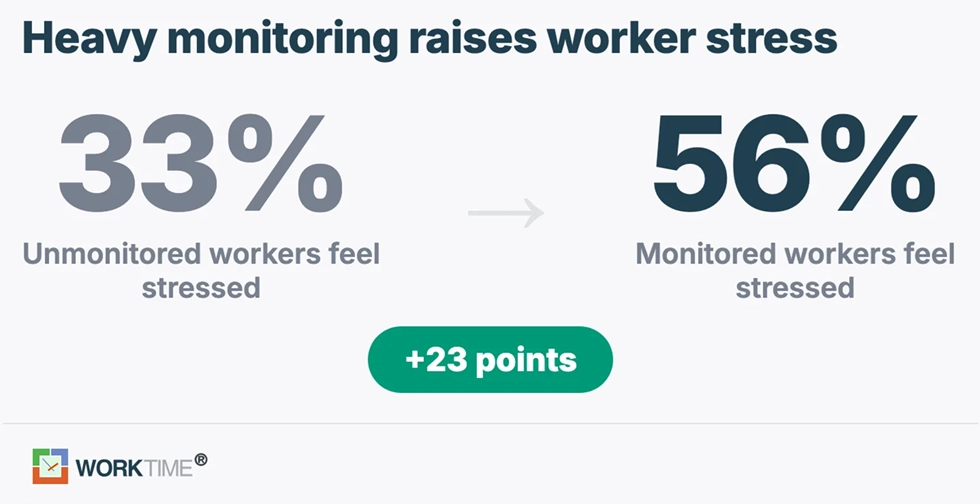
Top 7 on-premise employee monitoring software tools
Each tool below is confirmed to offer on-premise or self-hosted deployment. We note where that option is gated, how invasive the tool is, and what it costs at the time of writing.1. WorkTime: Best non-invasive on-premise option
WorkTime runs on-premise or in the cloud, with a private cloud option on its Enterprise plan and no seat minimum to get started. It is the only tool on this list that self-hosts without relying on surveillance. Instead of screenshots or keystroke content, it measures productivity through activity patterns and a safe screen analyzer that scores how actively someone uses their screen without logging the screen's contents.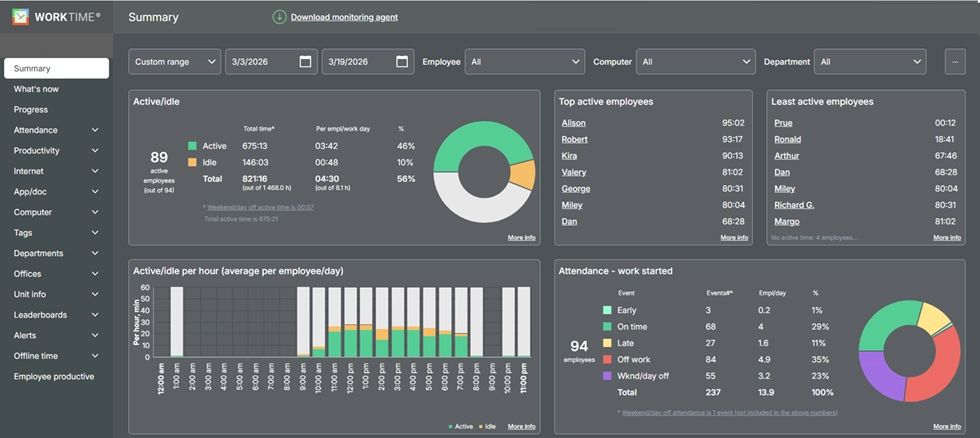

Turn activity into insights with 80+ WorkTime reports. Analyze performance clearly and safely, without collecting personal content.
Start free trial


2. Teramind: Best for deep activity capture
Teramind is the security-first option, built for data loss prevention and insider-threat detection rather than everyday productivity coaching. It supports cloud, on-premise, and private cloud deployment, with behavior analytics, session recording, DLP rules, and live session viewing.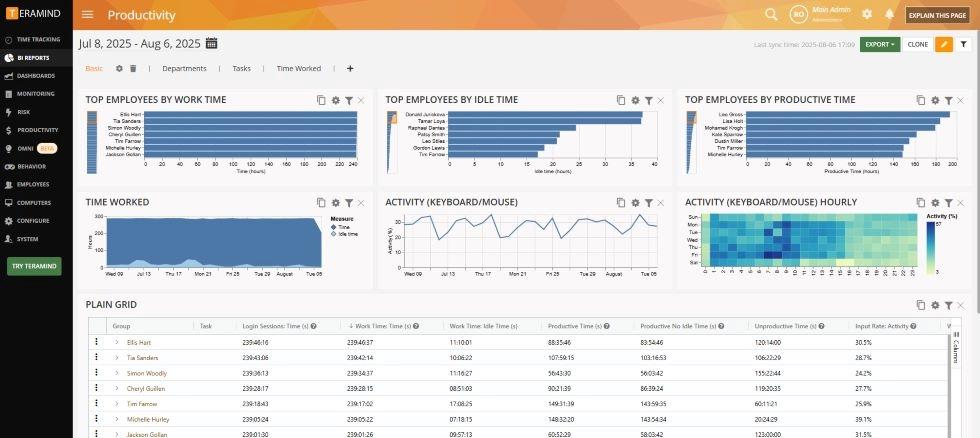
3. Controlio: Most flexible deployment
Controlio offers cloud, on-premise, and private cloud deployment, so you can keep data fully in-house or hand off hosting. Its on-premise option starts at a 10-user minimum, with private cloud reserved for larger Enterprise rollouts. It tracks app and website usage, logs keystrokes, blocks USB devices and sites, and sends real-time behavioral alerts.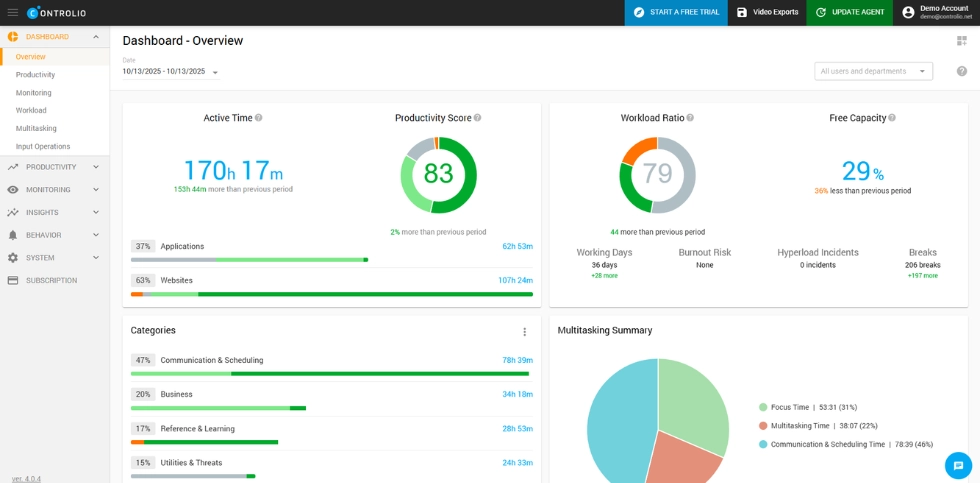
4. CleverControl: Local storage, heavily invasive
CleverControl installs on your company network and stores all tracking data locally, with no vendor cloud in the loop. That makes it a true on-premise option, but it is the most invasive tool here.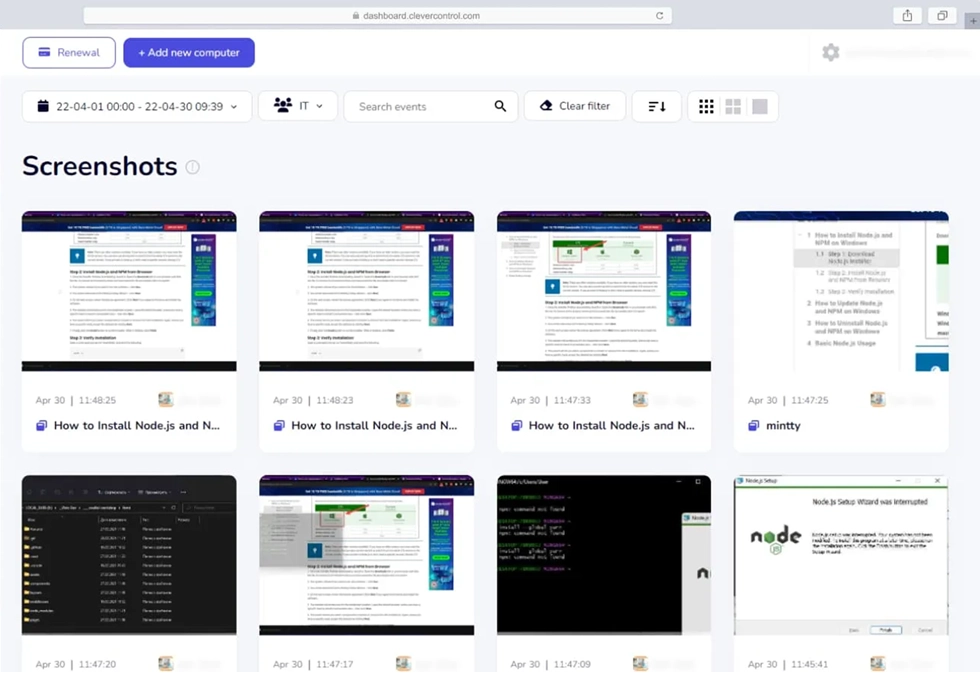
5. Kickidler: On-premise first
Kickidler is built around an on-premise architecture that uses a server, a lightweight agent, and a viewer application. It is designed for full local control and unlimited data retention on your own storage.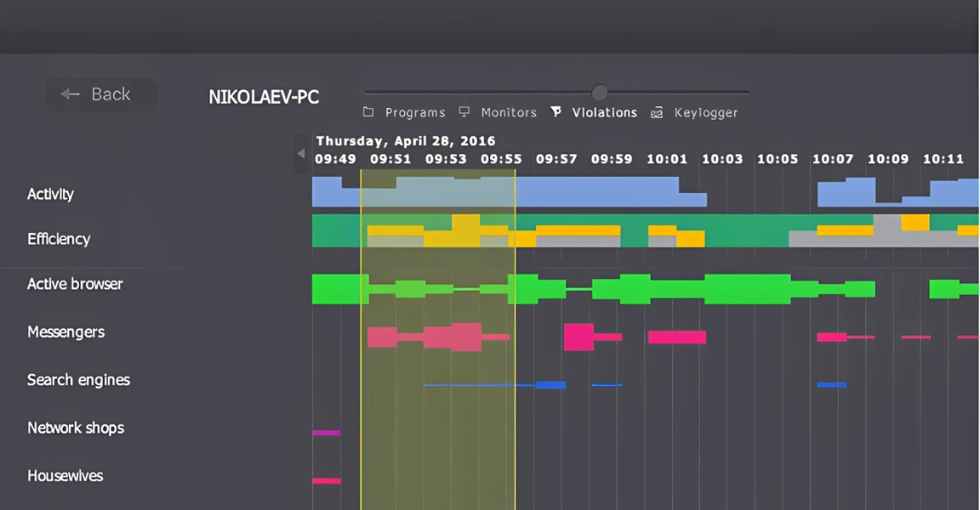
6. Veriato: Best for insider-risk programs
Veriato supports both cloud and on-premise deployment and focuses on user activity monitoring paired with insider-risk analytics. It is aimed at larger organizations running formal security and risk programs rather than simple productivity tracking.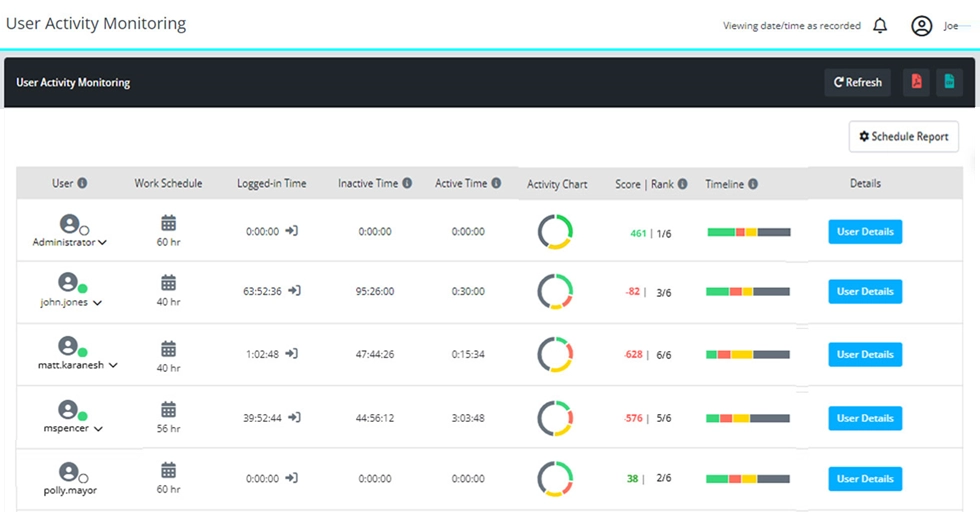
7. Insightful: On-premise gated to enterprise
Insightful (formerly Workpuls) offers on-premise and private cloud deployment, but only on its Enterprise tier, and that tier carries a 250-employee minimum. Smaller regulated teams that need self-hosting often cannot reach it.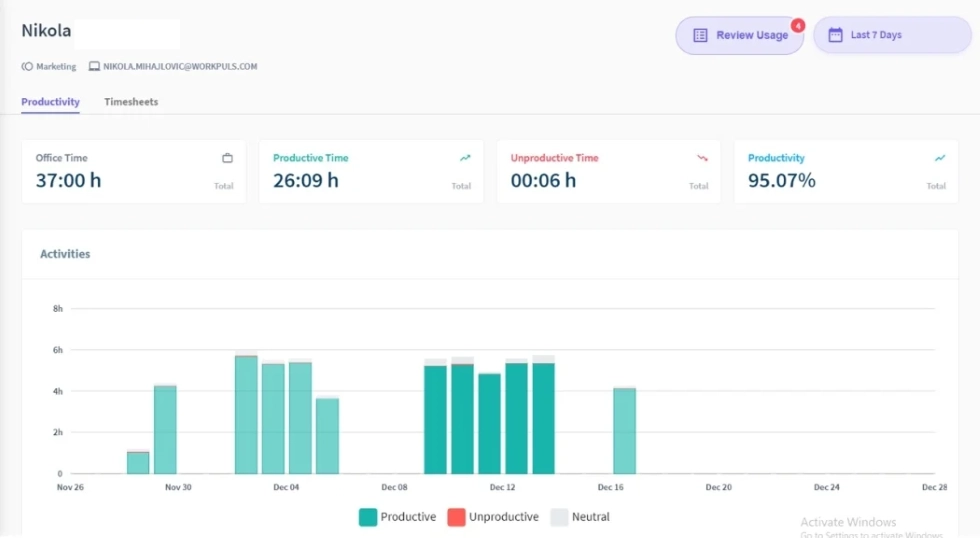
Popular but cloud-only: ActivTrak and Hubstaff
Two widely recommended tools cannot self-host at all. ActivTrak runs cloud-only and starts at $10 per user per month at the time of writing, with a free plan for up to three users and optional screenshots through a paid add-on. Hubstaff is also cloud-only, starting at $7 per user per month with a two-seat minimum, and it builds screenshots into its core product. Both are capable, but neither can keep data on your servers. If you like their analytics or field-team features, see our guides to the best ActivTrak alternatives and for self-hosting options.On-premise employee monitoring software compared
| Tool | On-premise? | Non-invasive? | Starting price (at time of writing) |
Best for |
|---|---|---|---|---|
|
WorkTime |
Yes (no seat minimum) |
 |
$6.99/employee /mo |
Regulated, privacy-conscious teams |
|
Teramind |
|
 |
$21/seat/mo (5-seat min) |
Security, DLP, insider threat |
|
Controlio |
Yes (10-user min) |
|
Contact vendor |
Flexible cloud, on-premise, or private cloud |
|
CleverControl |
|
|
Contact vendor |
Maximum local activity capture |
|
Kickidler |
|
|
Contact vendor |
On-premise-first, unlimited retention |
|
Veriato |
|
|
$18/user/mo (5-user min) |
Larger insider-risk programs |
|
Insightful |
Enterprise only (250-seat min) |
|
$8/seat/mo |
Enterprises wanting optional screen capture |
|
ActivTrak |
No (cloud-only) |
Optional |
$10/user/mo |
Light-touch analytics |
|
Hubstaff |
No (cloud-only) |
|
$7/user/mo (2-seat min) |
Mobile and field teams |
On-premise vs. cloud: Which makes sense?
On-premise wins when data control is non-negotiable. Choose it when you face data residency mandates, run air-gapped or tightly regulated systems, need full control over retention, or cannot allow employee activity data in a third-party cloud.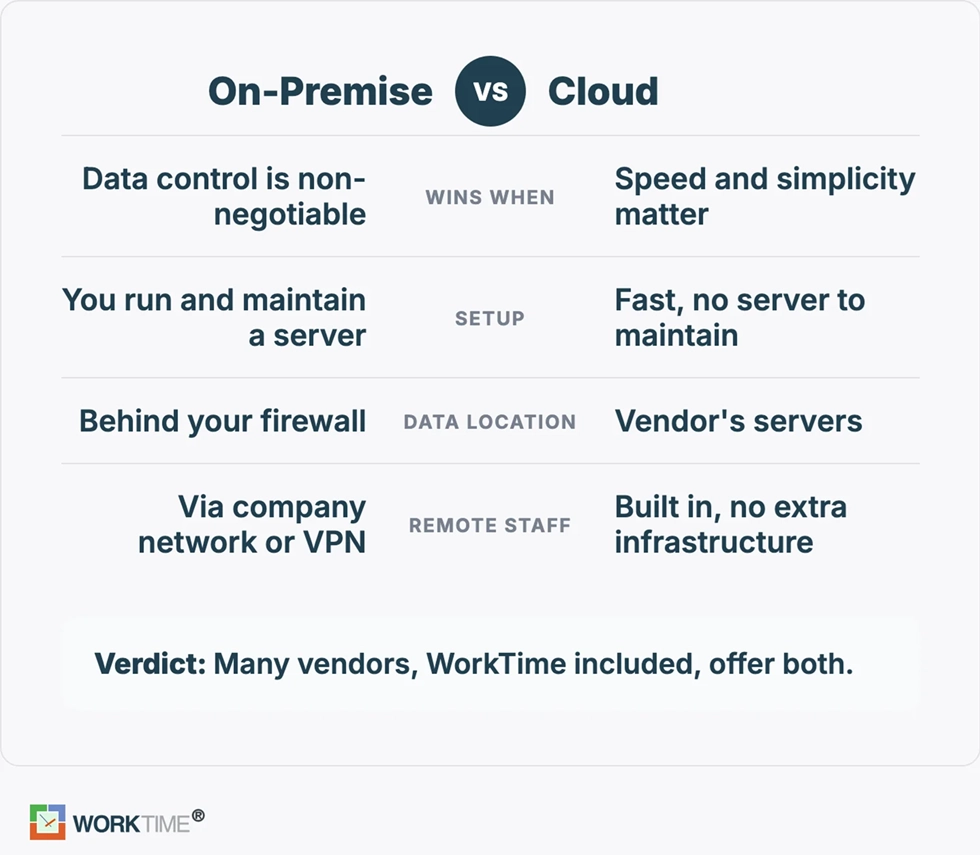
One-time license vs. subscription: what on-premise costs
On-premise pricing comes in two shapes. A one-time or perpetual license means you pay once and avoid recurring hosting fees, but you own the server, storage, and updates. A subscription with a self-hosted option spreads the cost and keeps the vendor responsible for updates, while the data still lives on your hardware.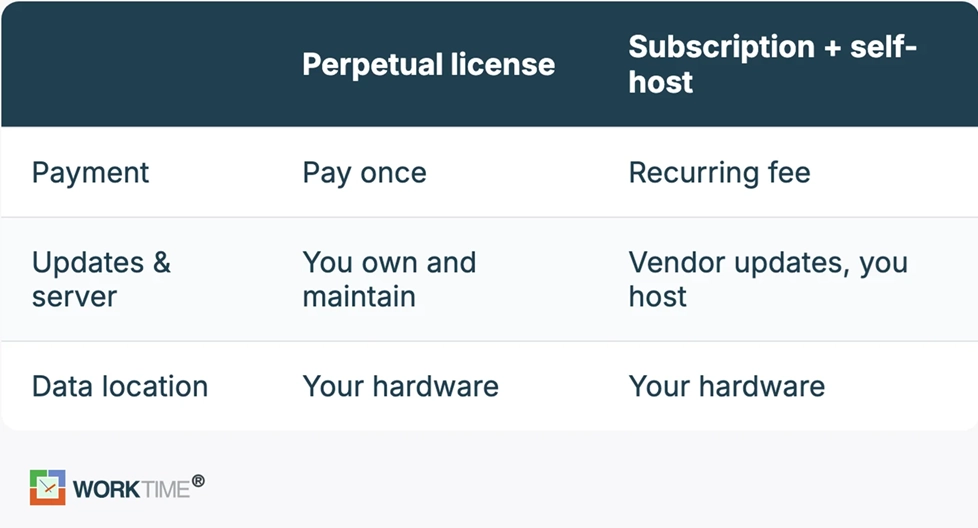
How to choose on-premise monitoring software
Work through these steps in order, because the early ones eliminate the most options.- Confirm it actually self-hosts. Many "on-premise" claims are gated. Insightful requires a 250-seat Enterprise plan, and Teramind sets a five-seat minimum. Verify the tool can run on your infrastructure at your size before anything else.
- Decide invasive or non-invasive. Screen content recording raises employee trust and legal questions. If those are a concern, prioritize activity-pattern monitoring over screen capture.
- Check compliance modes. Look for built-in HIPAA, GDPR, or GLBA-safe handling and recognized certifications, not just a claim that data stays local.
- Match deployment to IT capacity. Self-hosting means you maintain the servers. Confirm your team can support it, or choose a private cloud option.
- Compare pricing and seat minimums. Factor in per-seat cost, minimums, and the infrastructure you supply.
The bottom line
On-premise employee monitoring software is about one thing: keeping employee activity data on your own server under your own control. The real decision is not just whether a tool self-hosts, but how much surveillance you are willing to run alongside it. Most self-hosted tools answer that question with screenshots and recording, and the most popular names cannot self-host at all. WorkTime is the on-premise employee monitoring software that keeps activity data on your servers. We deliver 80+ productivity reports and compliance-safe modes for regulated teams. Try WorkTime free for 14 days if you need self-hosted, effective, and transparent monitoring. Or book a demo to see the reports first.