
TL;DR
- Hubstaff's add-on pricing model can push costs to $25-30/user/month when you add Insights, Screenshots, Tasks, and Locations on top of base plans.
- 59% of monitored workers report stress or anxiety from surveillance tools like screenshot capture, which means the monitoring features you choose directly impact employee retention.
- Non-invasive Hubstaff alternatives exist that track time, employee productivity, and active/idle time without capturing screenshots, keystroke content, or screen recordings.
- Compliance matters more than most software comparison articles mention. If your team works in healthcare, finance, or government, screenshot capture can inadvertently record sensitive data and create compliance risk.
In this article
Top 7 alternatives to Hubstaff for employee time tracking
1. WorkTime
Best for: Non-invasive employee monitoring with productivity analyticsWorkTime is a proven expert in non-invasive employee monitoring software, trusted by organizations to provide actionable productivity insights while protecting employee privacy.WorkTime is the Hubstaff alternative for teams that want employee productivity data without invasive surveillance. Unlike Hubstaff, WorkTime does not capture screenshots, keystroke content, emails, chat messages, or screen recordings. It provides time tracking for attendance, active and idle time, app usage, and URL tracking through a non-invasive approach that measures productivity levels without recording what employees see on their screens.
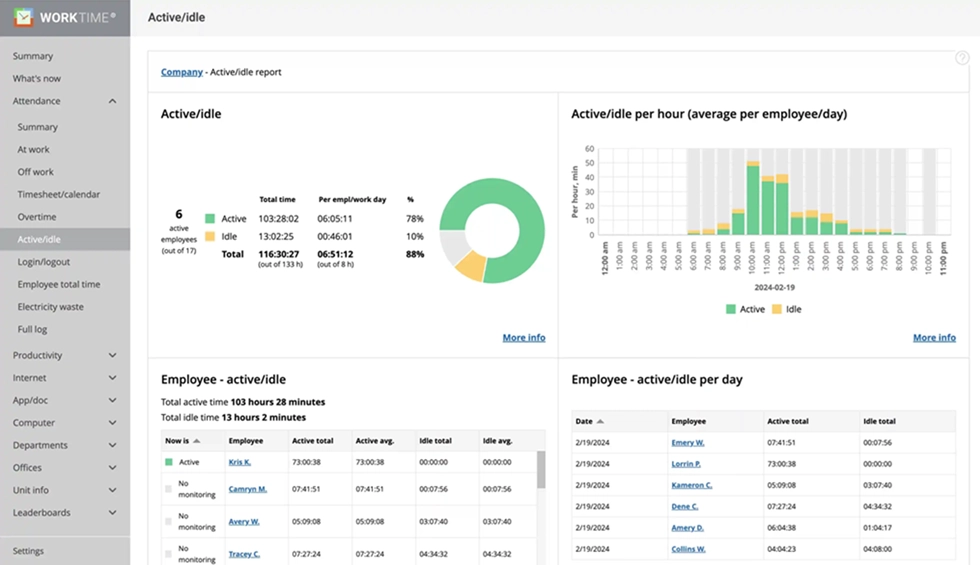

Analyze employee activity patterns with the active/idle report. Compare total and average active time to identify engagement levels across your team.
Start free trial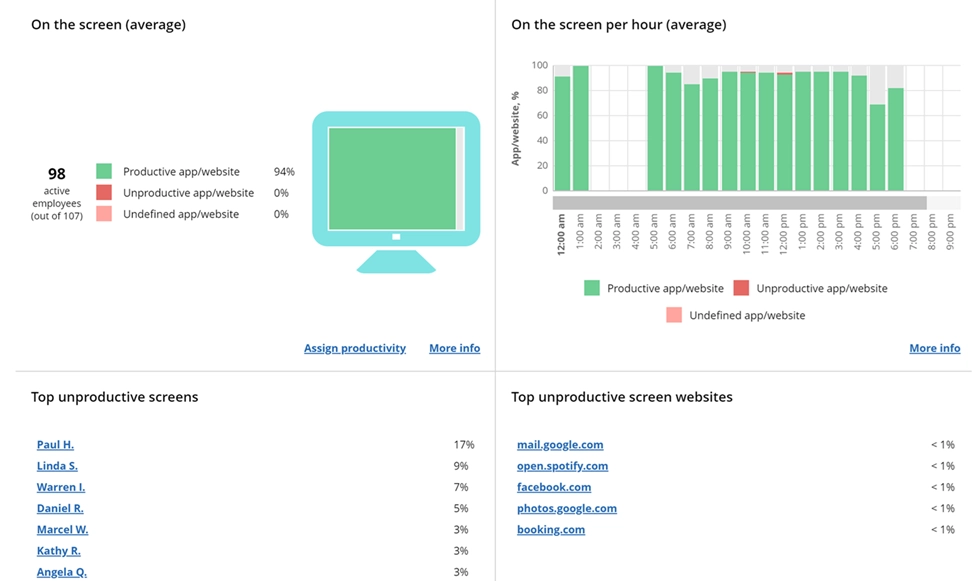
Evaluate screen productivity without screenshots or intrusive monitoring. The report shows a clear productivity % that supports transparent, privacy-friendly analysis.
Start free trial- Remote vs. in-office productivity comparison using IP-based location tracking to show how remote workers perform compared to in-office staff;
- Built-in HIPAA, GDPR, and GLBA compliance modes for regulated industries;
- On-premise and private cloud deployment for organizations that need to keep sensitive data on their own servers;
- Burnout signs tracking, overtime fraud detection, distraction scoring, leaderboards, and real-time alerts;
- Runs on Windows, macOS, and Terminal/Citrix environments, scaling from 1 to 15,000+ computers.


2. Time Doctor
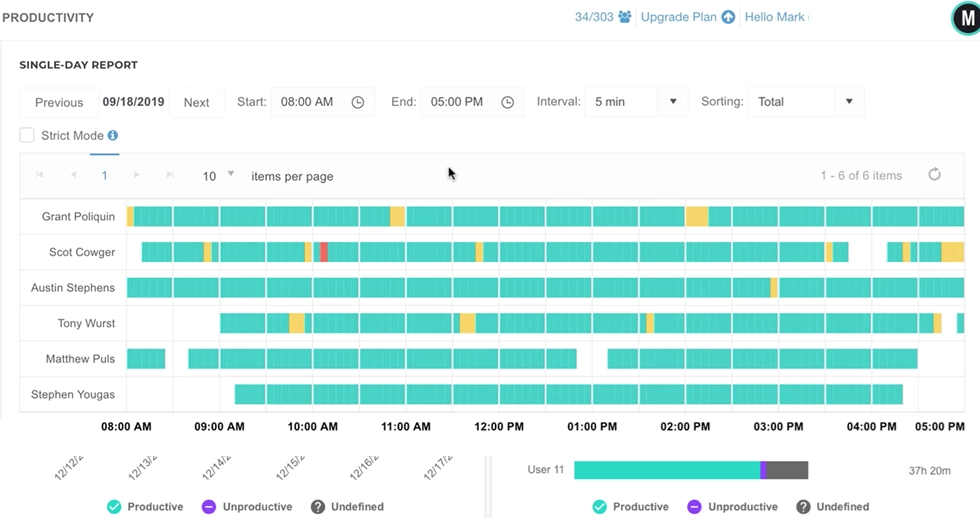
Best for: Distraction management with optional screenshots Time Doctor is a time tracking and productivity tool that bridges the gap between Hubstaff's heavy monitoring and fully non-invasive approaches. It automatically tracks employee time, categorizes web pages and apps as productive or unproductive, and provides wellness insights to help managers spot overworked team members. What's included:- Optional screenshots that employees can blur for privacy;
- Distraction alerts and productivity scoring by app and website category;
- Daily timesheet summaries, weekly productivity analytics, and team performance benchmarks;
- Integrations with Slack, Asana, Salesforce, and other project management tools;
- Works well for call centers and service-based businesses that need to track time spent against specific shifts and manage payroll.
3. ActivTrak
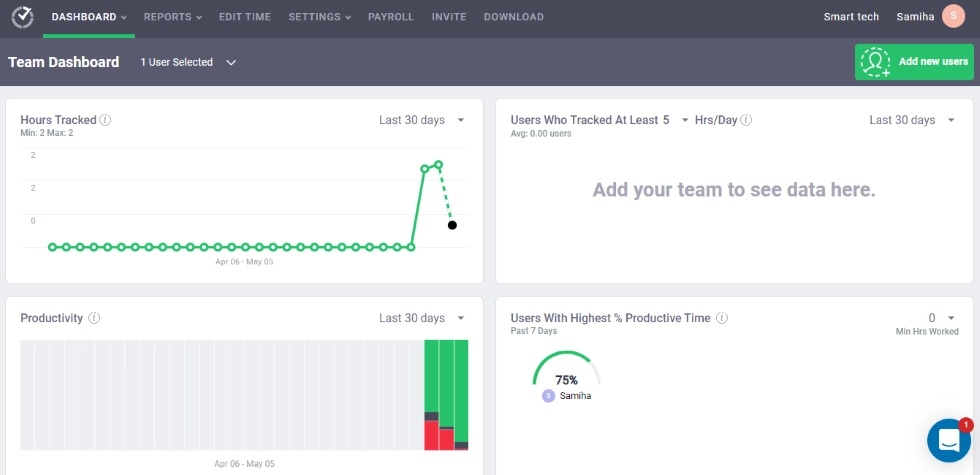
Best for: Workforce analytics and productivity insights ActivTrak positions itself as "workforce analytics" rather than traditional employee monitoring software. It tracks app usage, URL activity, and productive vs. unproductive time, then presents the time-tracking data through dashboards that help managers understand how employees spend their work hours. Key features:- Productivity reports, workload balance views, and benchmarking across teams;
- Coaching-focused approach to team productivity trends rather than surveillance;
- Integrations with project management tools and HR systems;
- Detailed comparison data on how employees spend time across tools and categories.
4. Toggl Track
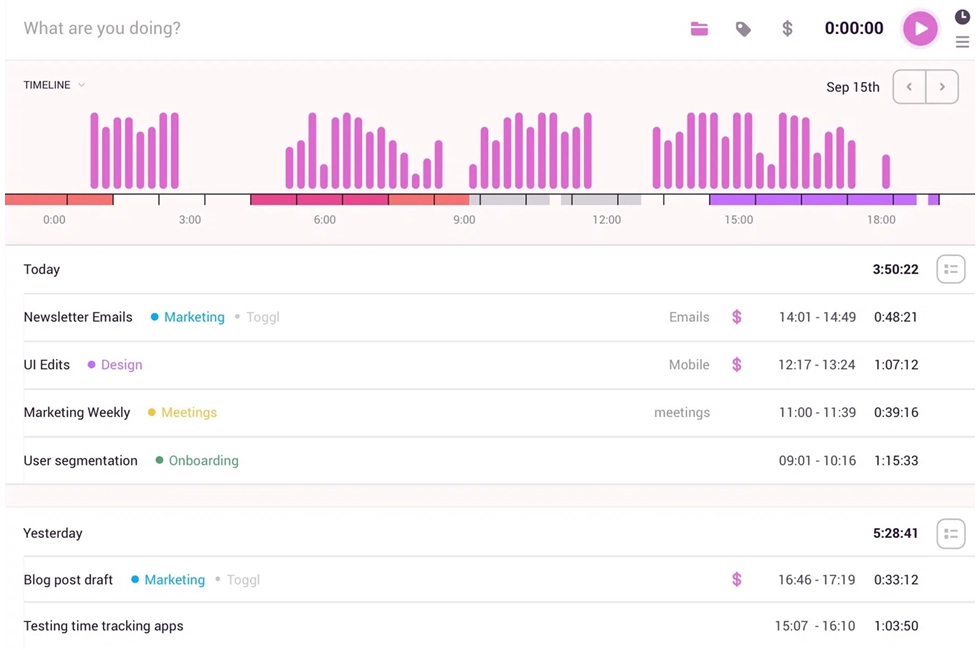
Best for: Simple time tracking without any employee monitoring Toggl Track is the Hubstaff alternative for teams that only need to track time, not monitor employees. There are no screenshots, no activity monitoring, no keystroke tracking, and no idle-time alerts. The time tracking tool is built for agencies and consulting teams that need to track billable hours against client projects. Highlights:- One-click timer, manual time entries, and calendar-based input;
- Integrations with over 100 tools, including Asana, Jira, and Slack;
- Filter time entries by user, team, client, project, and tasks;
- Generate reports for project budgeting, client invoicing, and budget management in just a few clicks;
- Advanced reporting and project budgeting on paid plans.
5. Clockify
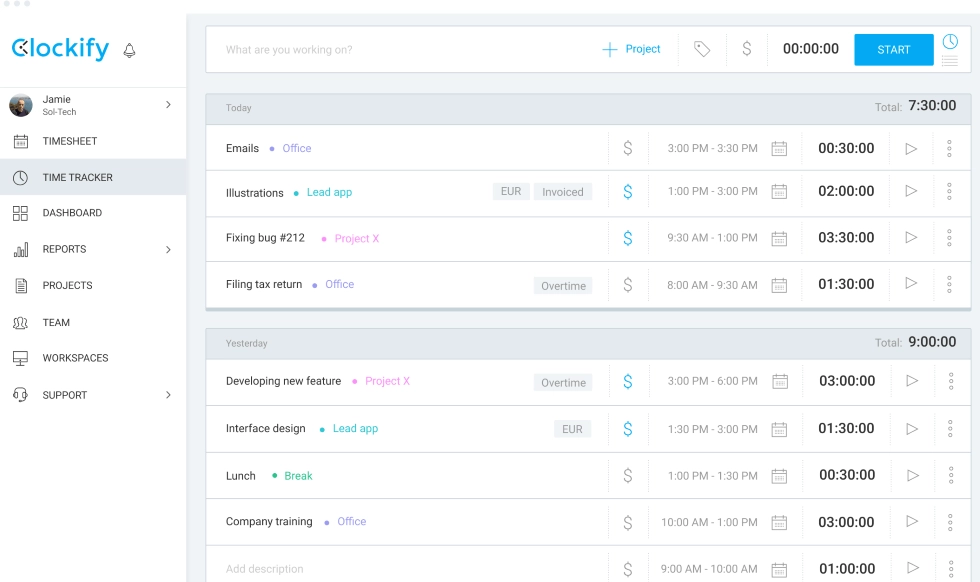
Best for: Free time tracker for budget-conscious teams Clockify is the most popular free Hubstaff alternative, offering unlimited users, unlimited projects, and basic time tracking at no cost. For teams that need just timesheets and basic time tracking, Clockify handles the job. Key features:- Track time using a timer, manual entry, or timesheet view across desktop, web, mobile app, and browser extension;
- GPS tracking, shift scheduling, expense tracking, and expense management on paid plans;
- Schedule management, time off tracking, and data export for payroll;
- User-friendly interface that makes it easy for teams to adopt.
6. Insightful
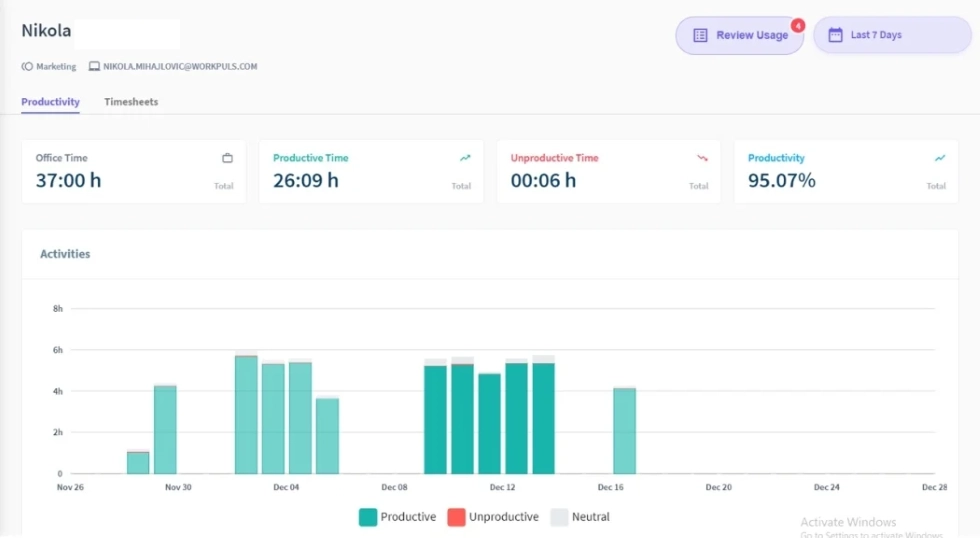
Best for: Workforce analytics with configurable privacy Insightful (formerly Workpuls) offers time tracking and productivity monitoring with a focus on workforce analytics. It tracks app usage, productive time, and engagement trends, then surfaces insights on team performance and workload balance. Key features:- Configurable screenshots with control over frequency and access;
- Employees can view their own time tracking data, which helps with adoption;
- Assign time entries to projects, track progress against goals, and generate detailed reports on how employees spend work hours;
- Supports both remote teams and in-office staff;
- User-friendly interface with more flexibility around privacy settings than Hubstaff.
7. DeskTime
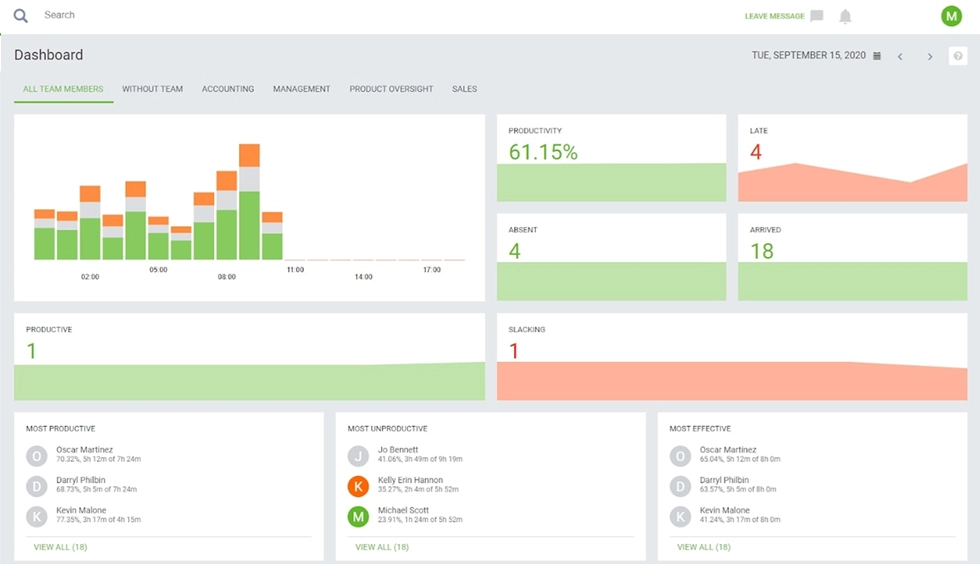
Best for: Automatic time tracking with private time features DeskTime automatically tracks time when employees start their computers, categorizes apps and websites as productive, unproductive, or neutral, and provides productivity analytics without requiring employees to start and stop timers. The time tracking runs in the background. What stands out:- "Private Time" feature that lets employees pause tracking for personal breaks without managers seeing what they're doing;
- Automatic app and website categorization for productivity scoring;
- Offline mode for tracking work that happens away from the computer;
- Optional screenshots available, but not required;
- Less invasive idle time monitoring than Hubstaff, reducing employee resistance.
Detailed comparison
Here is a detailed comparison of the key features, time tracking capabilities, and monitoring approach for each Hubstaff alternative.| Feature | WorkTime | Time Doctor | ActivTrak | Toggl Track | Clockify | Insightful | DeskTime |
|---|---|---|---|---|---|---|---|
|
Screenshots |
 |
Optional (blur) |
|
|
|
Configurable |
Optional |
|
Keystroke logging |
|
|
|
|
|
|
|
|
App/URL tracking |
 |
|
|
|
|
|
|
|
Idle time tracking |
|
|
|
|
|
|
|
|
GPS tracking |
|
|
|
|
Paid only |
|
|
|
HIPAA/GDPR modes |
|
|
|
|
|
|
|
|
On-premise option |
|
|
|
|
|
|
|
|
Remote vs. office comparison |
|
|
|
|
|
|
|
|
Burnout detection |
|
Wellness insights |
|
|
|
|
|
|
Free plan |
3 employees |
|
3 users |
5 users |
Unlimited |
|
14-day trial |
|
Starting price |
$6.99/user |
$8/user |
$10/user |
$10/user |
$6.99/user |
$10/user |
$7/user |
Why teams switch from Hubstaff
Hubstaff does basic time tracking well. But as teams grow and time-tracking needs become more complex, several pain points emerge that push managers toward Hubstaff alternatives.Pricing adds up fast
Hubstaff's Starter plan begins at $4.99/user/month (billed annually), but key features are locked behind add-ons:- “Insights” costs $2.50/user;
- “Screenshots” costs $2.50/user;
- “Tasks” costs $2.50/user;
- “Locations” costs $3.33/user.
Monitoring feels invasive
Hubstaff captures screenshots, tracks mouse and keyboard activity levels, monitors app usage and URL tracking, and logs idle time. A 2024 Cornell University study analyzed Reddit posts about tracking software, including Hubstaff, and found that workers reported privacy concerns severe enough to consider resignation. When employees spend more energy gaming the system than doing productive time on real work, the tool is working against you.Employee resistance is real
A Raconteur study found that 80% of workers already feel monitored to a moderate or high degree. Adding screenshot-based employee monitoring software on top of that creates friction. Research co-authored by Arizona State University's David Welsh, published in Harvard Business Review, found that excessive monitoring reduces employees' sense of personal responsibility, making them more likely to break rules rather than focus on work hours that matter.What to look for in a Hubstaff alternative
Before comparing specific Hubstaff alternatives, here's a decision framework based on the most common pain points that drive teams to switch.1. Monitoring approach
Does the time-tracking software capture screenshots and keystroke data, or does it measure employee productivity through app categorization and productivity scoring? Unlike Hubstaff, some alternatives track time and productivity without recording what's on the screen. This is the biggest differentiator in the time tracking software market.2. Total cost with features included
Compare all-inclusive pricing vs. base-plus-add-on models. A tool that costs $10/user and includes everything may be cheaper than a $5/user tool that requires $15 in add-ons to match the same key features.3. Employee acceptance
Will your team work with the tool or against it? Non-invasive time-tracking tools see higher adoption because employees don't feel surveilled during personal breaks or while handling sensitive data.
4. Compliance and deployment
Does the software offer compliance-safe modes for regulated industries? Can you deploy it on-premise or in a private cloud if your organization can't store employee data on third-party servers?5. Reporting depth
Basic tracking gives you time entries and work hours. Advanced features like productivity analytics, burnout detection, and remote vs. in-office comparison give you insights you can act on.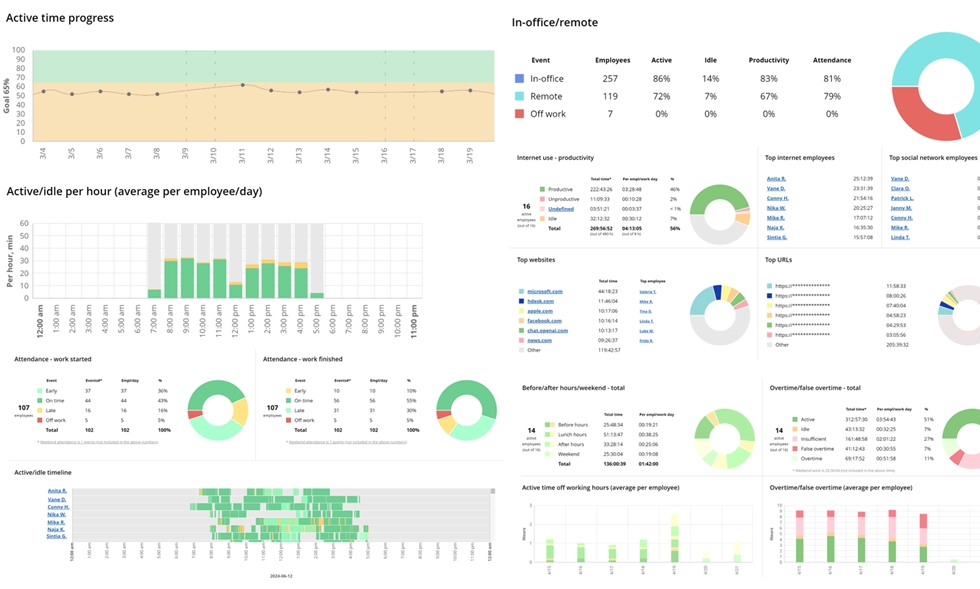

Explore 80+ WorkTime reports that help evaluate and improve employee performance. Clear metrics and visual dashboards deliver transparent, ready-to-use insights.
Start free trialSwitch to smarter monitoring
The best Hubstaff alternatives don't just replicate Hubstaff at a lower price. They offer a fundamentally better approach to employee monitoring, one that gives you the productivity data you need without the surveillance baggage that drives employees away. If you're ready to track employee productivity, attendance, and active time with a non-invasive approach, try WorkTime free for 14 days. All features, unlimited employees, no credit card required.