
In this article
This article is brought to you by WorkTime, a trusted software that emphasizes ethical, non-invasive monitoring to improve employee performance.
11 steps for getting monitoring right from the start
A recent study shows a clear pattern: workplace surveillance lowers job satisfaction. More than half of the respondents report that their managers aren’t fully transparent about how monitoring works. These stats clearly show that surveillance-driven monitoring is no longer effective. It just creates resentment and damages trust.A non-invasive, transparent approach to monitoring is what earns employee trust.Transparency and ethical employee monitoring, on the other hand, can do wonders. A transparent, ethical approach does the opposite. When companies use non-invasive, privacy-first tools and clearly explain what is being monitored, employees are more engaged and supportive. Here’s how to implement monitoring in a way that builds trust from day one.
1. Start with transparency
For employee monitoring to work, your employees need to trust the process. And trust comes with transparency. That’s why it’s important to communicate openly about why you’re introducing monitoring and exactly how employees will be monitored.- Make it clear that monitoring isn’t about surveillance or micromanagement, but to track productivity, balance workloads, and improve overall visibility.
- Reassure your team that invasive methods like constant screenshots, keystroke logging, or capturing private content are not used.
WorkTime - employee-friendly,
ethical monitoring


2. Involve employees early
Introducing monitoring is a huge organizational change that directly impacts employees. But how do you introduce monitoring in a way that earns employee support from the beginning? Involving them in the decision-making process from the very beginning can make things a lot easier. When employees feel involved, their trust in the organization increases, and they are more likely to support and accept the change. Instead of suddenly announcing that monitoring has been introduced, ask team leads and employees to share their input before rollout. Explain why you’re implementing monitoring and encourage employees to share their concerns or expectations. A good way to do this is to run short sessions where employees can ask questions anonymously.When monitoring isn’t a mystery, it no longer feels intimidating or suspicious.Employees usually worry about privacy, micromanagement, and fairness when they hear about monitoring. Address these concerns properly and reassure them that you’re committed to transparent monitoring. Another great way to make employees comfortable is to walk them through the monitoring system before it goes live. Give them a demo of the system to preview the interface so they can see how it works in practice. Try WorkTime for 14 days free and let your employees explore it! So they can see that monitoring is non-invasive and focused on productivity, not surveillance.
3. Use privacy-first monitoring software
Privacy is the biggest concern employees have about monitoring. Things like constant screenshots and keystroke logging damage trust and create unnecessary pressure on employees. When the tool protects privacy, employees feel far more comfortable with the process. With WorkTime, you can easily implement non-invasive, employee-friendly monitoring.- It takes a privacy-first approach and avoids screenshots entirely;
- WorkTime doesn’t record any content, video, or sound;
- It only tracks necessary key performance indicators (KPIs) like attendance, active time, and productive time, without collecting personal data or violating employee privacy.
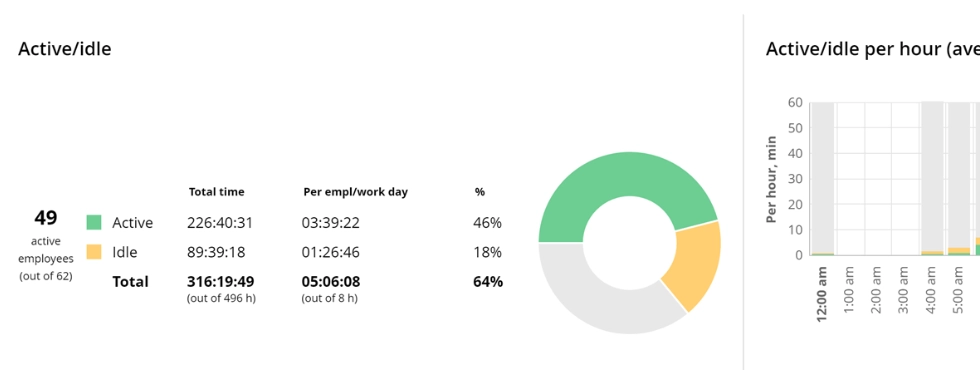

Know exactly where your team stands. This report highlights productivity, active vs. idle time, and attendance patterns - helping you catch absenteeism early.
Start free trial4. Define the “why” in positive terms
How you frame monitoring directly impacts how employees perceive it. Position it as an employee-friendly tool that will help identify overwork, improve process efficiency, reduce burnout, provide fair performance evaluation, and support hybrid teams. The way you talk about monitoring matters. So keep the message positive and avoid terms that imply control or discipline. WorkTime green monitoring approach will be really helpful. Employees will perceive monitoring as a way to improve productivity and workflows, not as surveillance.
5. Set clear boundaries
Employees feel more comfortable with monitoring when the boundaries are clearly defined. You should ensure that it covers work time only, and there is no monitoring outside working hours. Tracking personal devices should never be part of the process. Regular audits are also important to confirm that monitoring configurations respect these limits. A good way to show employees that these boundaries are in place is to provide them with a monitoring boundaries checklist. This transparency shows that the company values employee-friendly monitoring. WorkTime is built to respect these boundaries by design. Our software is designed for non-invasive performance monitoring. It doesn’t track personal data or personal activities of employees. Your team can review our main features to understand how monitoring stays ethical and transparent. This builds trust by showing employees that their personal data remains completely untouched.6. Roll out monitoring in stages
Monitoring is a sensitive topic, and it’s important to introduce it gradually. Make sure the system works smoothly before launching it company-wide. With WorkTime non-invasive design, you can roll out tracking in phases while maintaining trust and productivity. A small pilot group, like HR and one participating team, is a good place to begin. Collect detailed feedback about technical issues, concerns, and suggestions. What you do with this feedback matters. For example, adjust tracking categories or other settings based on what you learn. Once the pilot group is comfortable and confident with the system, expand the rollout to additional departments.7. Give employees access to their own data
Your policy already states that personal activity is never captured. So how can you make transparency even more meaningful? Let employees access their own dashboard so they can see exactly what’s being tracked.Transparency grows when employees can see and understand their own monitoring data.Walk them through the reports and provide simple instructions for accessing their data. This level of clarity reduces uncertainty and builds trust. Besides, it shows that employee monitoring data is there to help them improve, not to punish or micromanage them.
8. Train managers
No monitoring tool can succeed without managers who understand how to apply it correctly. That’s why it’s essential to train them to use monitoring ethically and in ways that boost productivity. What steps make monitoring supportive rather than intrusive?- Fully understand that monitoring is not about micromanagement, constant checking, or surprise confrontations;
- Show employees that monitoring insights are used for improving workflows, reducing overload, and recognizing high performers.
- Present the data in a way that motivates - not pressures - the team.
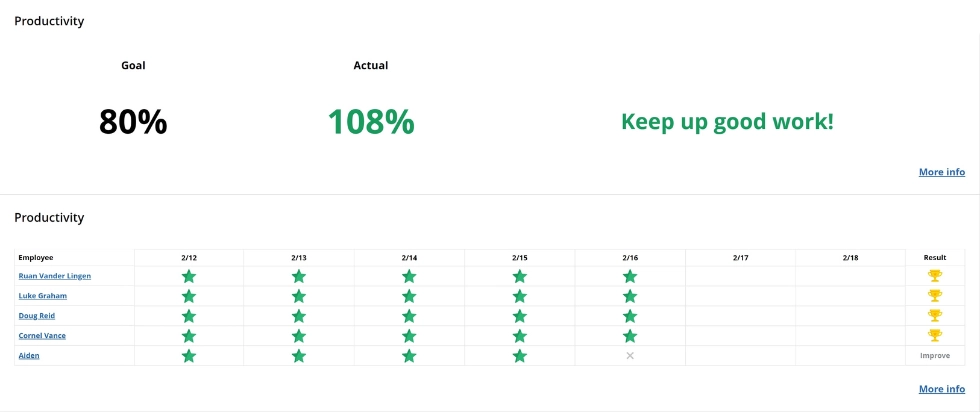

Motivate your team with WorkTime leaderboards! You can add leaderboards to the newsletter or keep this report on the wall to inform employees about goals, achievements, and areas for improvement.
Start free trial9. Emphasize that monitoring isn’t used for discipline
Monitoring stops being employee-friendly when it’s used to control or discipline. Employees should feel confident that the goal is better workflows and productivity. It’s important to remember that monitoring highlights patterns, not isolated moments. Even the best performer has occasional productivity days. And that’s normal. A single slow afternoon doesn't necessarily need to be pointed out. You should focus on persistent patterns, and these should be discussed respectfully rather than in a confrontational manner. Focus on consistent patterns, and discuss them calmly and constructively. Such performance trends often signal overload, technical barriers, or gaps in training. Make identifying such patterns easy with WorkTime scheduled reports. You can automate weekly, monthly, or annual reports, delivered on a schedule you set.10. Communicate success stories
You’ve introduced ethical monitoring, and the benefits are already visible. The question is: how do you keep employees confident in the process? Share concrete examples, such as a 15% drop in after-hours overtime or a team discovering workload imbalances and resolving them. You can reinforce the message by sharing monthly or quarterly performance snapshots. WorkTime provides weekly and monthly reports with clear data on active time, idle time, attendance, and productivity.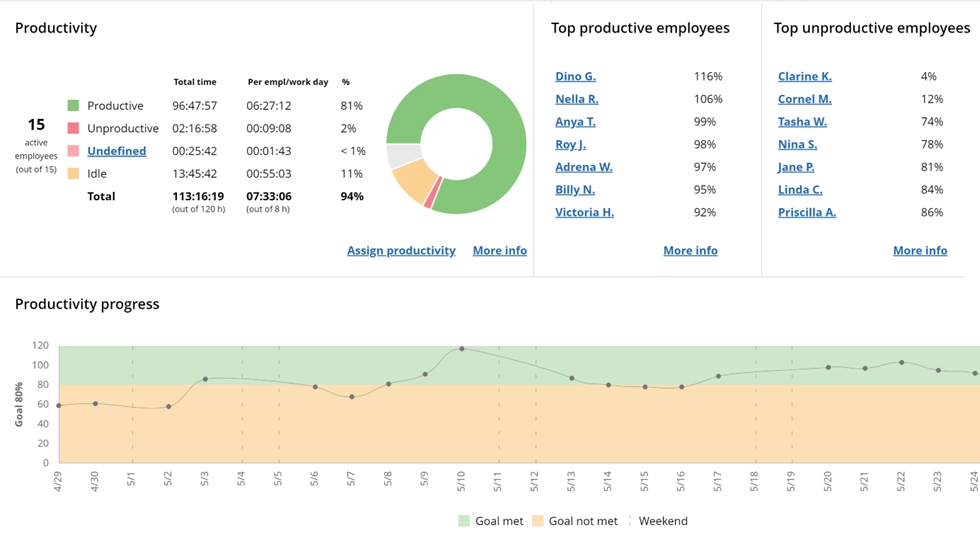

Use this report to find out whether your employee is productive during the workday based on computer usage analysis. WorkTime evaluates the productivity of each app, website, and doc
Start free trial11. Maintain ongoing dialogue
A monitoring system only works long-term if it’s continuously reviewed and refined. Conduct Regular surveys, every 3 to 6 months, to help understand how employees feel and identify any performance issues. An anonymous feedback channel also helps your team share honest feedback. And when employees share feedback, treat it seriously. Let employee feedback guide updates to your workflows. If employees see certain metrics as unfair or stressful, adjust them accordingly.Implement monitoring seamlessly with WorkTime
Monitoring by itself doesn’t boost productivity. It only works when applied ethically and when insights are used constructively. WorkTime non-invasive tracking approach reassures employees that their personal activity remains private. Our privacy-first software focuses on productivity without screenshots, keylogging, or any invasive methods. We turn clear, actionable insights into real workplace improvements.Try WorkTime now!