


TL;DR
- Teramind is a security-first monitoring and DLP platform, strongest for insider-threat detection and data loss prevention, not basic time tracking or attendance.
- The real cost starts well above the $15 door price. Keystroke logging and risk scoring begin at the UAM tier at $30 per seat per month, and every plan carries a five-seat minimum.
- Ratings are sharply split. Teramind holds a 4.7 out of 5 on Gartner across 89 reviews but a 2.5 out of 5 on Trustpilot across 7 reviews. Enterprise buyers rate the depth; some users flag support and onboarding.
- The most cited drawbacks are the learning curve and the invasive design. Teramind records screens, keystrokes, and email, which can lower employee trust when used for micromanagement.
- Teams that want productivity visibility without screenshots, keystroke content, or video should weigh a non-invasive alternative such as WorkTime, which starts at $6.99 per employee and has no seat minimum.
In this article
The article is presented by WorkTime, helping organizations understand employee performance through transparent, privacy-conscious monitoring.
What is Teramind?
Teramind is an employee monitoring and data loss prevention (DLP) software that records user activity, including screen video, keystrokes, and application use, in real time. It is available as a cloud-hosted service or an on-premises deployment. Its focus is security, not time tracking. Teramind is built around insider-threat detection, user and entity behavior analytics (UEBA), and DLP tools like optical character recognition (OCR) and content fingerprinting that flag unauthorized data transfers. It competes in the heavy end of the monitoring market, where the goal is catching data leaks and policy violations, not just measuring productive hours.What Teramind monitors
Teramind captures a wide range of user activity, from screen recording and keystroke logging to email, file transfers, and OCR-based content detection. This breadth is its main selling point and the root of the "invasive" label that follows it.| Capability | What it captures | Availability |
|---|---|---|
|
Screen and video recording |
Real-time video of on-screen activity, replayable |
Core, all plans |
|
Keystroke logging |
Records everything a user types |
Starts at UAM tier |
|
Website and app monitoring |
Sites visited and applications used, with time spent |
Core |
|
Email and IM monitoring |
Message content across email and messaging apps |
UAM tier and up |
|
File transfer and USB monitoring |
Files moved, copied, or sent to external drives |
UAM tier and up |
|
DLP and content fingerprinting |
Detects and flags unauthorized data transfers |
DLP tier; OCR engine on Enterprise |
|
Insider threat and anomaly detection |
Dynamic risk scoring and behavior alerts |
UAM tier and up |
|
Stealth or revealed agent mode |
Runs hidden or visible to the employee |
All plans |
Teramind deployment and requirements
Teramind runs in the cloud with a 7-day free trial, or on-premises with a 14-day free trial, and its agent can operate in stealth (hidden) or revealed (visible) mode. It is designed for desktops and servers only. The support gaps matter before you buy. Teramind cannot monitor Linux, and certain advanced features and video-playback functions are limited or missing on macOS and mobile devices. There is no cell-phone monitoring agent. For a mixed-OS or heavily remote-mobile workforce, those limits can rule it out early.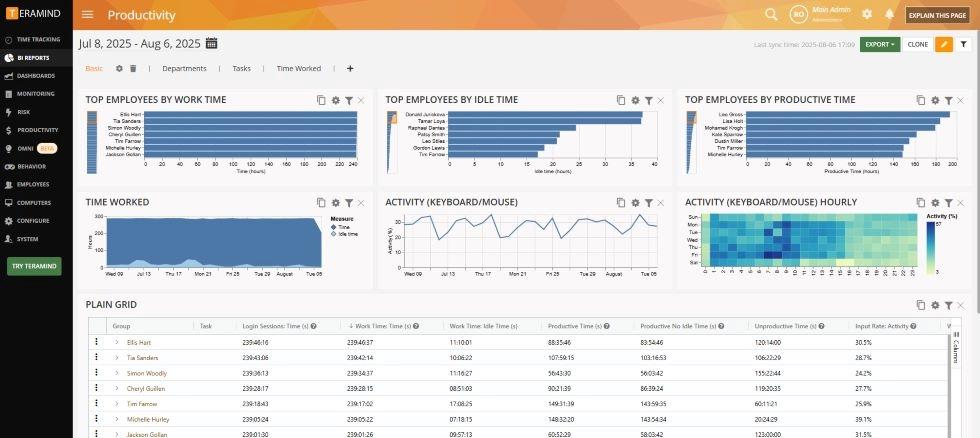
Teramind pricing in 2026
Teramind starts at $15 per seat per month, but the monitoring and DLP features it is known for begin at $30 to $35 per seat, and every plan has a five-seat minimum. Pricing below is as of September 2026, drawn from Business.com's current review.| Plan | Monthly (per seat) |
Annual (per seat) |
What it adds |
|---|---|---|---|
|
Starter |
$15 |
$14 |
Live view, basic activity monitoring |
|
UAM |
$30 |
$28 |
Keystroke logging, email and file monitoring, risk scoring, anomaly detection |
|
DLP |
$35 |
$32 |
Full DLP tools, HIPAA- and GDPR-compliant rule templates |
|
Enterprise |
Custom quote |
Custom quote |
OCR engine, unlimited behavior rules, premium support, and SLA |
Teramind pros and cons
Teramind's strength is depth. Its weaknesses are complexity, cost, and how invasive it feels to the people being monitored. Pros:- Deep visibility across screen video, keystrokes, and application use in real time.
- Advanced data loss prevention with OCR and content fingerprinting to catch unauthorized data transfers.
- Flexible deployment across cloud-hosted and on-premises options.
- Strong enterprise ratings for feature depth on Gartner.
- Steep learning curve. Configuration is complex and generally needs a tech-savvy manager or dedicated IT staff.
- Limited Mac and mobile support, plus no Linux and no cell-phone monitoring.
- Invasive by design. Recording video, keystrokes, and email can lower employee trust when used for micromanagement rather than genuine security.
- Expensive for basic needs. The advanced plans cost considerably more than lightweight monitoring tools, per Business.com's assessment.
- Five-seat minimum blocks very small teams.
Teramind ratings: what real users say
Teramind's ratings split sharply by platform. It holds a 4.7 out of 5 on Gartner across 89 reviews, while sitting at 2.5 out of 5 on Trustpilot across 7 reviews. Understanding that gap is the key to reading Teramind honestly.| Platform | Rating | Reviews | As of |
|---|---|---|---|
|
Gartner |
4.7 / 5 |
89 |
Sept 2026 |
|
Trustpilot |
2.5 / 5 |
7 |
Sept 2026 |
|
Business.com (editorial) |
9.3 / 10 |
Editorial |
Sept 2026 |
Who Teramind is for (and who should look elsewhere)
Teramind is the right pick for security and compliance teams that need deep DLP and insider-threat detection and have the IT resources to configure it. It is overkill for teams that mainly want productivity, attendance, and remote-work visibility. Teramind fits if you:- Run security or compliance operations where data loss and insider risk are the priority.
- Have dedicated IT staff to handle a complex setup.
- Need forensic detail like session video and content-level DLP.
- Want productivity and time visibility, not full activity recording. Forbes Advisor specifically does not recommend Teramind for light productivity monitoring.
- Run a small team that the five-seat minimum prices out.
- Care about employee trust and want to avoid the friction that comes when monitoring becomes too invasive.
- Operate in a regulated field where screenshots or keystroke content of sensitive records create their own liability.
A non-invasive alternative to Teramind
If you want productivity and remote-work visibility without recording screens, keystroke content, or email, WorkTime is a non-invasive alternative to Teramind. We track productivity scores, active and idle time, attendance, and app usage without capturing personal data.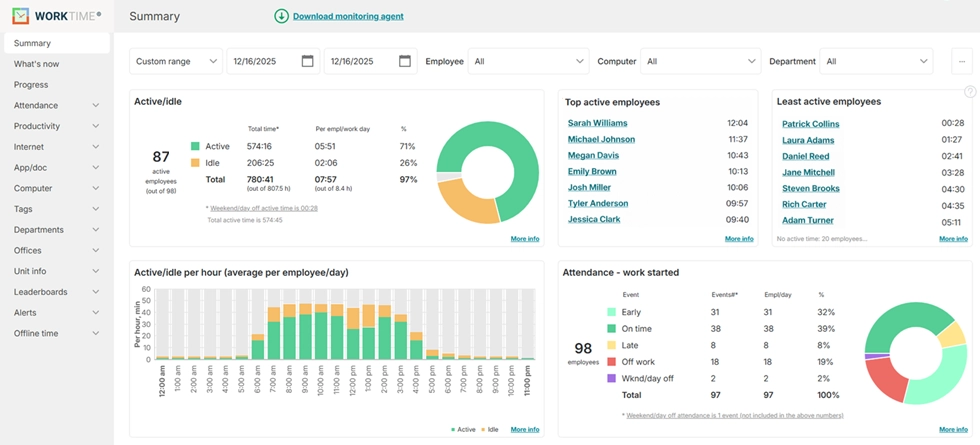
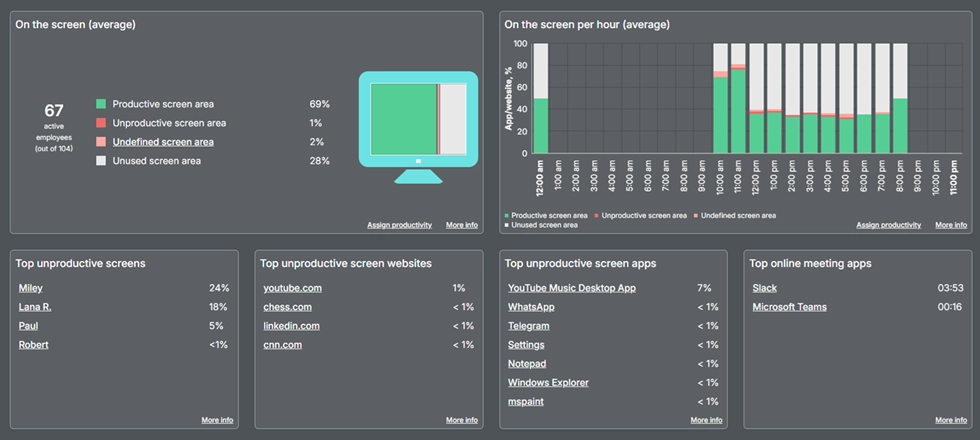

Turn screen activity into clear productivity insights - without intrusive tracking. WorkTime categorizes apps, websites, and documents and shows their productivity impact in real time.
Start free trialHigher performance in just 1 week!
Excellent boost!
Industry
Insurance
Employees
5,000
This U.S. insurance company achieved a 40% boost in attendance and performance after implementing WorkTime - with consistently high results for over five years.
Read more
The bottom line
Teramind is a strong, deep, security-focused monitoring platform that earns its high enterprise ratings. If your priority is data loss prevention and insider threat detection, and you have IT staff to run it, few tools match its depth. The trade-offs are real: a steep learning curve, a cost that climbs quickly past the entry price, and an invasive design that can strain employee trust. For the many teams that simply want to understand and improve productivity, that depth is more than they need. WorkTime is non-invasive employee monitoring software that has helped regulated and remote teams measure productivity since 1998, using productivity scores and active-time data instead of screenshots, video, or keystroke content. Real visibility does not have to feel invasive to employees. WorkTime provides detailed productivity and performance analytics without screenshots or invasive content monitoring. Start a free 14-day trial with no credit card required.