
TL;DR
- Hubstaff vs. Time Doctor comes down to management style. Hubstaff leans toward workforce management with project budgets, payroll, and GPS tracking for field teams. Time Doctor leans toward activity monitoring with distraction alerts, productivity ratings, and detailed reports on web and app usage.
- Both tools use invasive monitoring. Hubstaff captures up to 3 screenshots per 10 minutes. Time Doctor captures screenshots every 10 minutes, with idle-time detection and URL tracking.
- Hidden costs add up fast. Hubstaff's add-ons can push the real cost to 2-3x the base price. Time Doctor locks integrations and payroll management behind higher tiers.
- WorkTime is the non-invasive alternative. It tracks employee productivity through active/idle time, productivity ratings, attendance, and app usage without screenshots or screen recordings.
In this article
The article is presented by WorkTime - a non-invasive employee monitoring solution with 25+ years of expertise, delivering in-depth productivity analytics through a privacy-safe approach.This Hubstaff and Time Doctor time-tracking comparison breaks down the key features, pricing plans, and trade-offs of each tool.
Quick comparison: Time Doctor vs. Hubstaff vs. WorkTime
| Feature | Time Doctor | Hubstaff | WorkTime |
|---|---|---|---|
|
Screenshots |
Every 10 min (default on) |
Up to 3/10 min (optional) |
None |
|
GPS tracking |
Basic |
Full (geofencing, routes) |
IP-based only |
|
Project management |
Light (integrations) |
Built-in (budgets, billing) |
Not included |
|
Free plan |
 |
1 user |
Up to 3 employees |
|
Starting price |
$8/user/mo |
$7/seat/mo |
$6.99/employee/mo |
|
HIPAA compliance |
Enterprise only |
Enterprise only ($25/user) |
Enterprise plan (built-in) |
|
Video screen recording |
Premium plan |
|
|
|
Distraction alerts |
 |
|
|
|
Remote vs. in-office comparison |
|
|
Yes (IP-based) |
|
Deployment |
Cloud only |
Cloud only |
Cloud + on-premise |
Time Doctor vs. Hubstaff: feature comparison
Both Time Doctor and Hubstaff offer time tracking, activity monitoring, and productivity monitoring tools for distributed workforces. Here is how Time Doctor and Hubstaff compare across the features that matter most.Time tracking
Time Doctor vs. Hubstaff both support automatic time tracking, manual time entry, and timer-based tracking through mobile and desktop apps. Key differences:- Hubstaff adds a Chrome extension, timesheet approvals, daily/weekly limits, and project budgets
- Time Doctor focuses on detailed insights into how teams use their work hours, with automated time tracking through a silent app or manual start
- WorkTime uses automated time tracking to capture active/idle periods without requiring employees to start or stop timers. No screenshots or screen recording.
Activity monitoring and employee monitoring features
This is where Time Doctor vs. Hubstaff diverges most. Time Doctor includes:- Screenshots captured every 10 minutes
- Web and application tracking and URL tracking
- Inactivity alerts and distraction pop-ups for non-work websites
- Screen recording (premium plan).
Hubstaff includes:
- Optional screenshots (up to 3 per 10 min, blurrable)
- App tracking and URL tracking
- Keyboard and mouse activity measurement
- Inactivity timeouts (no distraction pop-ups).
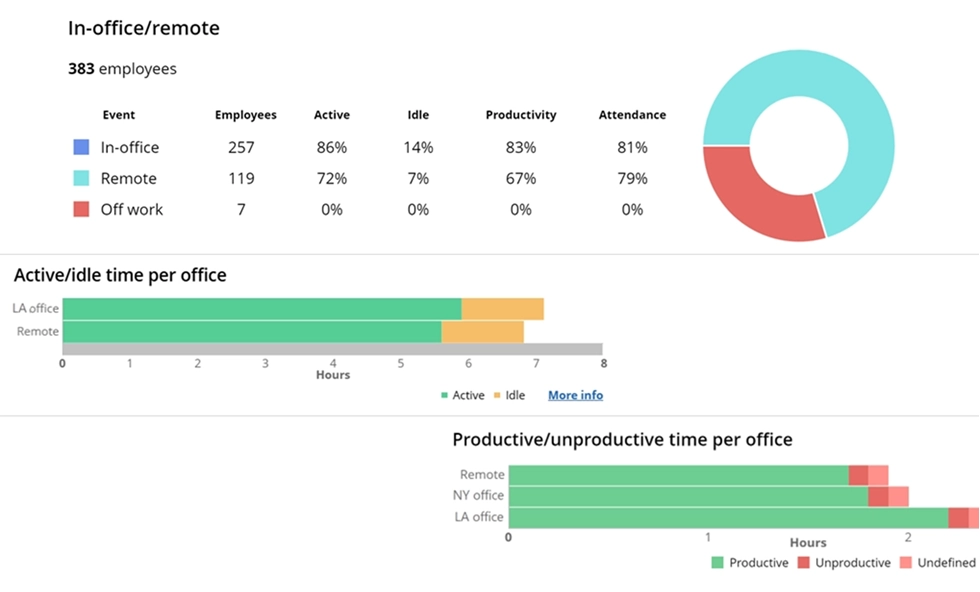

Compare productivity across work locations. See performance levels and the top apps used in the office, remotely, or in a hybrid setup.
Start free trialGPS and location tracking
- Hubstaff: Full GPS tracking with geofencing, route tracking, and location-based time tracking. Clear winner for field teams.
- Time Doctor: Basic location tracking through its mobile app. No geofencing or route tracking.
- WorkTime: IP-based location tracking for remote vs. in-office productivity comparison. Not a GPS tool for field teams.
Project management and task management
- Hubstaff: Built-in project management features (though the breadth means a steeper learning curve): project budgets, task management, client billing, client login access, scheduling, and timesheet approvals. Integrates with project management software like Asana, Jira, Trello, and Basecamp. Also connects with accounting tools for invoicing. Functions as both a project management tool and a workforce management tool.
- Time Doctor: Lighter on project management. Supports task assignment and time spent tracking. Relies on project management integrations with Asana, Basecamp, monday.com, and Wrike for detailed task management.
- WorkTime: As employee monitoring software, it focuses on productivity monitoring, attendance, and in-depth workforce analytics. Pairs well with dedicated project tools.


Reporting
- Time Doctor: Detailed reports on application usage, web and app usage, time spent on tasks, productivity ratings, and employee productivity trends. Benchmarks AI (add-on or top tier) compares team performance against 250,000+ anonymous users. Advanced analytics available.
- Hubstaff: Productivity reports, time and activity reports, project budget tracking, and client billing reports. The Insights add-on provides deeper analysis, including utilization rates and focus time.
- WorkTime: 80+ reports, including productivity scores per employee, department, and team. Tracks distraction scores, burnout signs, and time management patterns. Scheduled delivery available. Reports can be used to track time trends across departments, measure productivity by location, and identify periods of low productivity. All based on productivity metrics, not screenshots.
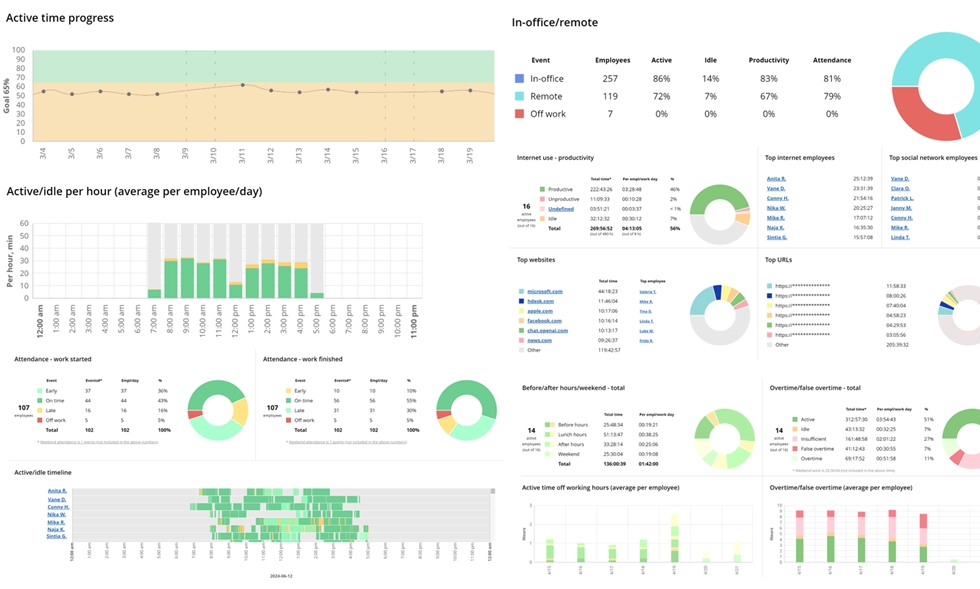
From activity to insight - explore 80+ reports that reveal performance clearly and safely, with zero personal data collection.
Start free trialHubstaff & Time Doctor pricing comparison
Pricing is where both tools get complicated. The base plan prices look affordable until you add the features most teams actually need.Time Doctor pricing plans
| Plan | Annual price | Monthly price | Key features |
|---|---|---|---|
|
Basic plan |
$6.70/user/mo |
$8/user/mo |
Time tracking, screenshots, basic reports |
|
Standard |
$11.70/user/mo |
$14/user/mo |
Integrations, payroll, attendance tracking, advanced reports |
|
Premium plan |
$16.70/user/mo |
$20/user/mo |
Video screen recording, advanced analytics, all features |
Hubstaff pricing plans
| Plan | Annual price | Monthly price | Key features |
|---|---|---|---|
|
Starter |
$4.99/seat/mo |
$7/seat/mo |
Basic time tracking, 500 screenshots/mo, no integrations |
|
Grow |
$7.50/seat/mo |
$9/seat/mo |
1 integration, project budgets, inactivity alerts |
|
Team |
$10/seat/mo |
$12/seat/mo |
Unlimited screenshots, payroll, scheduling |
|
Enterprise |
$25/seat/mo |
Annual only |
HIPAA, SOC 2, SSO, advanced analytics |
WorkTime pricing
WorkTime pricing is straightforward: $6.99/employee/month on Basic, $8.99 on Premium, and $10.99 on Enterprise. Teams of 3 or fewer can use the free tier. A 14-day free trial includes all features with unlimited employees and no credit card required. No hidden add-ons or feature gates between time tracking tiers. Visit worktime.com/pricing for current plans.The real cost for 50 users
| Tool | Plan needed | Monthly cost (annual billing) |
|---|---|---|
|
Time Doctor |
Standard |
$585/mo |
|
Hubstaff |
Team |
$500/mo |
|
Hubstaff + GPS |
Team + locations |
$700/mo |
|
WorkTime |
Premium |
$449.50/mo |
The privacy problem both tools share
Most Time Doctor and Hubstaff comparisons skip this: both tools capture screenshots of employee screens and store them in the cloud. These images may contain sensitive data like customer information, personal messages, or protected health information. For regulated industries like healthcare, finance, or government, this creates compliance risk. A single screenshot could contain customer account numbers or patient records. Hubstaff offers HIPAA compliance only on its Enterprise plan at $25/user/month. Time Doctor offers HIPAA at its Enterprise tier with custom pricing. A Cornell University study found persistent employee distrust of screenshot-based monitoring. Products like mouse jigglers exist specifically to bypass these tools. When employees spend energy appearing productive instead of being productive, productivity tools become counterproductive. This is especially common with remote teams, where the trust gap between managers and remote employees is already a challenge.WorkTime's solution
WorkTime was built from the ground up as non-invasive employee monitoring software. It does not take screenshots, log keystrokes, read emails or chats, or record screens. For every invasive monitoring function, WorkTime provides a safe, productivity-based replacement. This makes it the only time-tracking and monitoring tool in this comparison that works in HIPAA-, GDPR-, and GLBA-regulated environments at standard pricing and includes built-in compliance modes.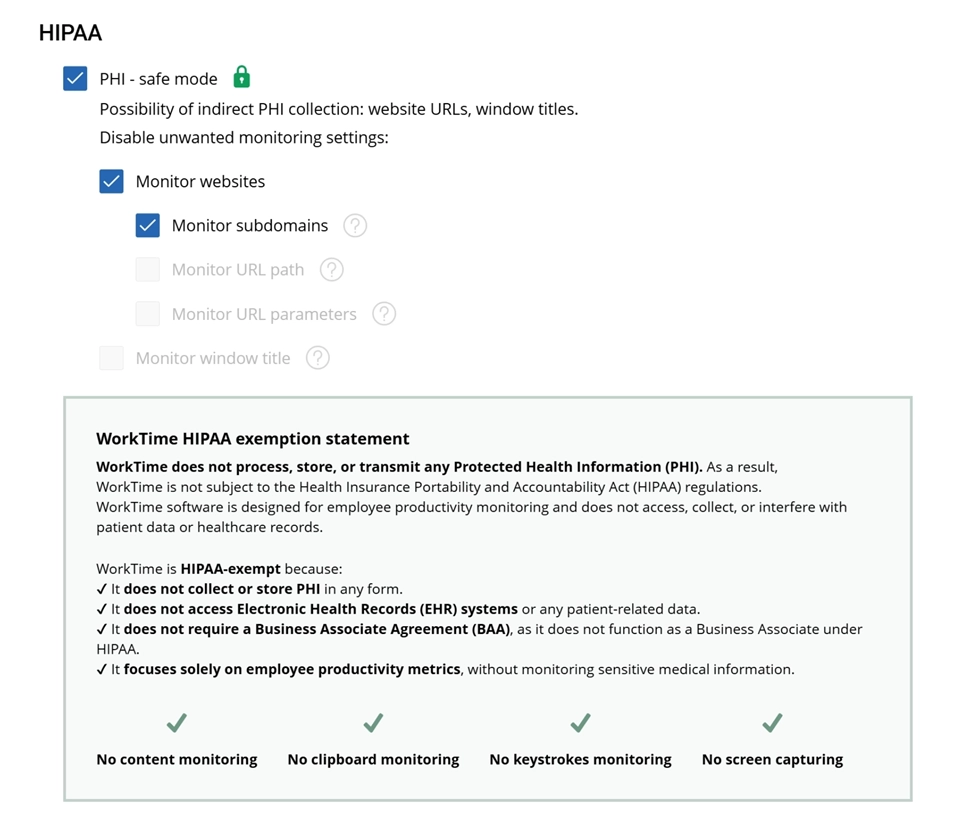

Even as a HIPAA-exempt solution, WorkTime provides a HIPAA-safe mode to remove any possibility of indirect data collection.
Start free trialWho should choose which tool?
Choose Time Doctor if:
- You manage BPO teams, call centers, or agencies where proof of work matters
- You want distraction alerts and activity monitoring to keep remote employees on task
- You are comfortable with screenshot-based monitoring approaches
- Your team uses the desktop app heavily, and you need automatic time tracking with inactivity alerts.
Choose Hubstaff if:
- You manage field teams that need GPS tracking and location tracking
- You want built-in project management, project budgets, and client billing
- You need a workforce management tool with scheduling, payroll, and task management
- You prefer optional screenshots with the ability to blur or disable
- You run an agency that needs client login access and tracked hours for billing.
Choose WorkTime if:
- You need to measure employee productivity without capturing screenshots or keystroke content
- You operate in a regulated industry (healthcare, finance, government, law)
- You need in-depth performance analytics
- You want to compare remote vs. in-office productivity across your remote and hybrid teams
- You need attendance, overtime monitoring, and burnout detection
- Employee privacy matters to your organization, and trust is a priority
- You want the lightest system resource footprint among employee monitoring tools.
Final thoughts
The Time Doctor and Hubstaff debate gets most of the attention, but it is the wrong framing for many teams. Both tools are built around a surveillance model with aggressive activity tracking: screenshots, keystroke and mouse activity tracking, URL tracking, and idle time detection. That model works for BPO operations, freelancer billing, and field teams that need GPS tracking. But for organizations that want to enhance productivity, track time management patterns, and measure employee productivity without capturing personal screen content, there is a third option. WorkTime has provided non-invasive employee monitoring for 28 years, serving 9,500+ organizations across healthcare, finance, government, and more. It tracks everything that matters for team productivity, from active time and attendance to productivity scores and burnout signs, without ever taking a screenshot. Try WorkTime's 14-day free trial to see the difference non-invasive monitoring makes.