
TL;DR
- Non-invasive monitoring reduces agent attrition. Research shows 63% of employees would consider leaving a company that uses invasive tracking software. For call centers already fighting high turnover, the monitoring method itself is a retention variable.
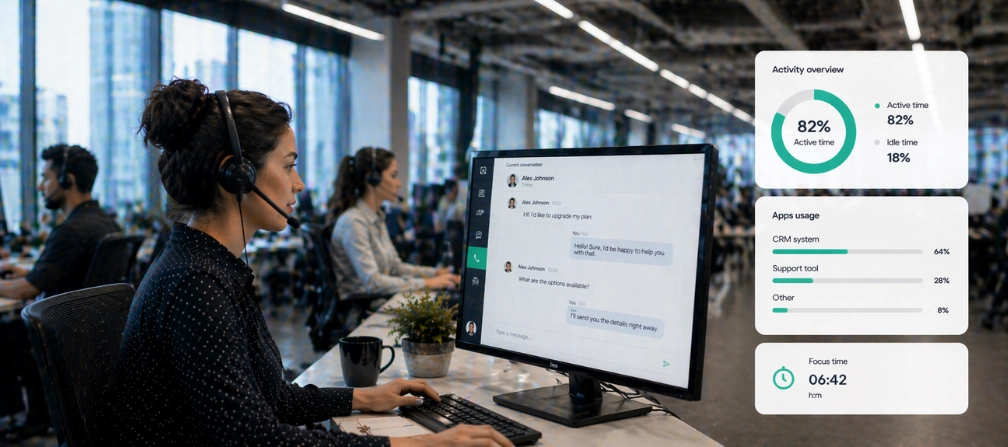
- Call center quality monitoring goes beyond call recording. The best tools combine productivity monitoring with application and website usage tracking, attendance data, and burnout detection to give supervisors a complete view of agent performance.
- Compliance shapes your shortlist. Healthcare operations need HIPAA-safe monitoring. Financial services teams require GLBA compliance. If your platform captures screenshots or keystroke content, it may store restricted information and create liability.
- Remote call center teams need monitoring equity. Agents working from home should be measured on the same KPIs as in-office staff. Tools with remote vs. in-office comparison features eliminate guesswork about distributed teams.
In this article
The article is presented by WorkTime, a non-invasive monitoring solution helping to improve call center productivity and agent performance.
How we selected these tools
We evaluated each tool against criteria that matter most for support operations: agent monitoring depth, key features for workforce management, compliance readiness, system resource footprint, real-time visibility into agent activity, and total cost at scale. We prioritized tools with published use cases, detailed reporting for agent performance, and pricing transparency.Top 10 call center employee monitoring software
1. WorkTime - best for non-invasive call center agent monitoring & in-depth performance analytics
WorkTime tracks agent productivity, attendance, active time, and application and website usage without capturing screenshots, keystrokes, or screen content. It is the only employee monitoring platform on the market built entirely around non-invasive tracking.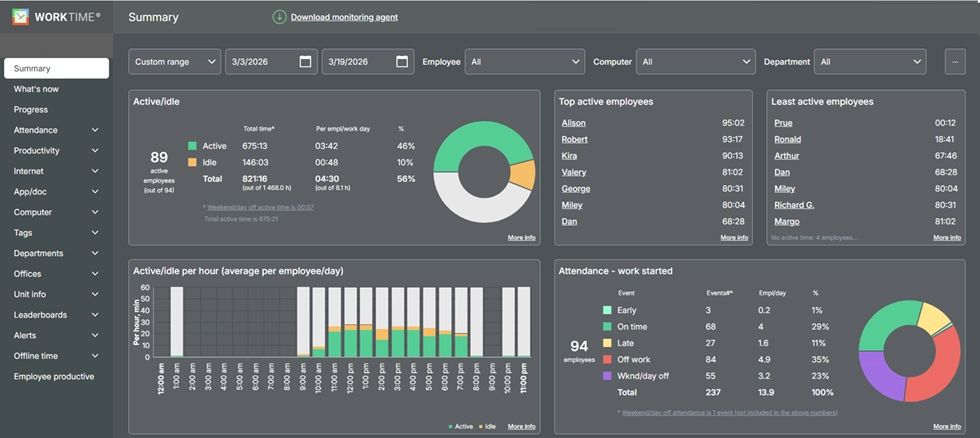
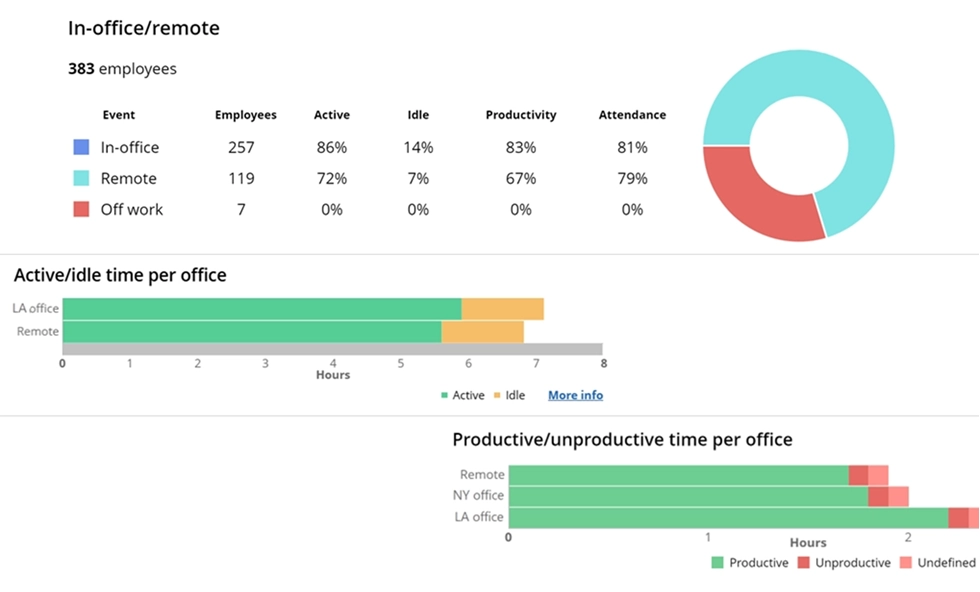

Gain visibility into attendance and productivity across all work environments. Understand work patterns, compare performance by location, and discover the most-used tools.
Start free trial- Non-invasive agent monitoring
- Productivity monitoring with AI-assisted categorization
- Real-time visibility via dashboard and automated alerts
- Remote team monitoring
- Burnout and absenteeism tracking
- Lightest resource footprint among major competitors
- 80+ reports with scheduled delivery.
Try WorkTime now!


2. Teramind - best for call center security and insider threat prevention
Teramind provides deep behavioral analytics and data loss prevention alongside agent monitoring. Call center operations handling protected information, including payment card data, health records, and financial accounts, benefit from its automated policy engine that flags suspicious activity in real time. Teramind tracks screen activity, keystrokes, file transfers, email content, and application and website usage. Its OCR functionality extracts text from screenshots, which strengthens audit records but also increases storage demands and raises privacy considerations for agent-facing environments. Pricing: Starts at $21/user/month (Starter), $42/user/month (UAM), $49/user/month (DLP). Enterprise pricing is custom.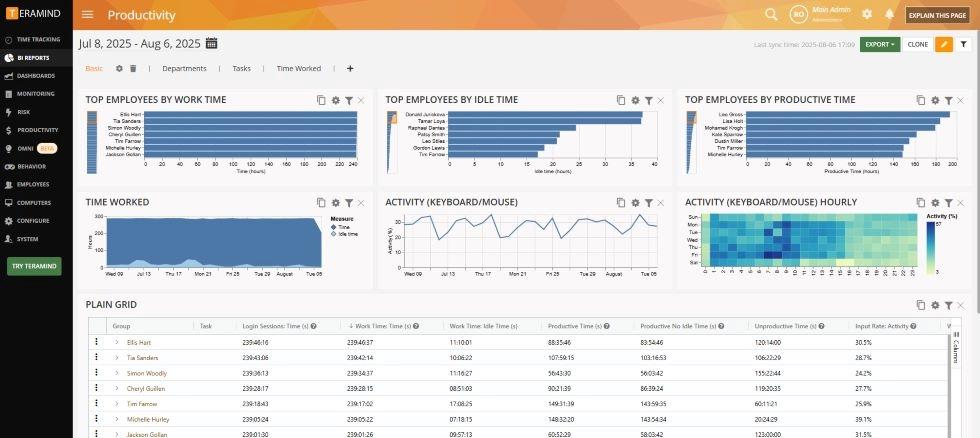
- Real-time data on agent desktops during and between calls
- Policy enforcement automation
- Role-based access controls
- Insider threat detection
- Advanced analytics for compliance investigations.
3. Insightful - best for call center workforce analytics and operational efficiency
Insightful (formerly Workpuls) positions itself as a workforce analytics platform with dedicated call center features. It monitors agent activity in real time, tracks time spent across applications, and generates detailed reporting on individual and team performance metrics. The platform also offers automatic time tracking, performance tools, and process improvement features. Insightful's strength lies in turning raw monitoring data into productivity insights that reveal workflow bottlenecks. Call center managers can track customer interactions alongside agent desktop behavior to identify coaching opportunities and optimize resource allocation. Pricing: Starts at approximately $8/seat/month (Productivity Management). Process Improvement at approximately $15/seat/month. Enterprise pricing is custom.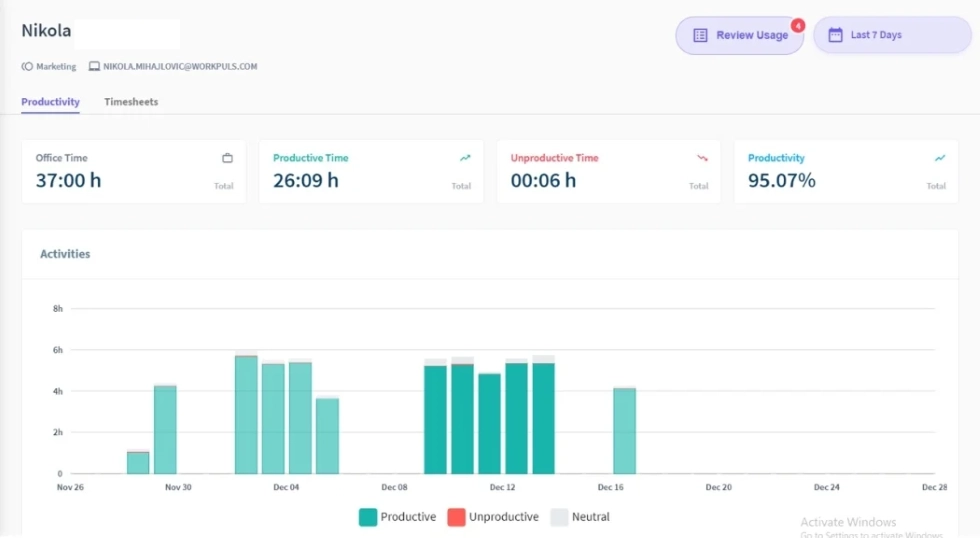
- AI-powered productivity insights
- Operational efficiency dashboards
- Real-time visibility into agent workflows
- Screen monitoring with optional blurring
- Shift and schedule analysis tools.
4. ActivTrak - best for agent productivity pattern analysis
ActivTrak focuses on workforce analytics rather than surveillance. It tracks app and site activity, categorizes time as productive or unproductive, and surfaces patterns in agent behavior and employee productivity through dashboards and AI-powered insights. Its Productivity Lab benchmarks team focuses on organizational goals. For environments where employee performance coaching matters more than security enforcement, ActivTrak helps team leaders see who is stretched thin, who is underperforming, and where workflow adjustments could boost agent performance. Pricing: Free plan for up to 3 users. Paid plans start around $10/user/month (annual billing only). No monthly billing option.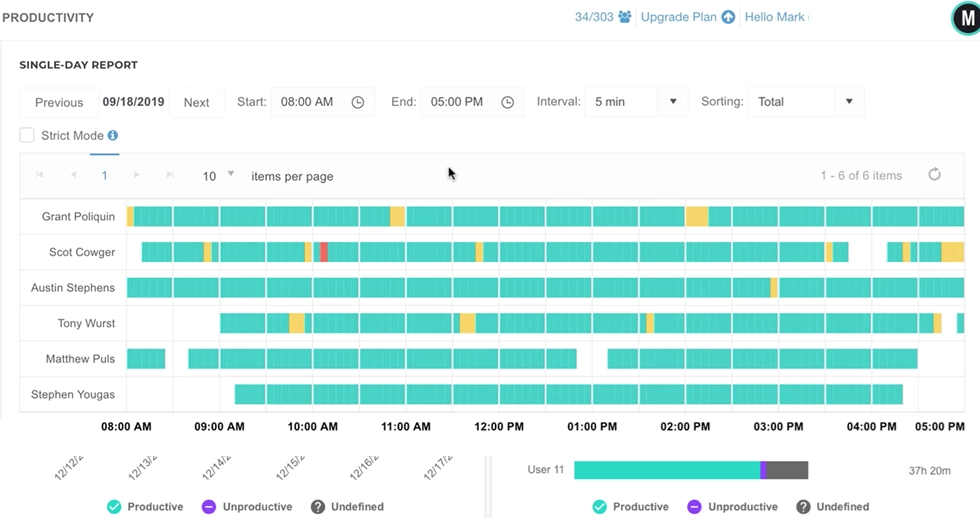
- Workload balance reporting
- Productivity coaching insights
- Burnout risk identification
- Workforce management dashboards
- Useful for both support and sales teams
- Trend analysis for distributed teams.
5. Time Doctor - best for BPO and outsourced call center operations
Time Doctor combines time tracking with productivity monitoring and is widely used in BPO and outsourcing environments. It supports automatic time tracking in the background, distraction alerts for agents who spend time on unproductive websites, and payroll integration through platforms like Gusto and Wise. Its Benchmarks AI feature lets call center managers compare agent performance against industry peers, which is useful for outsourced customer service operations that need to report on SLAs and employee hours. Pricing: Starts at approximately $8/user/month (Basic). Standard plan at $14/user/month. Premium at $20/user/month.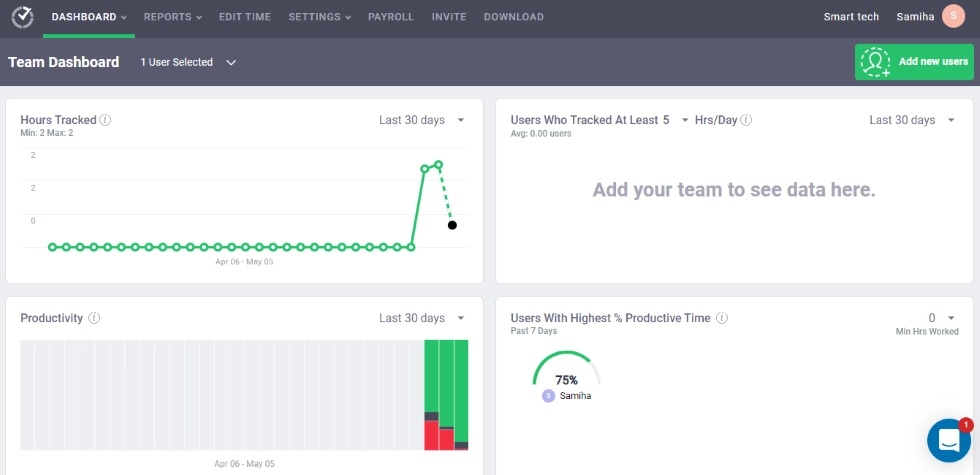
- Payroll integration for accurate employee hours tracking
- Automatic time tracking
- Distraction alerts for idle time
- Project management and client-level time allocation
- Sales teams and support team time analysis
- BPO sales teams reporting.
6. Hubstaff - best for call centers with field service or GPS requirements
Hubstaff is a time-tracking and employee-monitoring platform with robust GPS capabilities. For operations that also manage field service workers, dispatchers, mobile sales teams, or hybrid sales teams, it offers location-based monitoring alongside desktop tracking. Hubstaff tracks app usage, captures optional screenshots, and generates project progress reports with budget tracking. Its invoicing and payroll integrations reduce manual input for employee hours and billing. Pricing: Starts at approximately $7/user/month (Starter). Grow plan at $9/user/month. Team plan at $12/user/month. Enterprise pricing is custom.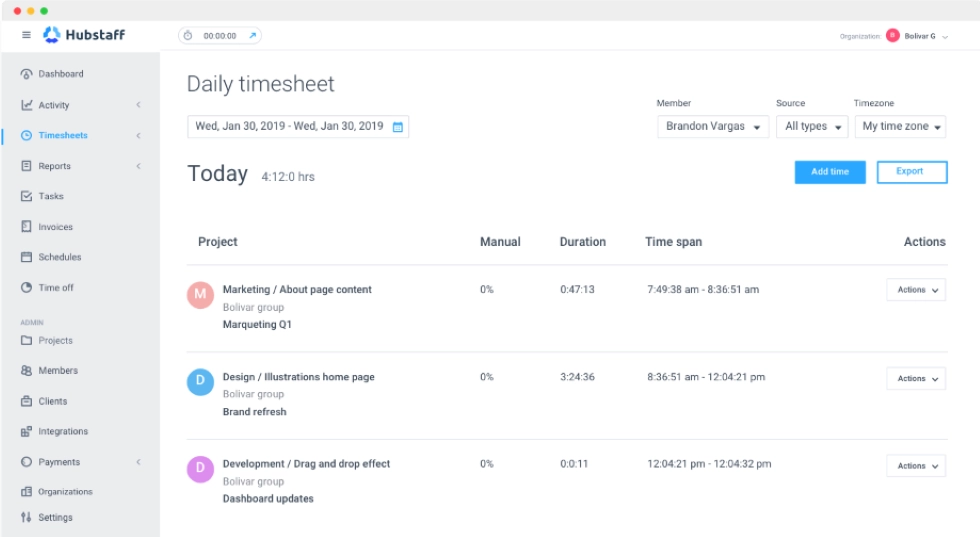
- GPS tracking for field-based agents
- Geofencing for attendance
- Project management and budget tracking
- Payroll integration
- Remote workforce features.
7. KeepActive (Kickidler) - best for visual real-time agent screen monitoring
KeepActive, formerly known as Kickidler, specializes in real-time visual monitoring. It lets supervisors view unlimited agent screens simultaneously and review historical screen recordings sorted by activity type. A published call center case study showed a 15% productivity increase after the platform identified agents creating fake support tickets. For contact centers where visual proof of work is required for compliance documentation or client-facing accountability, KeepActive provides detailed screen capture with on-premise deployment. Pricing: Offers both subscription and lifetime license options. Pricing varies by deployment model. On-premise options available.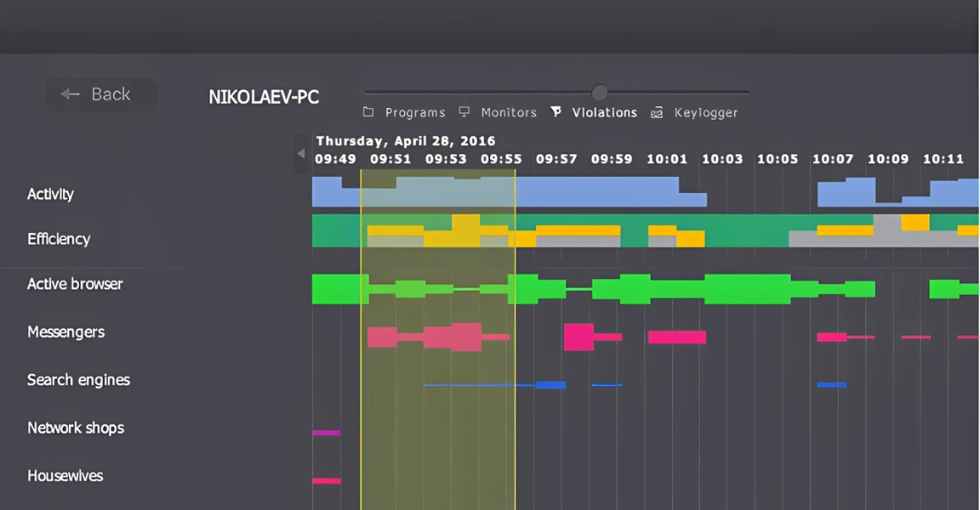
- Unlimited simultaneous screen viewing
- Historical activity playback
- On-premise deployment for data access security
- Detailed reporting on employee performance
- Project management features with task and time tracking.
8. CloudDesk - best for face recognition-based call center attendance
CloudDesk takes a different approach to agent monitoring by focusing on attendance verification through face recognition. Agents authenticate their presence at regular intervals during shifts, and the system takes photos to confirm identity. It integrates with UKG/Kronos and ADP for payroll sync. For support operations where attendance manipulation and buddy-punching are persistent issues, CloudDesk addresses identity verification alongside basic activity monitoring. It also tracks active, idle, and break time spent throughout shifts. Pricing: Contact vendor for current pricing.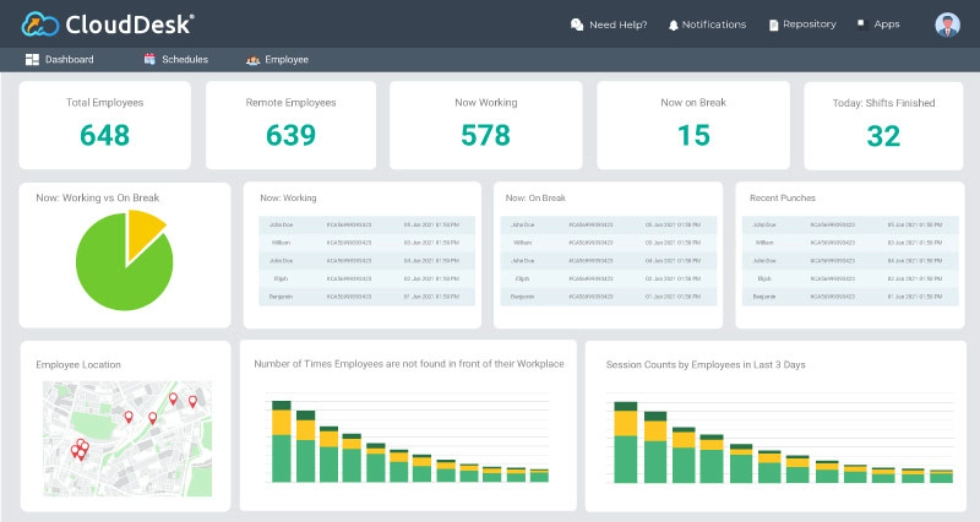
- Face recognition for attendance verification
- Integration with major payroll platforms
- Active/idle/break tracking
- Random screenshots for proof of work
- Web and mobile access.
9. Controlio - best for cloud-based call center monitoring
Controlio offers cloud-based agent monitoring with a focus on simplicity. It tracks app and site activity, captures configurable screenshots, and provides KPI-based productivity reports. The platform converts raw monitoring data into visual charts and actionable insights without the complexity of enterprise-grade DLP tools and minimal manual input for setup. For small to mid-sized centers that need monitoring capabilities without heavy implementation, Controlio provides a straightforward setup with real-time data on agent desktop activity. Pricing: Starts at $7.99/user/month.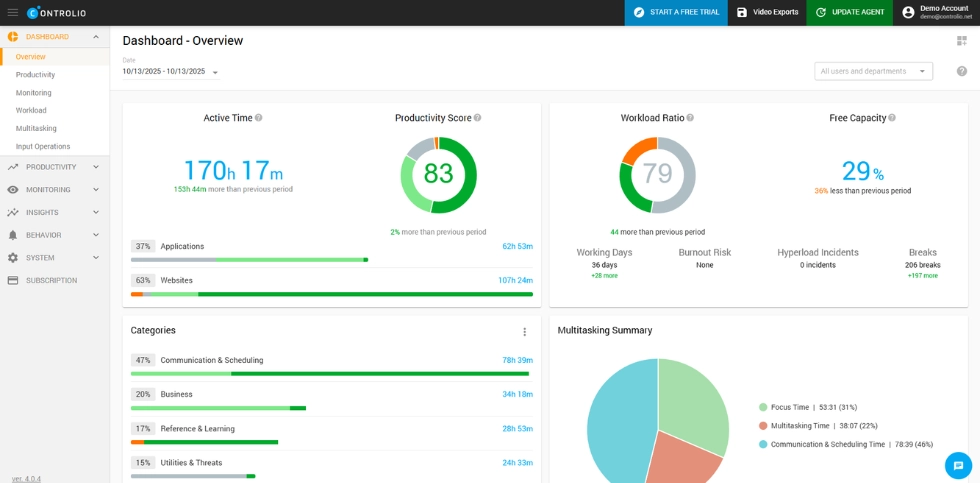
- Simple deployment
- Visual productivity dashboards
- Configurable screenshot intervals
- KPI-based reporting and dashboards
- Security features, including real-time alerts for policy violations.
10. DeskTrack - best for desktop activity logging and time analysis
DeskTrack provides automated time tracking alongside desktop activity monitoring. It records URL, file, and app activity with detailed timestamps, generating reports that show exactly how agents spend time during shifts. The platform supports both real-time monitoring and historical analysis. Call center managers use DeskTrack to identify workflow bottlenecks by analyzing how much time agents spend in CRM tools, phone systems, and knowledge bases versus unproductive applications. Pricing: Starts at $5.99/user/month. Contact the vendor for enterprise pricing.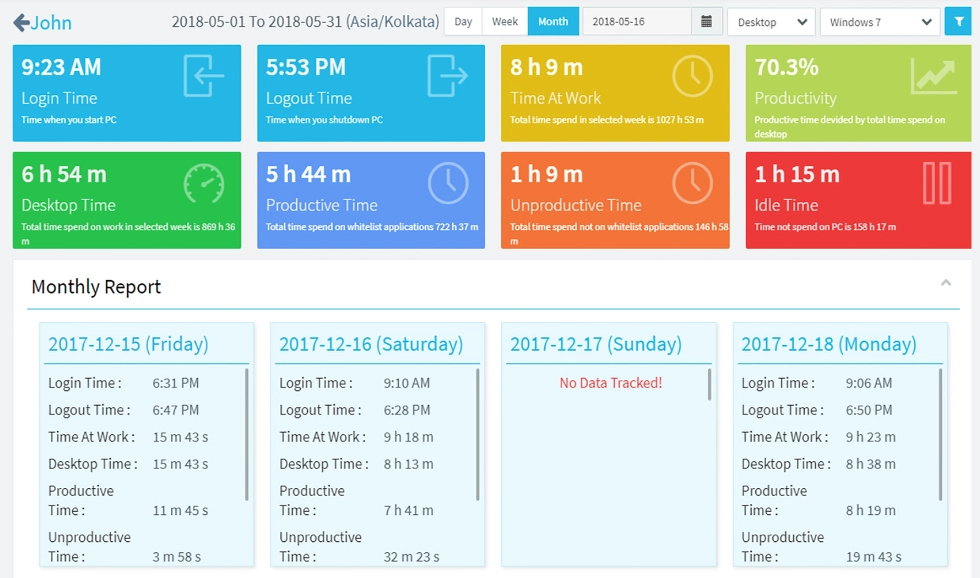
- Automatic time tracking with project and task allocation
- Detailed application and URL logging
- Real-time data and historical reports
- Productivity analysis with idle time detection
- Lightweight deployment.
Comparison table
| Tool | Category win | Starting price | Screenshots | On-premise | HIPAA/GLBA modes | Remote monitoring |
|---|---|---|---|---|---|---|
|
WorkTime |
Non-invasive performance monitoring & analytics |
$6.99/user/mo |
No (never) |
 |
|
|
|
Teramind |
Security & threat prevention |
$21/user/mo |
|
|
Partial |
|
|
Insightful |
Workforce analytics |
$8/seat/mo |
Yes (optional blur) |
|
 |
|
|
ActivTrak |
Productivity patterns |
$10/user/mo |
Add-on |
|
|
|
|
Time Doctor |
BPO & outsourced teams |
$8/user/mo |
Yes (optional blur) |
|
|
|
|
Hubstaff |
Field & GPS teams |
$7/user/mo |
|
|
|
|
|
KeepActive |
Visual screen monitoring |
Varies |
Yes (continuous) |
|
|
|
|
CloudDesk |
Face recognition attendance |
Contact vendor |
|
|
|
|
|
Controlio |
Lightweight cloud monitoring |
$7.99/user/mo |
Yes (configurable) |
|
|
|
|
DeskTrack |
Desktop activity logging |
$5.99/user/mo |
|
|
|
|
How to choose the right call center monitoring software
1. Start with your biggest operational pain point
If agent attrition and performance management are your primary concerns, non-invasive monitoring protects retention while still delivering the productivity insights and performance metrics you need. If data security and data protection drive the decision, invest in tools with security features like DLP and role-based access controls.WorkTime - non-invasive employee monitoring!
2. Consider your compliance requirements
Healthcare organizations cannot afford monitoring software that captures protected health information through screenshots or keystroke logging. Financial services organizations handling payment data need tools that automate routine tasks around compliance without creating liability.3. Test resource footprint
Call center agents typically run multiple business tools simultaneously, including CRM platforms, phone systems, knowledge bases, and ticketing software. Heavy endpoint agents that slow down agent desktops increase average handle time and damage call center efficiency and customer satisfaction. Choose tracking software with the lightest resource consumption you can find.Final thoughts
The best monitoring tools for support operations solve two problems at once: they give managers the real-time data and agent monitoring they need to run efficient daily operations, and they do so without turning the workplace into an environment agents want to escape. Agent turnover already costs the industry billions. Adding invasive tracking software on top of an already stressful job accelerates the problem. Non-invasive monitoring flips the equation by providing the same actionable insights through productivity data rather than surveillance. WorkTime was built for exactly this. It delivers productivity monitoring, attendance tracking, remote team comparison, and burnout detection across in-office, hybrid, and remote teams, all without ever capturing a screenshot, keystroke, or piece of personal content.Try WorkTime now!