
TL;DR
- User activity monitoring software serves two distinct purposes: security (identifying threats, preventing data leaks, and data loss prevention) and productivity (tracking user activities, measuring output, and improving workforce productivity). Choose based on your primary use case.
- How you monitor user activities matters as much as what you monitor. 56% of monitored employees report stress from surveillance, and 54% would consider quitting if monitoring increased. Non-invasive activity-monitoring software that tracks patterns rather than content is more widely accepted.
- The UAM market is projected to reach $5.85-7.65 billion by 2031-2033, growing at a 7.7-16.2% CAGR. Cloud deployment, driven by remote work adoption, is growing fastest at 27.5% CAGR, but on-premise remains important for regulated industries that need to maintain compliance with HIPAA, GLBA, and GDPR.
- Not every organization needs enterprise-grade security monitoring. Many teams overpurchase on features they never configure. Match the tool to the problem.
In this article
The article is presented by WorkTime, a productivity-focused UAM solution that analyzes performance patterns without compromising employee privacy.
How we selected these tools
We evaluated user activity monitoring tools based on five criteria: 1. Primary use case fit - Does the tool focus on security (DLP, identifying threats), employee productivity monitoring, or both? 2. Monitoring approach - Does the software track user activities through content capture (screenshots, keystroke logging, continuous screen recording) or through non-invasive metrics (active time, app usage, productivity scores)? 3. Deployment flexibility - Cloud, on-premise, or both? This matters for organizations that handle sensitive data under HIPAA, GLBA, or GDPR requirements. 4. System resource impact - How much does the monitoring agent affect endpoint performance? 5. Employee acceptance - Does the tool's approach to monitoring user activity support a productive work environment, or does it create resistance? Each tool below receives a genuine category win based on what it does best.10 best user activity monitoring software in 2026
1. WorkTime
Best for: Non-invasive user activity monitoring & in-depth performance analytics. WorkTime is the only fully non-invasive user activity monitoring solution on the market. It tracks user activities, including active and idle time, app and website usage, attendance, productivity scores, and distraction levels, without capturing screenshots, keystroke content, emails, or screen recordings. It measures user activities through metadata and behavioral scoring.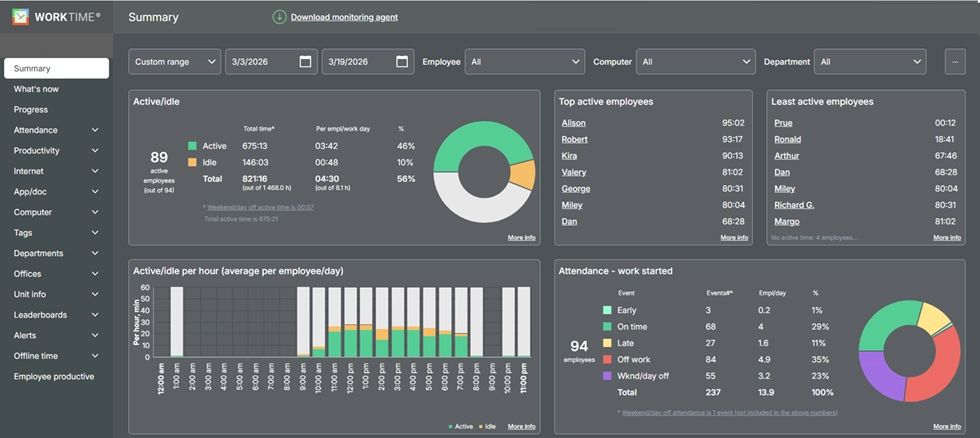
- Non-invasive activity monitoring that tracks user behavior patterns, not content
- Screen productivity analyzer as a non-invasive replacement for screenshots
- Remote vs. in-office productivity comparison using IP-based location detection
- Burnout signs tracking to detect overwork before it leads to turnover
- HIPAA-safe, GDPR-safe, and GLBA-safe modes built into the Enterprise plan
- Cloud, on-premise, and private cloud deployment
- Lowest system resource consumption benchmarked against 5 competitors
- 80+ reports with scheduled delivery.
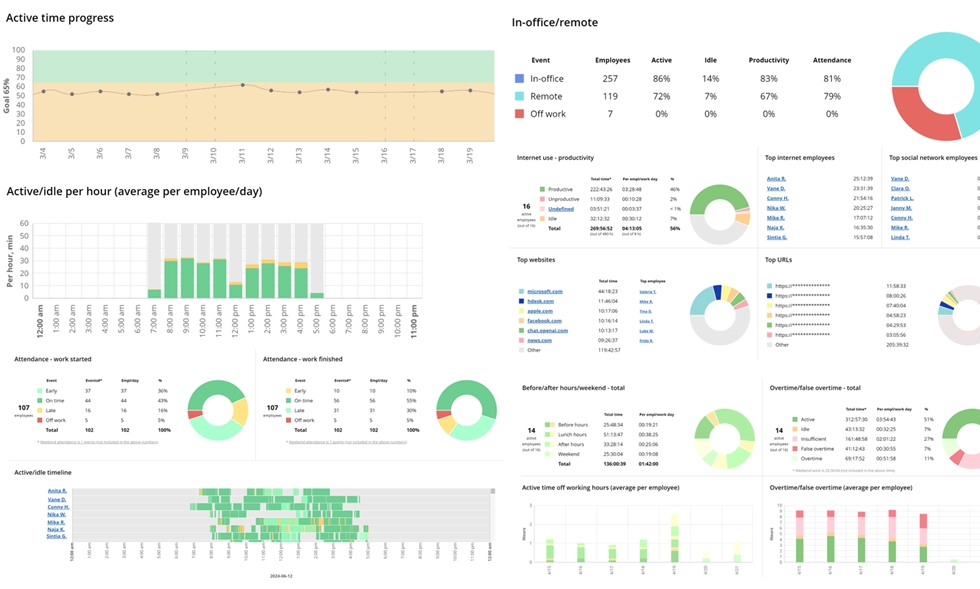

Turn activity into insights with 80+ WorkTime reports. Analyze performance clearly and safely, without collecting personal content.
Start free trial2. Teramind
Best for: Insider threat detection and DLP. Teramind is an enterprise-grade user activity monitoring platform built for organizations that need to monitor user activities for security purposes. It combines user behavior analytics, DLP, anomaly detection, and automated responses in a single platform.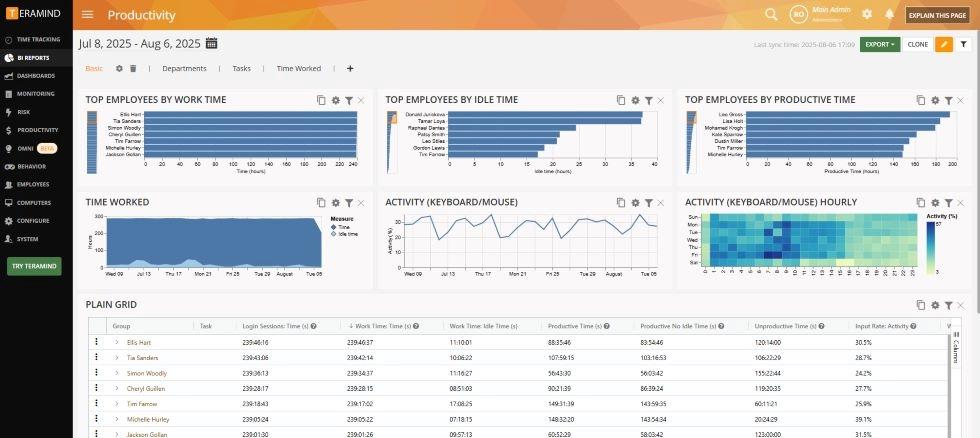
- Screen recording and session playback for investigations
- Optical character recognition (OCR) to scan on-screen text for protected content
- Smart rules engine with automated responses to policy violations
- behavioral analytics that score risk based on user actions over time
- Detailed insights into file transfers, email content, USB usage, and messaging
- On-premise and cloud deployment options.
3. ActivTrak
Best for: Workforce analytics and productivity insights. ActivTrak provides workforce analytics that help managers gain insights into how employees spend time on user activities across applications and websites. It focuses on measuring output patterns without logging keystrokes or monitoring email.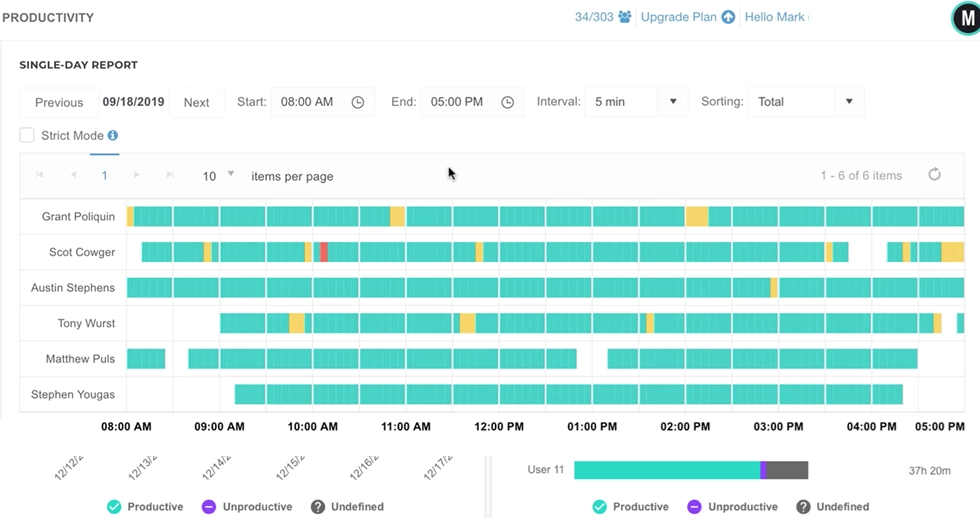
- AI-powered productivity scoring and usage tracking across applications
- Workforce analytics dashboards with team and individual detailed insights
- Employee activity and behavioral risk detection for burnout and disengagement
- Location insights to track user activity across remote and in-office settings
- No keystroke logging or email content capture.
4. Hubstaff
Best for: Remote teams with GPS tracking needs. Hubstaff combines time tracking with activity monitoring, making it popular for managing remote teams, field workers, and contractors. It tracks work hours, captures screenshots, and provides location tracking for mobile employees.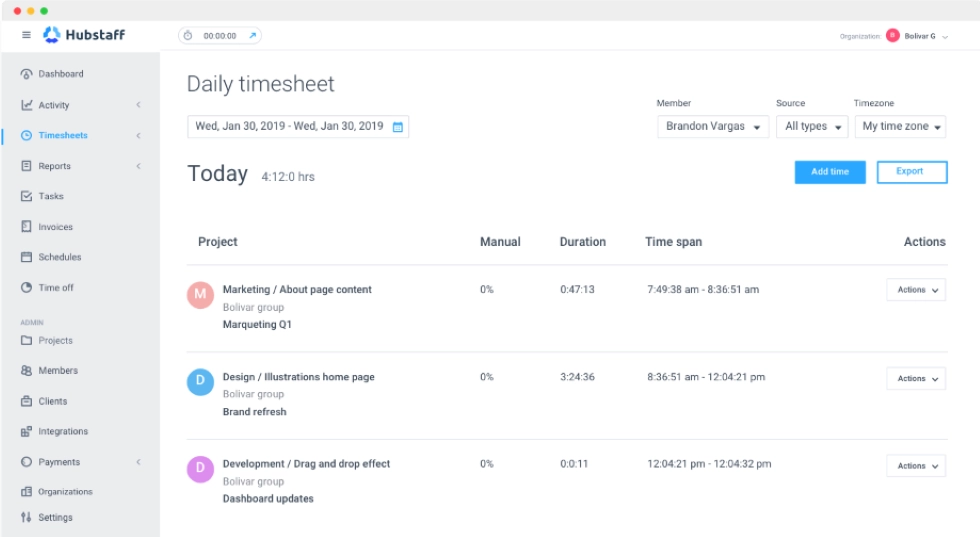
- Automated time tracking with optional screenshots at set intervals
- Location tracking and geofencing for field-based remote employees
- Activity levels based on mouse and keyboard input
- Project budgeting and resource allocation tools
- Payroll and invoicing integration for seamless integration with business processes.
5. Insightful (formerly Workpuls)
Best for: Hybrid team intelligence and workforce analytics. Insightful provides workforce analytics to help hybrid organizations understand how distributed teams work and how user activities flow across locations.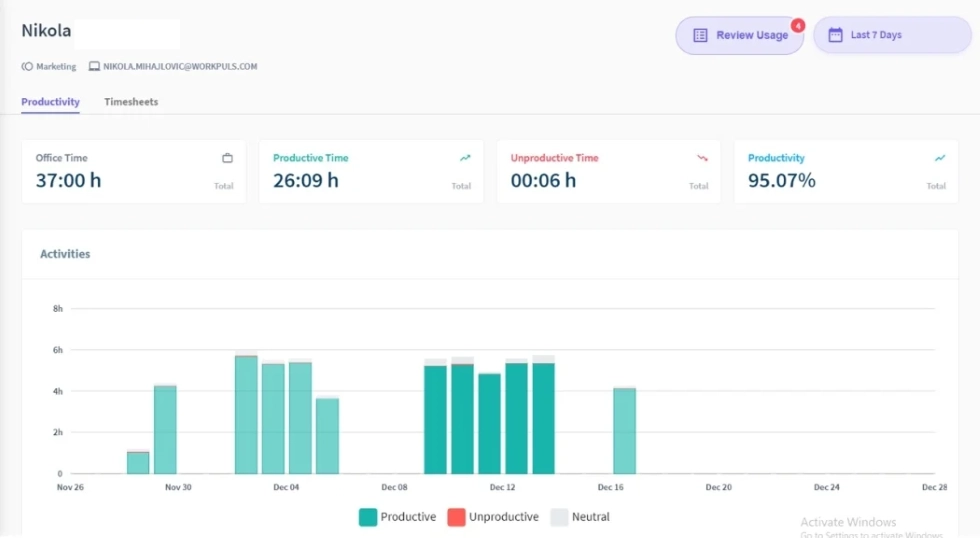
- Real-time monitoring of user activities and employee activity across applications and websites
- Automatic time tracking and time spent analysis by project
- Productivity and efficiency scoring with valuable insights for managers
- Optional screenshot capture (configurable frequency)
- Privacy and compliance controls for data handling.
6. CurrentWare
Best for: Web filtering and access control. CurrentWare combines user activity monitoring with internet filtering, giving IT teams control over which websites and applications employees can access. It is a suite of tools that cover usage tracking, web filtering, and endpoint security.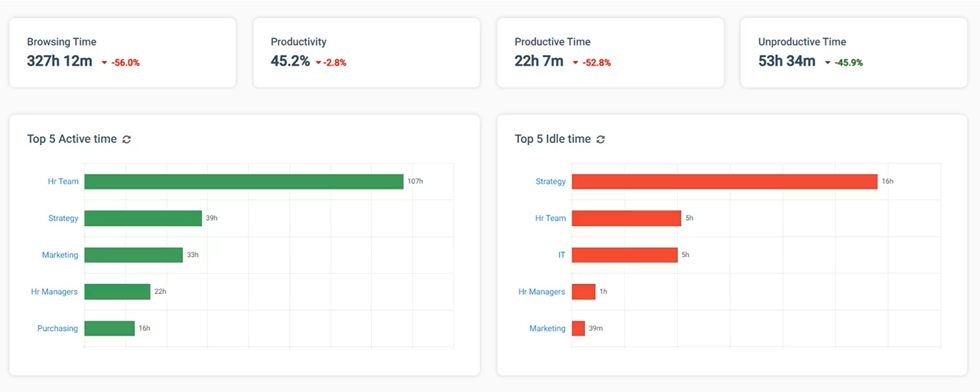
- BrowseReporter for detailed insights into web and application usage
- BrowseControl for blocking websites and applications by category
- enPowerManager for remote power management of endpoints
- AccessPatrol for USB device control and stopping leaks
- On-premise deployment available.
7. Veriato
Best for: Security-first stealth monitoring. Veriato is a security-focused platform designed for covert surveillance and insider threat detection. It captures and analyzes user actions across endpoints to detect risks and ensure compliance.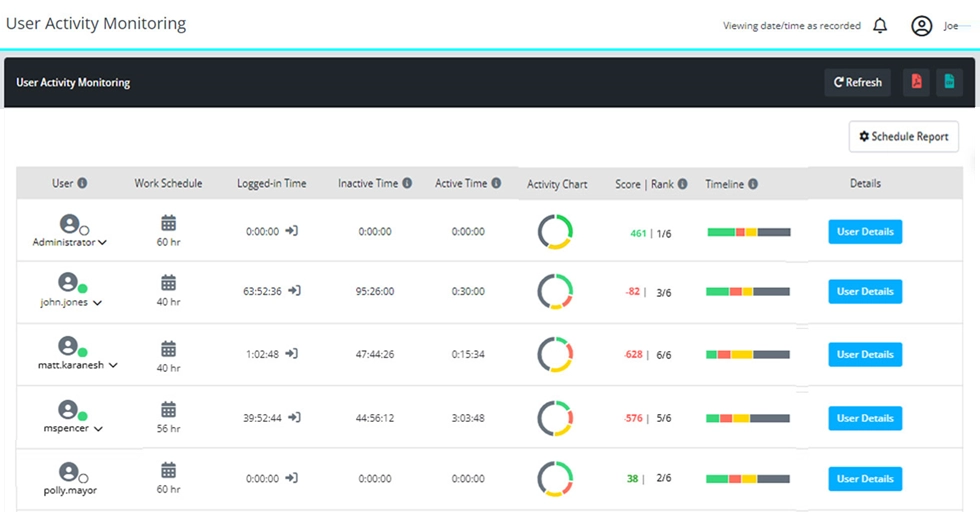
- Stealth agent that runs invisibly on monitored endpoints
- Behavioral analytics with behavioral alerting for suspicious activities
- Screen capture, keystroke logging, and application monitoring
- Network monitoring, including email, chat, and file transfers
- Enhanced security through behavioral baselines and alerting.
8. Time Doctor
Best for: Time tracking with activity monitoring. Time Doctor combines time tracking with user activity monitoring features aimed at BPO companies, outsourcing firms, and distributed teams that need to verify work hours and track user activities against computer activities.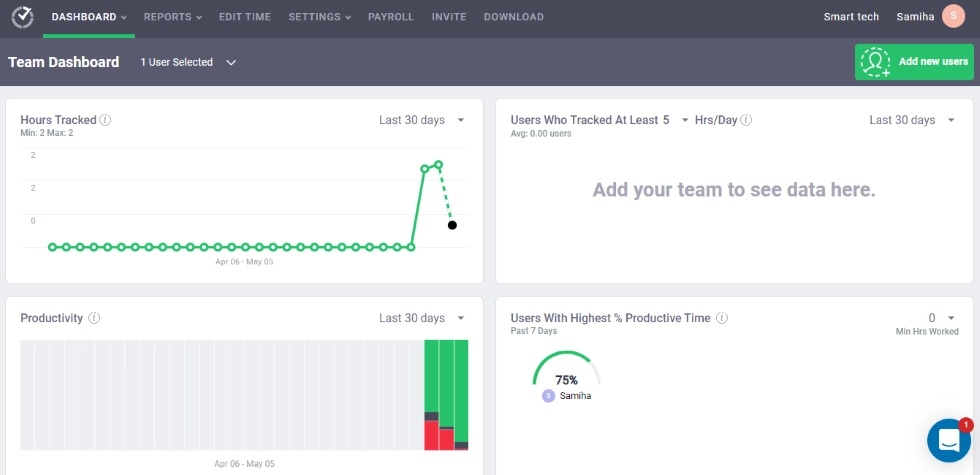
- Manual and automatic tracking with project assignment
- Screenshots at configurable intervals
- Web and app tracking with productive/unproductive categorization
- Client and project billing integration
- Work-life balance widget to monitor user work patterns and flag overwork.
9. DeskTime
Best for: Automatic productivity tracking. DeskTime starts tracking automatically when users turn on their computers. It categorizes user activities across applications and websites as productive or unproductive and calculates employee productivity from time spent in each category.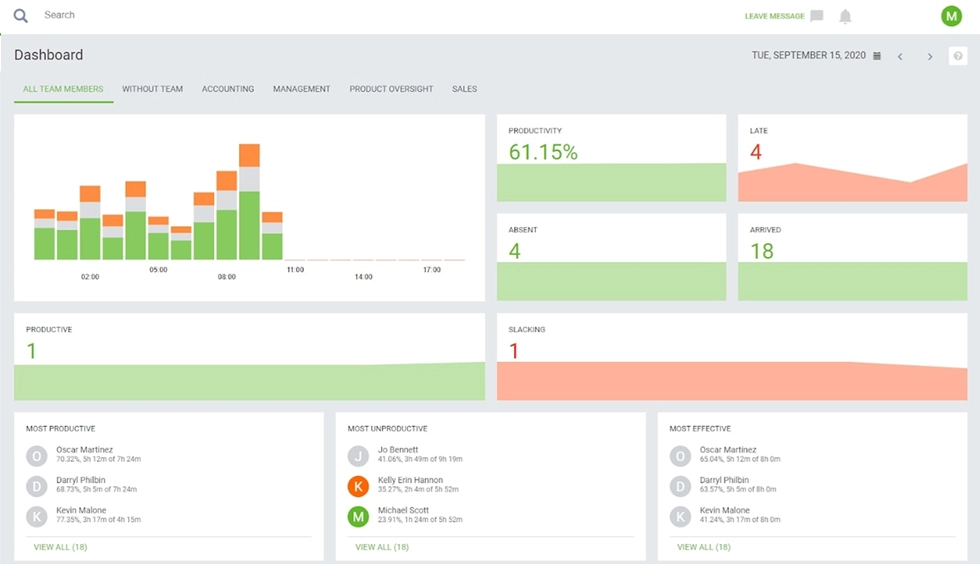
- Starts tracking automatically when the computer is powered on
- App and URL categorization with productivity scoring and productivity levels
- Optional screenshot capture (Premium plan and above)
- Project tracking and cost calculation
- Absence calendar and shift scheduling.
10. Kickidler
Best for: Live screen monitoring. Kickidler provides real-time video monitoring of user screens, allowing managers to watch employee computer activity as it happens. It is designed for organizations that want comprehensive visibility into user activities and what employees do on their computers.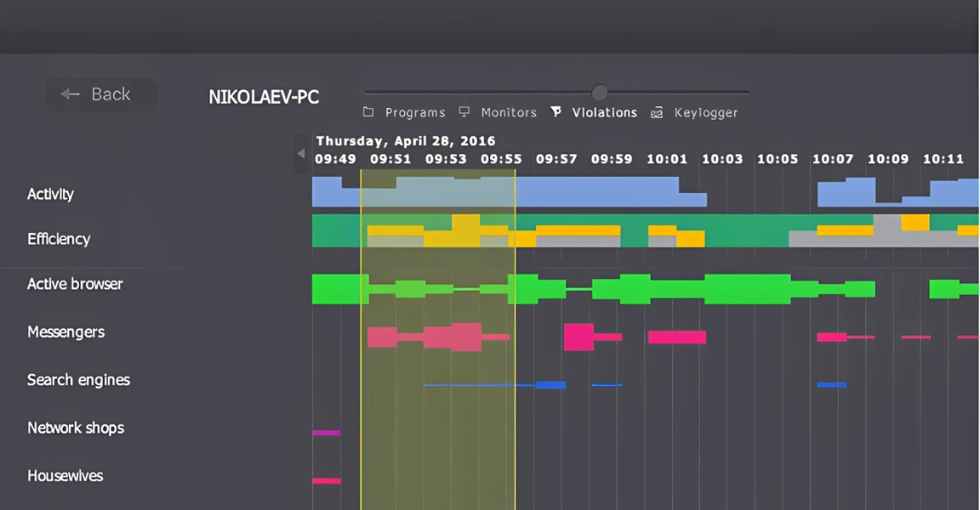
- Live screen viewing of multiple user screens simultaneously
- Screen recording with playback for reviewing user activities
- Keystroke logging and violation detection
- Productivity analysis based on application and website categorization
- On-premise and cloud deployment.
Comparison table
| Tool | Primary focus | Screenshots | Keystroke logging | On-premise | Compliance modes | Starting price |
|---|---|---|---|---|---|---|
|
WorkTime |
Productivity (non-invasive) |
 |
Counter only |
 |
HIPAA-, GDPR-, GLBA-safe modes |
$6.99/user/mo |
|
Teramind |
Security + DLP |
|
|
|
SOC 2 |
$21/user/mo |
|
ActivTrak |
Workforce analytics |
Optional |
|
|
SOC 2 |
$10/user/mo |
|
Hubstaff |
Remote + GPS |
|
|
|
None built-in |
$7/user/mo |
|
Insightful |
Hybrid teams |
Optional |
|
Limited |
SOC 2 |
$8/user/mo |
|
CurrentWare |
Web filtering |
Optional |
|
|
None built-in |
$6/module |
|
Veriato |
Security (stealth) |
|
|
|
SOC 2 |
$25/user/mo |
|
Time Doctor |
Time tracking |
|
|
|
None built-in |
$8/user/mo |
|
DeskTime |
Auto tracking |
Optional |
|
|
None built-in |
$7/user/mo |
|
Kickidler |
Live monitoring |
Live view |
|
|
None built-in |
$5/user/mo |
What to look for in user activity monitoring software
Security-focused UAM
Security-focused UAM prioritizes data protection, anomaly detection, and preventing data breaches. These tools track user actions like file transfers, email content, USB device usage, and unauthorized access attempts. They often include user behavior analytics, automated threat detection, and DLP capabilities.Productivity-focused UAM
Productivity-focused UAM prioritizes tracking productivity, work hours, and user activities across applications and provides analytics with valuable insights. These tools monitor user activities and behavior patterns such as active and idle time, app and website usage, and attendance.
Invasive vs. non-invasive monitoring
The other key distinction is invasive vs. non-invasive monitoring. Invasive tools capture content (what appears on screen, what users type). Non-invasive tools capture user behavior as patterns. Non-invasive tools capture patterns and metadata (how long users are active, which apps they use, and whether they are productive). This choice directly affects data security risk, employee acceptance, storage requirements, and whether the tool helps you ensure compliance or creates new compliance exposure.
Final thoughts
The user activity monitoring and employee monitoring software market offers tools for every need, from lightweight monitoring to enterprise-grade security platforms with DLP and behavioral analytics. The right choice depends on your primary goal. For organizations that need to improve workforce productivity, track work hours, and gain visibility into how employees work without invading privacy, non-invasive user activity monitoring software provides the data managers need by tracking user activity without the downsides of surveillance. WorkTime delivers non-invasive user activity monitoring with workforce analytics, attendance tracking, and burnout detection, all backed by 26+ years on the market, HIPAA/GDPR/GLBA safe modes, and the lightest monitoring agent in its class. Start a free 14-day trial with every feature enabled, unlimited employees, and no credit card required.Try WorkTime now!