
TL;DR
- 81% of companies report increased work output after implementing employee monitoring, but 51% of monitored employees feel micromanaged (APA).
- Monitoring tools help detect 42% of insider threats, and insider incidents cost organizations $17.4 million per year on average (Ponemon Institute, 2025).
- Employee acceptance jumps from 30% to over 50% when employers inform employees about what is being tracked and why (Gartner/Deloitte).
- Invasive monitoring backfires. 49% of employees fake being online, and 54% would consider quitting over excessive surveillance.
- Non-invasive employee monitoring solutions that track productivity scores and active time without capturing sensitive information avoid most cons of employee monitoring while preserving the benefits. The difference comes down to how employees work with the tools, not whether they exist.
In this article
The article is prepared by WorkTime - delivering actionable productivity insights through secure, non-invasive, and fully transparent monitoring.
Top 10 advantages of employee monitoring
1. Increased productivity and accountability
The AMA found that companies implementing transparent monitoring practices saw a 22% improvement in worker productivity. Separately, 81% of organizations report increased output after deploying monitoring tools. When employees know their activities are measured against clear goals, productivity and accountability rise naturally, which is exactly what WorkTime enables with its transparent, privacy-safe monitoring approach.2. Remote and hybrid team visibility
Managers' top concerns about remote employee monitoring are maintaining engagement (29%) and reduced visibility (27%), according to Owl Labs' 2025 report. Employee monitoring tools address this by providing objective data on employee productivity across locations. Without this visibility, business leaders are left guessing whether remote workers are as productive as in-office workers.Monitor in-office, remote,
& hybrid teams!


3. Insider threat detection and data protection
Employee monitoring plays a direct role in preventing data breaches. The Ponemon Institute's 2025 report found that insider threat incidents cost organizations $17.4 million annually, with 55% caused by employee negligence. Employee monitoring software helps detect 42% of insider threats by tracking employee activities like file access, app usage, and unauthorized data access. Organizations with formal insider risk programs avoided $8.2 million in breach-related costs (Ponemon, 2025).4. Protection against risky behavior
Employee monitoring tools that track employee internet use and flag visits to known malicious sites stop accidental malware introduction. GPS tracking and location tracking for field teams add another layer of security around company data. For industries handling sensitive information under HIPAA, GLBA, or GDPR, this level of data protection is not optional. WorkTime covers it with built-in safe modes that keep monitoring compliant and risk-free.5. Attendance and time fraud prevention
Time tracking tools and attendance monitoring catch problems that cost real money. False overtime, buddy punching, and extended breaks add up. One insurance company saved $50,000 in a single year after employee monitoring exposed that 70% of computers were used for non-work activities. Monitoring employees' attendance patterns also reveals where employee performance drops on specific days or shifts.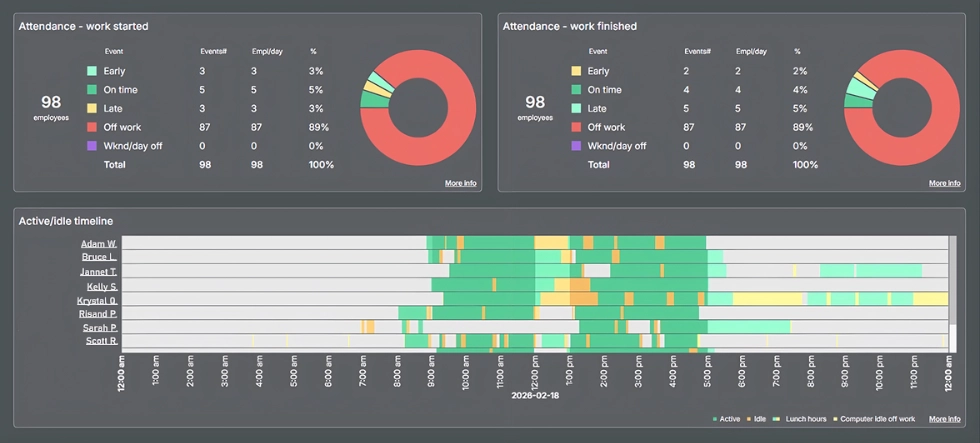

See who’s on time, late, or absent while tracking active/idle time. With this WorkTime report, you can spot attendance issues early & maintain team productivity.
Start free trial6. Software license cost savings
Software use monitoring identifies unused licenses. A U.S. school board monitoring employees across 2,500 computers identified significant savings by comparing which software was actually in use with what the organization paid for. Internet usage data from monitoring employees reveals where time and money are wasted across business processes.7. Regulatory compliance and company policies
Monitoring employees creates audit trails that support legal compliance across regulated industries. In healthcare, monitoring must avoid capturing protected health information. In finance, GLBA compliance requires controls on non-public personal information. The right employee monitoring software provides the oversight these regulations demand while adhering to company policies on employee data and company system security.WorkTime - GLBA-safe employee monitoring!
8. Employee training and skill development
Monitoring data helps identify where employees need support. If the data shows a team struggles with a specific application or spends excessive time on a task that should be routine, that signals an employee training opportunity. Rather than guessing where to invest in development, managers can use employee data to make targeted decisions that improve employee performance.9. Burnout detection and employee well-being
This benefit gets overlooked. Most articles frame monitoring employees as a risk to well-being. But burnout tracking through overtime patterns and active time data catches overwork before it leads to employee turnover. When monitoring tools flag that someone is consistently overworking, managers can intervene. This protects employee productivity over the long term and reduces turnover costs that far exceed the cost of any employee monitoring software.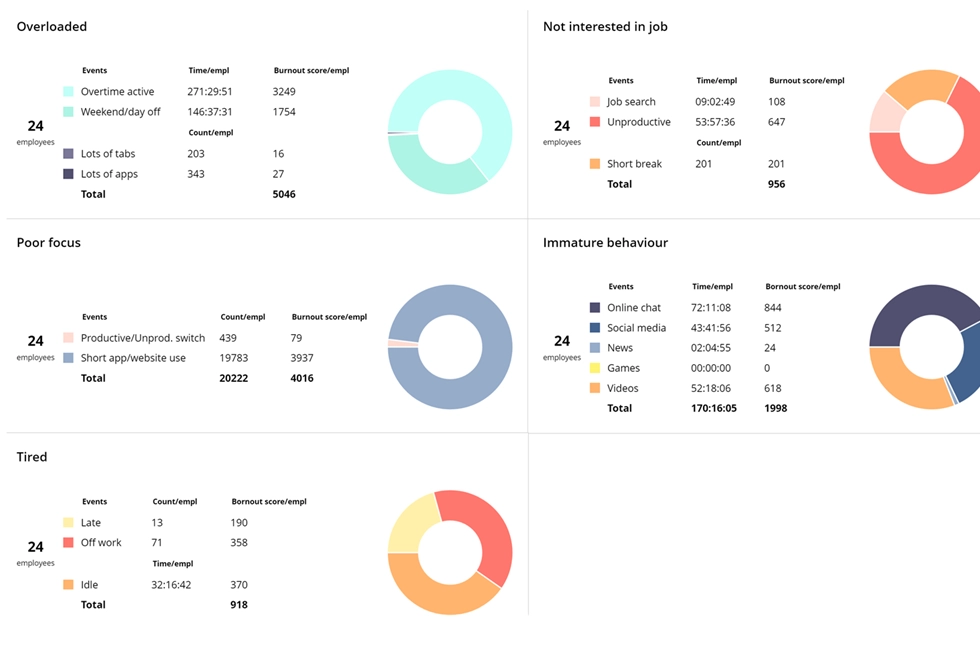

This WorkTime report surfaces potential burnout signals across employees and teams. Take a proactive approach to maintain productivity & engagement!
Start free trial10. Data-driven performance reviews
Rather than relying on manager perception, employee monitoring provides objective data on how employees work. This leads to fairer evaluations and better resource allocation. When reviews are based on real data rather than assumptions, it builds trust in leadership.The cons of employee monitoring
Decreased job satisfaction and employee morale
When monitoring feels like constant surveillance rather than a management tool, employee morale drops. The APA's Work in America Survey found that 51% of electronically monitored employees feel micromanaged. In high-surveillance environments, stress is 45% higher than in less-monitored settings (Pew Research). This is especially true when employers collect data through screenshots, keystroke logging, or video surveillance without clear communication. In-office workers and remote staff alike feel watched, not supported, and job satisfaction declines. A Harvard Business Review study (2024) found that when monitoring data is used for control purposes, employees work more slowly, take more breaks, and deliberately disengage.Maintain employee engagement - transparently!
Employee privacy concerns
Employee privacy is the most common objection to workplace monitoring. 43% of employees believe monitoring invades their privacy, and employee privacy concerns intensify when employers monitor personal devices or record phone calls outside of work. The line is clear: collecting data from employees' activities on work devices during scheduled time is generally legal and accepted. Monitoring personal devices or off-hours activity damages employee trust and creates legal exposure. Other factors, such as state laws like the CCPA in California and the GDPR in Europe, can prevent employees from being monitored beyond what is necessary. Informed consent is the minimum standard. Several states, including New York, Connecticut, and Delaware, now require written disclosure. When employers are transparent about such measures and provide access to employee data, acceptance rises dramatically. WorkTime offers monitoring policy samples to make the process smoother. Feel free to use them!WorkTime - privacy-friendly employee monitoring!
Productivity theater and gaming the system
Invasive monitoring creates a perverse incentive. When monitoring practices focus on mouse movements, keystrokes, and screen time, employees optimize for looking busy rather than doing meaningful work. Studies show 49% of monitored employees fake being online, and 31% use anti-tracking tools. The U.S. Government Accountability Office noted that workers under constant surveillance often take on meaningless tasks to appear productive.Talent loss
Perhaps the most expensive con of invasive employee monitoring: losing good people. About 54% of employees would consider quitting if their employer increased surveillance, and over two-thirds of companies have lost employees who did not want to be monitored. The cost of replacing senior staff, typically 50% to 300% of annual salary, often exceeds any productivity gains the monitoring was supposed to deliver.How to get the benefits without the cons
- Choose non-invasive monitoring practices. Non-invasive employee monitoring tracks productivity scores, active time, attendance, and app usage without capturing sensitive data, screenshots, or personal content. This preserves every benefit while eliminating the trust issues that drive talent away.
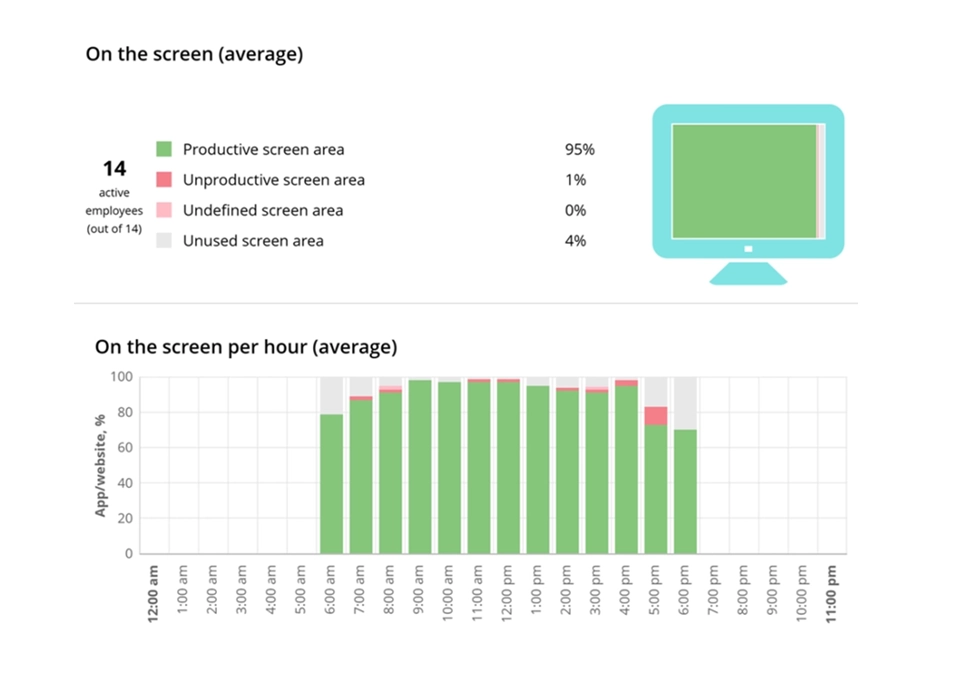

Analyze how effectively employees use their screens with a clear productivity %. All data is collected transparently, without capturing screen content.
Start free trial- Be transparent. Inform employees before monitoring begins. Explain what is tracked, why, and how the data will be used. Provide valuable insights back to employees through access to their own data. Gartner found that comfort with monitoring jumps from 30% to over 50% with a simple explanation.
- Use data for coaching, not punishment. Monitoring data should empower employees to improve, not motivate them through fear. When the data drives conversations about workload and training needs, it builds employee satisfaction.
- Monitor work devices during work hours only. Follow local laws and obtain informed consent. Respect the boundary between accountability and workplace culture.
- Track outcomes, not activity. The best employee monitoring solutions measure productivity trends, attendance patterns, and burnout indicators. Not mouse jiggles.
Final thoughts
Employee monitoring is a valuable tool when done right. The data shows clear benefits: higher organizational productivity, stronger security, better attendance, and early burnout detection. It also shows clear risks: decreased job satisfaction, backlash over employee privacy, and talent loss. The difference is not whether you monitor. It is how. WorkTime provides non-invasive employee monitoring that delivers the benefits without the cons. No screenshots, no keystroke content, no personal data captured. Just productivity analytics, attendance tracking, and burnout detection that works for employers and employees alike.Try WorkTime now!