
TL;DR
- Hubstaff is a time tracking and payroll platform, not a monitoring tool. It's built for agencies and field teams that need to bill hours, manage projects, and process payroll from one dashboard.
- Teramind is a deep surveillance platform built for insider threat detection and data loss prevention. It captures screen recordings, keystrokes, email content, and file transfers.
- Pricing gaps are significant. Hubstaff starts at $7/user/month with no minimums. Teramind starts at $21/user/month with a 5-seat minimum. WorkTime starts at $6.99/employee/month with a free plan.
- Neither Hubstaff nor Teramind offers built-in compliance safe modes. WorkTime is the only option with HIPAA-safe, GDPR-safe, and GLBA-safe modes designed for regulated industries.
- Employee acceptance varies sharply. Hubstaff's screenshots and Teramind's stealth mode both face pushback. WorkTime's non-invasive approach captures zero personal content, making full disclosure easy.
In this article
Presented by WorkTime - a transparent employee monitoring solution designed for remote, hybrid, and office teams.
How we selected these tools
We evaluated these employee monitoring tools based on published feature documentation, current pricing, verified G2 and Capterra reviews, and hands-on product analysis. Each tool earns its category win based on its key features and what it genuinely does best. We also include WorkTime as a non-invasive alternative for teams that need in-depth productivity analytics without content capture.Hubstaff vs. Teramind: Feature comparison
When comparing Hubstaff and Teramind side by side, the feature sets reveal how different these platforms are. The core difference when comparing Hubstaff and Teramind is scope. Hubstaff and Teramind offer different features for fundamentally different use cases. Hubstaff focuses on time tracking, payroll management, and project management, and its time tracking tools integrate directly with invoicing and client billing. Teramind focuses on deep employee monitoring and behavioral analytics.| Feature | Hubstaff | Teramind | WorkTime |
|---|---|---|---|
|
Automatic time tracking |
 |
|
|
|
App tracking |
|
|
Yes (categories only) |
|
Optional screenshots |
|
Yes (plus screen recordings) |
No (non-invasive) |
|
Keystroke logging |
 |
|
|
|
GPS tracking |
Yes (mobile) |
Limited geolocation |
|
|
DLP (data loss prevention) |
|
Yes (DLP tier) |
|
|
Insider threat detection |
|
Yes (UAM and DLP tiers) |
|
|
Idle time detection |
|
|
|
|
Payroll management |
Yes (built-in) |
|
|
|
Task management |
Yes (Hubstaff Tasks) |
Limited |
|
|
Project management tools |
Yes (agile project management software via Hubstaff Tasks) |
|
|
|
Productivity reports |
Basic (Insights add-on) |
Detailed reports with productivity analysis |
80+ customizable reports with customizable dashboards |
|
Screen recording feature |
|
|
|
|
HIPAA/GDPR/GLBA safe modes |
|
|
Yes (Enterprise) |
|
On-premise deployment |
|
|
|
|
Free plan |
Yes (1 user) |
No (5-seat minimum) |
Yes (up to 3 employees) |
Pricing comparison
Pricing is one of the clearest key differences when comparing Hubstaff and Teramind. Both Hubstaff and Teramind offer tiered plans, but the cost structure is very different.| Plan | Hubstaff | Teramind |
|---|---|---|
|
Entry tier |
Starter: $7/user/month |
Starter: $21/user/month (5-seat minimum) |
|
Mid tier |
Grow: $9/user/month |
UAM: $42/user/month |
|
Upper tier |
Team: $12/user/month |
DLP: $49/user/month |
|
Enterprise |
$25/user/month |
Custom pricing |
|
Free plan |
Yes (1 user) |
No |
What each tool captures
This is where comparing Hubstaff vs. Teramind gets most important for employee experience.Hubstaff
Hubstaff captures time data, app and URL tracking logs, optional screenshots (configurable frequency), activity levels from keyboard and mouse input, and GPS location data for mobile employees. Employees can see when their screen is captured. Hubstaff does not record screens or capture keystroke content.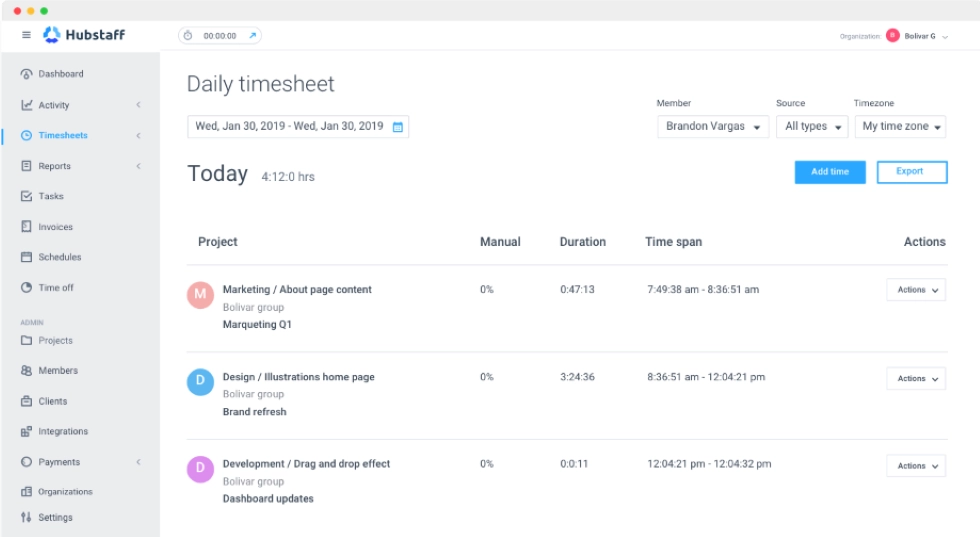
Teramind
Teramind captures everything Hubstaff does and significantly more: continuous live screen capture, input logging, email content, chat messages, and user activity across specific websites and applications. Teramind also offers a stealth mode that lets employers monitor employees without their knowledge, which raises both ethical and legal questions.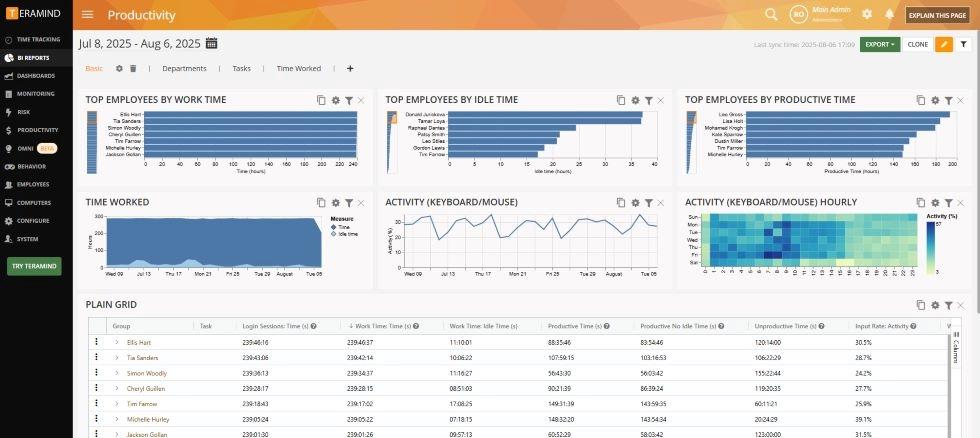
WorkTime
WorkTime captures none of the above content. It tracks productivity scores, active and idle time, attendance, distraction levels, app and website categories (not specific URLs), and overtime patterns. No screenshots. No content capture. No live recording. No personal data capture. This is the core difference: WorkTime provides employee monitoring without content capture, making it the safest employee monitoring solution for organizations where employee trust and data protection matter equally.


Compliance and data security
Neither Hubstaff nor Teramind offers purpose-built compliance safe modes. Teramind provides compliance reporting and can be configured to meet certain regulatory requirements, but its default monitoring captures content that could include protected health information (PHI) under HIPAA or personal data under GDPR. Organizations in healthcare, finance, and government need to configure Teramind carefully to avoid compliance violations. Hubstaff's security features are limited to basic access controls and encryption. It is not designed for regulated industries with strict compliance requirements. WorkTime is the only employee monitoring tool in this comparison with HIPAA-safe, GDPR-safe, and GLBA-safe compliance modes built into the Enterprise plan. These modes prevent the indirect collection of protected data, which is a fundamentally different approach from configuring invasive tools to exclude sensitive content after the fact.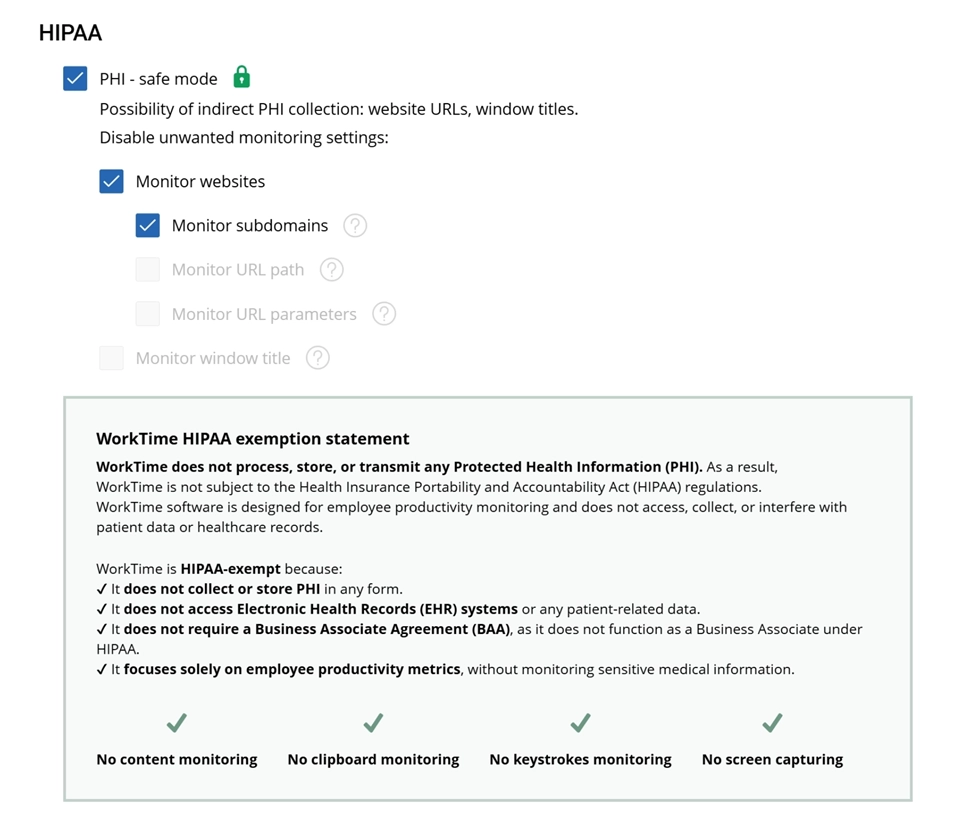

HIPAA-safe mode reinforces WorkTime’s privacy-first approach by eliminating even an indirect collection of potentially sensitive healthcare data.
Start free trialEmployee experience and acceptance
How employees react to monitoring directly affects whether the tool improves or harms employee productivity. Both Hubstaff and Teramind face acceptance challenges that are worth understanding. Hubstaff's screenshot feature is optional but enabled by default in many configurations. Employees who know their screens are being captured report lower trust and increased stress. G2 reviewers have described Hubstaff as "spyware" in critical reviews. Teramind's stealth mode allows employers to monitor employees without disclosure. While legally permitted in some jurisdictions, covert monitoring is associated with higher quit intent, lower employee engagement, and reduced employee performance. WorkTime's non-invasive approach is built to be fully disclosed. Because it captures no personal content, employers can tell employees exactly what is being tracked without risk. Productivity trends, attendance patterns, and distraction scores give managers what they need to monitor employees effectively while maintaining trust. Employees can access their own reports through WorkTime's dashboards.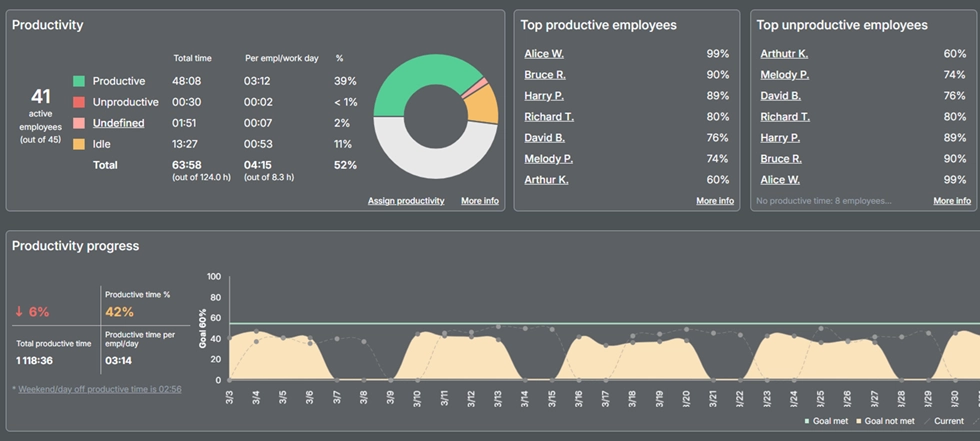

Get actionable productivity insights with WorkTime. No spying, no screenshots, just transparent analytics for teams and employees!
Start free trialWhen to choose Hubstaff
Hubstaff is best for agencies and freelance teams that need to track employee time, bill clients by the hour, and process payroll from a single platform. Its location features make it the strongest option for field service businesses. If your primary need is time-tracking software with project and payroll management built in, Hubstaff delivers. It also integrates with other tools like Asana, Trello, Jira, and QuickBooks, and its time tracking capabilities are well-suited for remote workers who need to log work hours across individual tasks. Best for: Agencies, field teams, remote contractors, freelance operations, payroll management.When to choose Teramind
Teramind is best for security-first organizations that need insider threat detection, data loss prevention, and in-depth user activity monitoring. If your organization handles sensitive data, operates in a regulated industry, or needs forensic-level employee activity data, Teramind is the stronger choice. Teramind also serves enterprises that require audit trails for compliance investigations. Best for: Security-focused monitoring, compliance-heavy industries, in-office and remote forensic monitoring.When to choose WorkTime
WorkTime is best for non-invasive employee monitoring. If you need in-depth productivity analytics, attendance tracking, burnout detection, and distraction monitoring without capturing personal content, WorkTime fills the gap between Hubstaff's basic time tracking and Teramind's deep surveillance. It is the only option with HIPAA/GDPR/GLBA-safe modes and on-premise deployment, and it costs less than both Hubstaff and Teramind at comparable tiers. WorkTime has operated since 1998 and is trusted by 9,500+ organizations. Best for: Non-invasive productivity monitoring, regulated industries (healthcare, finance, government), organizations prioritizing employee trustFinal verdict
The right choice between Hubstaff vs. Teramind depends on your monitoring goals and compliance requirements. Hubstaff wins for time tracking, payroll management, and project management. Teramind wins for data loss prevention and in-depth user activity analysis. Neither is built for non-invasive employee monitoring in regulated environments. WorkTime fills that gap. No screenshots. No content capture. No live recording. Just the productivity data, attendance patterns, and workload signals managers need, with compliance for HIPAA, GDPR, and GLBA built into the product. Try WorkTime free for 14 days, every feature included - no credit card needed.