
In this article
What is meeting overload?
Work today is absolutely nothing like work even 10 years ago. Hybrid or totally remote work has taken the world by storm, and whether you feel it was pandemic or tech-driven, it’s here to stay. Somewhere along the remote work journey, meetings multiplied faster than ever. It leaves leaders wondering why employees have too many meetings and how to bring the workload back under control. In this guide, we’ll break down how meeting fatigue is tearing up the corporate world and how you can reduce meeting overload seamlessly with WorkTime.This article is brought to you by WorkTime, a privacy-safe monitoring tool that strengthens hybrid team workload visibility so teams can reduce needless calls.
The rising cost of unproductive meetings
The hybrid/remote work revolution has completely transformed communication patterns. There used to be a time when you could walk by a desk and comment on some ongoing work or even get an update in a hallway. Now, every decision, question, and project update has become a scheduled call or Zoom, which fuels meeting overload before teams even notice it’s happening. This is time wasted talking about work rather than executing a task, which has been draining on businesses. Since hybrid work took off, meeting time has surged far beyond what most teams can handle. Microsoft reports that weekly meeting time jumped 252% and the number of meetings rose 153% compared to pre-2020 levels. Employees now spend about 392 hours per year in meetings, and roughly 67% of those meetings are considered unproductive. Unproductive meetings cost U.S. companies between $259 billion and $3799 billion annually, and one Bain review found that a single weekly manager meeting costs a large organization $15 million per year in lost productivity.| Cost category | Annual cost |
|---|---|
|
Total U.S. cost of unproductive meetings (higher estimate) |
$399 billion |
|
Total U.S. cost of unproductive meetings (lower estimate) |
$259 billion |
|
Cost of one weekly manager meeting in a large firm |
$15 million |
|
Lost meeting time per employee (≈ 31 hours/month) |
≈ 372 hours/year |
|
Average portion of workweek spent in meetings for many roles |
20–35 % |
What is “meeting pollution”?
Meeting pollution is the buildup of unnecessary meetings that slowly take over the calendar and reduce the time people have for real work. It shows up through too many recurring meetings, updates that could be shared through email or Slack, old “shadow meetings” nobody remembers creating, overlapping calls across departments, and meetings with no clear purpose - a classic pattern in organizations facing unproductive meetings overload. People are pulled into events where they’re expected to attend but rarely need to contribute, which leaves them feeling busy but oddly unproductive. The toll of meeting pollution on companies is both emotional and financial. Employees sit through hours of calls and still end the day wondering why the important tasks didn’t get touched. Much of the time, these employees aren’t even engaged in the calls; they prefer to scroll through last night’s NBA scores to see if they indeed covered the spread on their bet for the Denver Nuggets to win. On paper, everything looks hunky dory, but this isn’t the case. Productivity is falling out the window, and employees lose all their working hours to conversations that never needed to exist in the first place.The hidden business impact of meeting overload
The data speaks for itself. Research across hybrid teams shows that deep-focus time drops by 40-60 percent when meeting overload sets in, leaving only 43% of their time for productive tasks. It’s not because the employees forgot how to work; it’s because their workday is sliced into fragments and spent on meaningless calls, waiting for others to join before the call can actually begin. And don’t even get us started about the “meetings about meetings”. It confirms that hybrid teams must learn how to run fewer meetings to stay productive.Meetings vs. focused work
Other consequences include:Higher burnout risk and drop in creativity
If you are switching tasks and switching apps constantly, then all your time is taken up by mundane tasks, and you lose your ability to be creative and innovative. As most employees are not robots (at least yet), their ability to innovate is what makes them valuable. Constant meetings and calls train that creativity, and can cause burnout very fast.Salary wasted and visibility lost in hybrid teams
There is no way for employers to actually monitor 75 meetings in a week, and thus, they lose all visibility. This can sometimes be thought of as “wasted salary”, as the actual KPIs related to the business are not increasing, even with all these meetings. This loss of visibility can take employers down the road to resentment.Distorted metrics
Long calls or offline meetings show up as “inactive time” because traditional tools can only track keyboard and mouse activity. This causes leaders to trust numbers that do not reflect reality. When companies rely on incomplete analytics, it becomes difficult to diagnose why KPIs are slipping.Why is meeting overload hard to control
Meeting pollution is hard to control due to human nature, combined with structural problems. Firstly, a call organized for 2 people can end up having 5 people on it that didn’t need to be there. One person can then be late to the meeting, and the other four just end up talking about a night out or the latest NBA scores, as opposed to anything work-related. And did this call even need to be set up in the first place? Microsoft’s 2023 Work Trend Index found that employees spend 57 % of their time in meetings, and emails/chats, leaving 43 % for “creating”. That’s a lot of hours drifting away. Hybrid teams also crave connection. Without a shared space, meetings become the default way to feel present. It’s well-intentioned, but too many syncs burn time quickly. Atlassian’s research showed the average employee attends 62 meetings per month, and most people rate half of them as low-value.Framework: how to reduce meetings by 30-40%
To bring structure back into hybrid work, companies need an actionable approach that doesn’t rely on guesswork. Below is a framework built specifically to reduce meeting overload while improving clarity and output.Run a meeting audit
Just like you audit your books for discrepancies, you can start auditing your employees’ calendars to gain a good understanding of how many useless or pointless meetings/calls have been logged. Look at every recurring call and ask one thing: Does this still earn its place? Most teams find meetings left over from old projects or managers who left years ago. A product team we worked with cut a weekly “alignment” call after realizing the same three sentences were repeated every Thursday. Research from Asana shows workers spend 58 percent of their time on “work about work,”. This is where WorkTime can come in handy, as they have a feature that shows which calls drain the most combined hours, making the “meeting audit” much easier.Use the 15-30-45 rule
The 15-30-45 rule works as follows: split your priorities into time allotted segments, and go from there. For example, the “quick syncs, or brief catchups, should stay around 15 minutes max. Decisions that need to be made regarding planning or execution get about 30 minutes, and the deeper conversations that affect the “macro picture” get 45. You would be surprised by how this little tweak in how we manage time and allocate importance can increase efficiency.Block out meeting-free hours
Teams think better when they aren’t bouncing between calls. Protecting a few hours each day for deep work pays off. Some companies go even further and set aside one full meeting-free day per week. The difference shows up quickly: fewer context switches, better output.Async vs sync communication
Even though it’s tempting to use 1,000 different apps to communicate the same point while testing various filters out can be interesting, it sucks productivity from employees. Try just using Slack or something similar as opposed to a bunch of different apps that take time to verify and install.Coach managers to set the tone
If you own a company and you have staff, then this message must be disseminated through the managers and leadership of the company. Take some time to train them. Good training teaches them to cancel meetings that have outlived their purpose, write agendas focused on outcomes, and pause before hitting “Invite.” One ops manager we know cut his team’s meeting load by 35 percent simply by challenging every recurring event for a month.Apply WorkTime meeting time tracking
If you want to cut meeting overload, you need clear visibility first - and that’s exactly where WorkTime helps. Its online meeting reports show how much time your teams actually spend in calls, which recurring meetings eat up the calendar, and where productivity quietly leaks away. With this data, managers can make smarter decisions: cutting meetings that no longer serve a purpose, shortening those that run on autopilot, and questioning every recurring invite. One team we worked with reduced their weekly meeting hours by nearly a third simply by reviewing their WorkTime meeting stats for a month.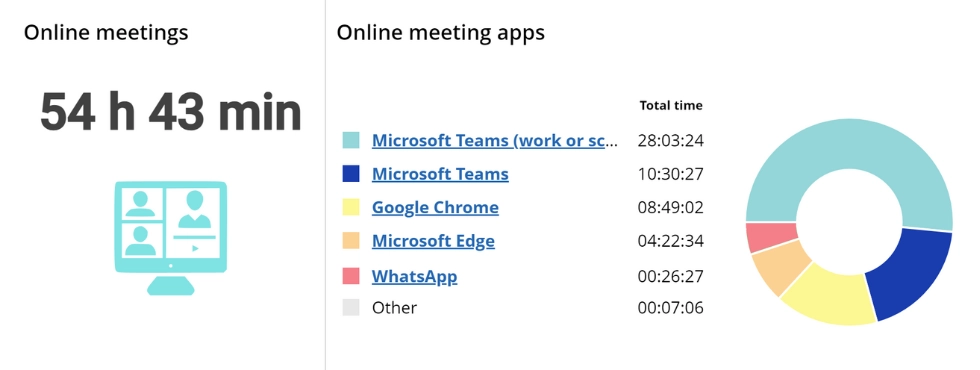

Track online meetings by department. This report shows meeting duration, participation frequency, top apps, and meeting history.
Start free trialWhere workload visibility breaks down
The majority of monitoring systems only track what happens on a computer. The table below breaks down some of the consequences of this type of visibility. This means that there are all sorts of things missing from that data, and important things at that.| What’s missing from the data | What it leads to | Example |
|---|---|---|
|
2–5 hours of offline meetings per day |
Idle time appears higher than it actually is |
An analyst spends the morning in conference rooms and gets flagged as “inactive” in monitoring tools |
|
Phone calls |
Productivity looks lower |
A sales rep closes deals by phone but shows almost no “activity” for half the day |
|
On-site tasks |
Employees seem disconnected |
A field tech visits client sites, but monitoring shows long stretches of zero activity |
|
In-person discussions |
Managers misread workload |
Two designers spend hours hashing out a feature in person but appear under-utilized in the dashboard |
|
All offline work combined |
Employees feel unfairly evaluated |
Someone gets pulled into ad-hoc chats all afternoon and later gets questioned about “low output” |
Meeting analytics: how WorkTime helps measure meeting load
Added Time from WorkTime solves the blind spot created by traditional monitoring without disrupting workflows or adding pressure.What is added time?
Added Time closes the visibility gap that makes hybrid teams look less active than they really are. Instead of treating offline work like it never happened, employees log those hours with a quick note, and WorkTime blends it with their digital activity. The result is a clear timeline of the full workday. A manager can finally tell the difference between someone who’s stuck in meetings and someone who’s truly waiting for work. It removes guesswork and gives teams credit for the work that normally disappears.| Offline activity | What Added Time captures | Why it matters |
|---|---|---|
|
Meetings |
Duration, purpose, and who was involved |
Shows why someone looks inactive during long stretches of the day |
|
Phone calls |
Time spent handling client or internal calls |
Reveals real workload for roles that operate mostly by phone |
|
On-site tasks |
Hours spent in the field or away from a keyboard |
Makes fieldwork visible so employees aren’t judged unfairly |
|
In-person discussions |
Unplanned problem-solving and collaboration |
Explains “quiet” periods that are actually full of activity |
|
Combined offline work |
A unified timeline with digital and offline hours |
Gives leaders a clear picture of real workload and pressure |
Added Time reduces meeting overload &apm; strengthens team health
Added Time gives leaders a clean view of where hours actually go, so meeting overload stops hiding in the shadows. Once offline work is included, it becomes obvious which teams are stretched, which recurring calls burn through entire weeks, and where “idle time” is really people stuck in conversations that the data never captured. Added time gives clarity to all of this with great results. Hybrid teams feel the shift quickly because schedules start matching the real workload instead of assumptions. Added Time turns meeting decisions into data-driven choices instead of gut calls, and that’s what lets companies fix the problem at its source.Example: Added time in action (Real estate fund)
A real estate investment fund rolled out Added Time to figure out why underwriting cycles kept slipping, even though analysts were logging long days. Once offline hours were included, the picture changed fast. Nearly 40 percent of the week disappeared into lender calls and internal deal reviews that never showed up in digital activity. After cutting seven recurring calls and trimming a few more, the fund saw a lift in deal throughput and a clear drop in stress across the team. Here is what that looked like by the numbers.| Metric | Before Added Time | After Added Time | Impact |
|---|---|---|---|
|
Weekly hours lost to offline meetings |
18 hours |
9 hours |
50% reduction |
|
Deals analyzed per week |
6 |
8 |
+33% |
|
Estimated analyst cost per deal |
$2,200 |
$1,650 |
-$550 per deal |
|
Annual productivity gain (team of 5 analysts) |
$0 |
$214,500 |
Added capacity from reclaimed hours |
|
Employee satisfaction |
Baseline |
Higher |
Reduced meeting load |
Meeting audit checklist
- ☐ Remove 30% of recurring meetings;
- ☐ Set meeting-free hours or days;
- ☐ Measure actual meeting load using Added Time;
- ☐ Replace status calls with async updates;
- ☐ Train managers in a minimalist meeting culture;
- ☐ Reassess meeting patterns every quarter.
Bottom line: Meeting overload is a pointless drag on business and an easy fix
Let’s face it; if our water were polluted (See Flint, Michigan), then you are going to certainly want to know the source. Likewise, if your business’s efficiency is suffering from pollution, you’ll certainly want to know the source as well. There is a very good chance, in this day and age, that meeting pollution is a real thing. The good thing? It’s a very easy fix. By adding a tool like WorkTime and steadying the ship in other regards as well, you can drastically reduce meeting pollution and have everyone in the office humming the same tune of optimized, efficient work.