
TL;DR
- PHI-safe monitoring is not optional. Monitoring software that captures screen content can record protected health information from EHR systems. Healthcare organizations need tools that produce only numerical data, protect PHI by design, and meet HIPAA compliance requirements.
- HIPAA-exempt is safer than HIPAA-compliant. An exempt tool never touches PHI, so it requires no Business Associate Agreement. A compliant tool handles PHI securely but adds ongoing compliance obligations. For employee monitoring, the lower-risk path is exempt.
- Burnout detection is a core feature. With 56% of nurses reporting burnout, monitoring should flag excessive work hours, overtime patterns, and declining engagement before turnover hits. Staff burnout costs the healthcare industry billions in replacement and lost productivity.
- Start with the administrative staff. Clinical teams provide patient care on the floor. Back-office teams handle billing, coding, scheduling, and records on computers. Employee productivity monitoring delivers the strongest ROI where day-to-day operations are screen-based.
In this article
The article is presented by WorkTime - trusted by healthcare agencies for secure, HIPAA-safe, and privacy-respecting employee monitoring.
The healthcare monitoring challenge
The healthcare industry operates under constraints that most sectors do not face. Protected health information flows through electronic health records on every screen. The Health Insurance Portability and Accountability Act governs how that data is handled. And the healthcare team works under physical and emotional pressure, making employee burnout a constant risk to staff and patient care alike. Employee productivity monitoring in the healthcare business must solve three problems simultaneously:Protect PHI while tracking productivity
Healthcare professionals interact with EHR platforms, billing systems, and scheduling tools throughout the day. Monitoring software that captures screenshots can inadvertently record patient information, diagnoses, medications, and treatment plans. Non-invasive monitoring that tracks only numerical data (productivity scores, time tracking metrics, attendance patterns) eliminates this risk entirely. WorkTime fits perfectly here, as we never capture, record, or collect screen content. Instead, we rely on pure productivity metrics. This approach keeps all PHI completely out of scope.WorkTime - HIPAA-safe employee monitoring!


Detect burnout early
The AMA found that work overload triples the risk of burnout. Nurses report 56% burnout rates, and 41% intend to leave within two years. Nearly 75% of physicians with burnout symptoms identify electronic health records as a contributing factor. Tracking work hours, overtime patterns, and active time beyond scheduled shifts provides administrators with early-warning data to adjust shift scheduling, redistribute workload, and reduce administrative burden.Improve back-office productivity
Healthcare organizations employ large administrative teams for billing, coding, claims processing, shift scheduling, and records management. These employees are where productivity monitoring and time tracking deliver the strongest return. Identifying bottlenecks in healthcare workflows, managing cross-departmental tasks, and analyzing time spent help streamline operations, improve resource allocation, and boost workflow efficiency.What makes monitoring software healthcare-ready
PHI-safe by design
If monitoring software captures screen content, it can expose protected health information. Look for tools that operate entirely outside the scope of PHI, require no Business Associate Agreement, and create zero HIPAA compliance risk. This is the difference between HIPAA-exempt and HIPAA-compliant, a distinction that matters for data protection and data security. WorkTime is HIPAA-safe by design as it operates entirely outside the PHI scope. Additional safeguards limit the collection of metadata that could potentially contain regulated information, eliminating indirect compliance risks.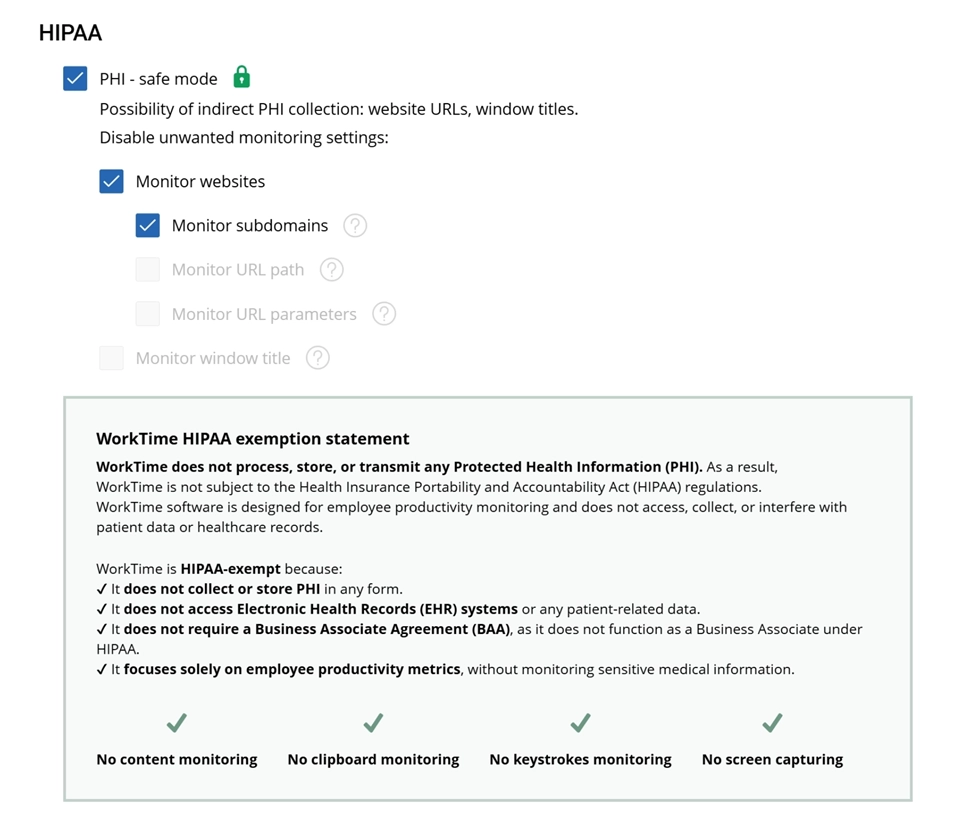

With HIPAA-safe mode enabled, WorkTime avoids capturing any potentially sensitive healthcare data sources. It keeps employee monitoring secure, transparent, and HIPAA-exempt.
Start free trialTime tracking without manual input
Shift workers, administrative staff, and remote teams need time tracking that runs without manual data entry. Passive time tracking captures scheduled hours, active periods, and idle time by application category. This supports payroll processes, accurate shift scheduling, and workforce management decisions across the healthcare business.Attendance tracking and shift support
Healthcare runs around the clock. Monitoring software should track logins and logouts, flag attendance issues, and support attendance monitoring across multiple locations and shifts. This feeds payroll integration and helps maintain optimal staffing levels.Burnout and overwork detection
Look for tools that flag overtime patterns, hours beyond scheduled shifts, and declining engagement. These metrics provide healthcare managers with real-time data to intervene before turnover spikes. Employee engagement drops when staff feel overworked.On-premise deployment
Facilities that handle PHI on internal networks may need monitoring data on their own servers. On-premise deployment keeps employee monitoring data within the organization's infrastructure.Role-based access controls
HR teams, department leads, and administrators need different levels of visibility. Role-based access controls ensure authorized personnel view only their team's productivity insights and reporting features - an approach WorkTime supports with granular RBAC and AES-256 encryption. This keeps all data protected and accessible only to the right users.
Comprehensive reporting
Generate reports on attendance, productivity scores, time tracking data, resource allocation, and performance management metrics. Automated reporting supports organizational processes and data-driven staffing decisions for hr management.Top 6 picks for healthcare employee monitoring
1. WorkTime: Best for HIPAA-safe productivity monitoring
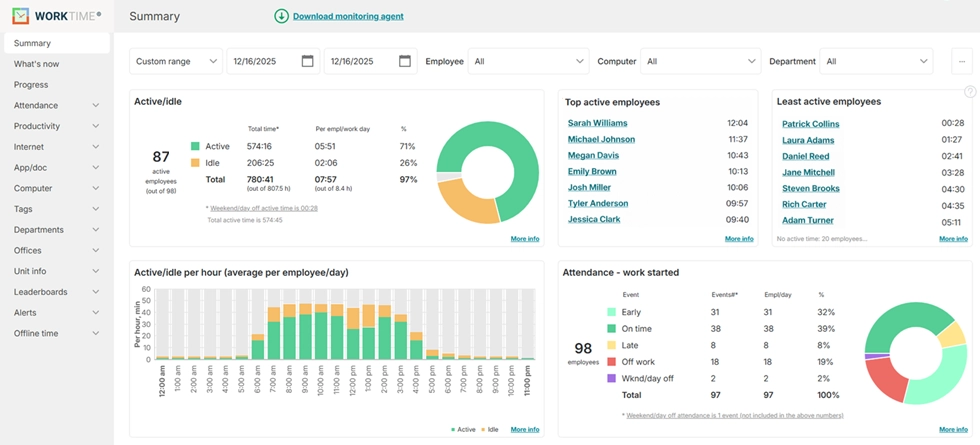
Best for: Hospitals, clinics, and medical groups that need employee productivity monitoring and time tracking with zero risk of capturing patient data. WorkTime operates entirely outside the scope of protected health information. It does not capture screenshots, keystroke content, clipboard data, or screen recordings. All monitoring data is numerical: productivity scores, active time percentages, attendance patterns, and application categories.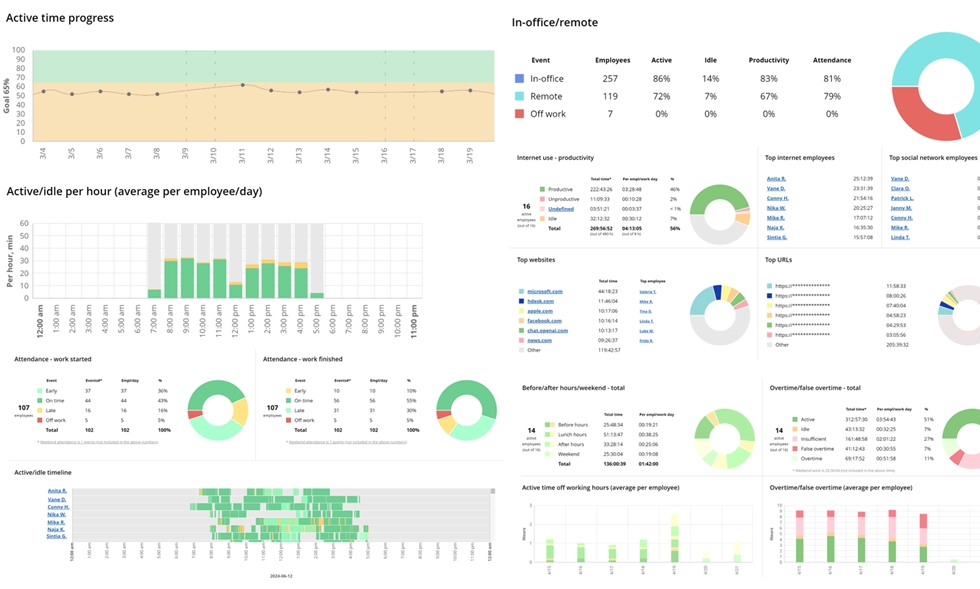

WorkTime offers 80+ comprehensive reports for in-depth performance analytics. All reports are transparent and safe for healthcare organizations, as no PHI-related data is captured.
Start free trial- HIPAA-exempt design with dedicated HIPAA-safe mode
- Automated time tracking of active and idle time
- Attendance monitoring with shift compliance alerts
- Employee burnout detection through overtime pattern tracking
- Software use monitoring for EHR and clinical tool adoption
- Remote vs. in-office comparison for hybrid teams
- On-premise and private cloud deployment
- AES-256 encryption and data security safeguards
- Scales from 1 to 15,000+ computers.
Try WorkTime now!
2. Insightful: Best for screenshot-based healthcare monitoring
Best for: Healthcare organizations that require screenshot-based activity verification alongside productivity monitoring. Insightful offers a healthcare-specific product with SOC 2, ISO 27001, and HIPAA compliance certifications. It provides AES-256 encryption, on-premise deployment, and a private cloud option. For facilities that need visual verification, Insightful provides both productivity analytics and screen capture.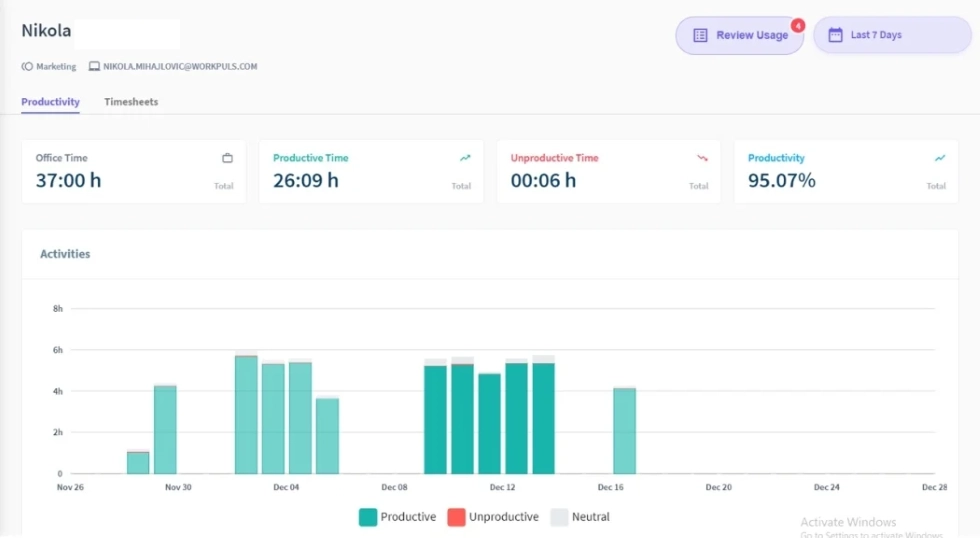
3. Teramind: Best for healthcare data loss prevention
Best for: Large hospital systems with insider-threat concerns and data-loss-prevention needs, alongside employee monitoring. Teramind provides deep monitoring, including screen recordings, file transfer tracking, and behavioral analytics. For facilities where data exfiltration risk is the primary concern, Teramind offers forensic visibility and data protection.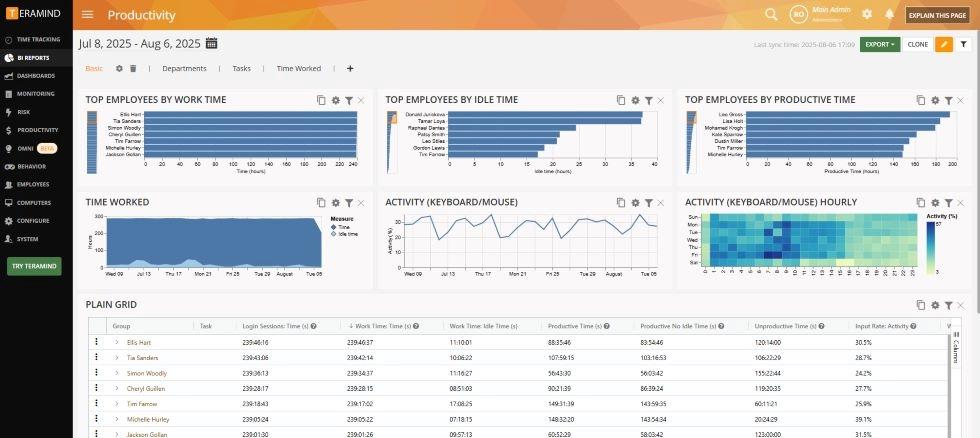
4. ActivTrak: Best for administrative workforce analytics
Best for: Healthcare organizations focused on the back-office team's productivity and workforce management analytics for billing, coding, and claims staff. ActivTrak tracks employee productivity through analytics dashboards. It monitors application usage, productive vs. unproductive time, and workload balance. For administrators focused on resource allocation across departments at multiple locations, ActivTrak provides productivity insights into how administrative teams spend their time.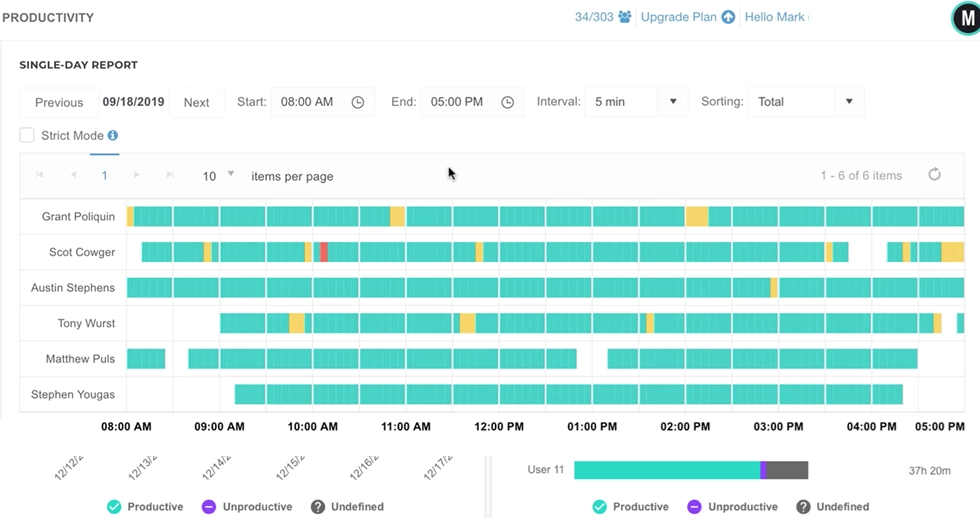
5. Hubstaff: Best for home health and field staff
Best for: Home health agencies managing remote teams, field nurses, or mobile healthcare professionals across multiple locations. Hubstaff pairs GPS tracking with time tracking, geofencing, and attendance monitoring for distributed staff. Home health aides, traveling nurses, and field therapists benefit from location data verification alongside time tracking. Payroll integration and task management features support managing tasks across remote healthcare staff.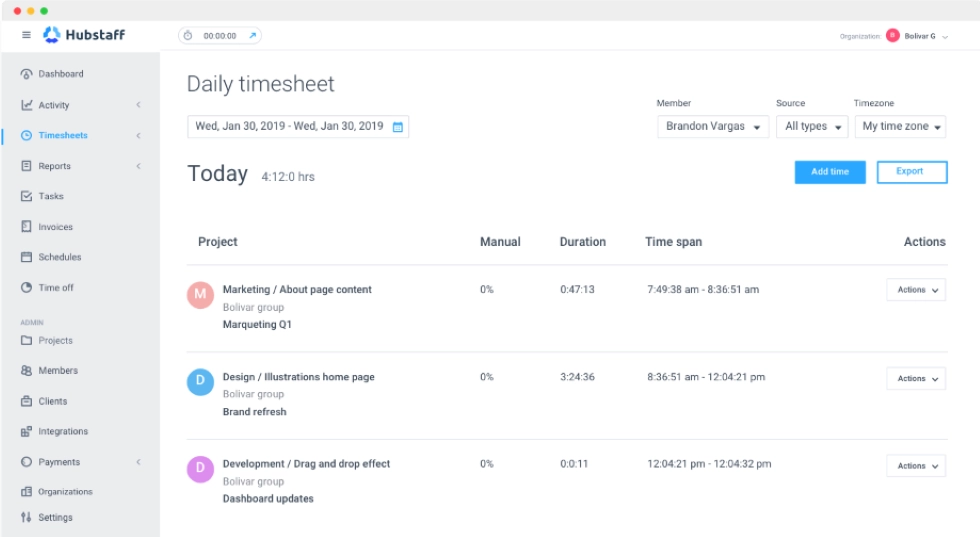
6. Time Doctor: Best for healthcare contractor accountability
Best for: Outsourced billing, coding, or administrative tasks needing strict contractor time tracking. Time Doctor provides time tracking with application monitoring, periodic screenshots, and productivity scoring. It works for the healthcare business where proving contractor work hours against project management deliverables matters.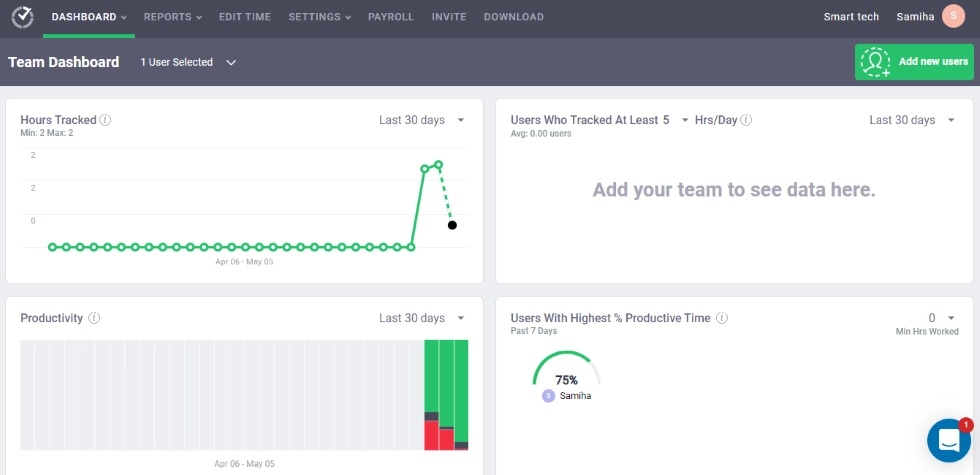
Quick comparison
| Feature | WorkTime | Insightful | Teramind | ActivTrak | Hubstaff | Time Doctor |
|---|---|---|---|---|---|---|
|
Healthcare use |
HIPAA-safe productivity |
Screenshot monitoring |
Data loss prevention |
Admin analytics |
Field staff |
Contractors |
|
HIPAA status |
Exempt |
Compliant |
Compliant |
Not specific |
Not specific |
Not specific |
|
Captures PHI? |
 |
Possible |
 |
Configurable |
Possible |
Possible |
|
On-premise |
|
|
|
|
|
|
|
HIPAA-safe mode |
|
|
|
|
|
|
|
Time tracking |
|
|
|
|
|
|
|
GPS |
|
|
|
|
|
|
|
Starting price |
$6.99/user |
$8/user |
$21/user |
$10/user |
$7/user |
$8/user |
HIPAA-exempt vs. HIPAA-compliant: What matters for monitoring
HIPAA-exempt means the monitoring software never accesses, stores, or transmits PHI. No BAA required. No compliance documentation for the monitoring tool. No risk that monitoring becomes a source of data breach exposure. WorkTime achieves this through numeric-only data collection, with no screen content captured.WorkTime - HIPAA-exempt monitoring solution!
Getting started with healthcare employee monitoring
1. Begin with the back-office staff
Billing coders, claims processors, schedulers, and records clerks are ideal for productivity monitoring. Clinical staff providing direct patient care have different needs. Start where the data is richest.2. Implement time tracking as a foundation
Time tracking that runs passively captures scheduled hours and active time without manual data entry from healthcare professionals. This data feeds payroll processes, supports labor laws compliance, and provides the baseline for performance management. Choosing to implement time tracking first builds trust and operational efficiency before expanding the monitoring scope.3. Use burnout data proactively
When monitoring shows a staff member consistently exceeding scheduled work hours, that signals burnout. Use this data to adjust shift scheduling, optimize resource allocation, and maintain optimal staffing levels. Optimizing workflows based on real-time data protects the healthcare team from overwork and reduces turnover costs.4. Be transparent
Explain that the tool tracks time tracking data, attendance, productivity scores, and application categories. Explain that it does not capture screen content or patient information. Transparency reduces resistance and improves adoption across the healthcare team.Final thoughts
The healthcare industry needs employee monitoring that protects patients while giving administrators the data to run an efficient operation. The right tool depends on your priorities: HIPAA-exempt productivity monitoring, data loss prevention, administrative analytics, or field staff tracking. For healthcare organizations that need to boost productivity, track attendance, and detect burnout early without risking patient data, WorkTime provides HIPAA-exempt monitoring purpose-built for healthcare. See how WorkTime keeps healthcare data safe with a free 14-day trial.Try WorkTime now!