• Deutsch

    Deutsch

  • English

    English

  • Español

    Español

  • Français

    Français

  • Italiano

    Italiano

  • Português

    Português

WorkTime research 2026

Computer usage statistics at work - 2026 report

The breakdown of employee computer time per country, company size, and management style

WorkTime WorkTime WorkTime WorkTime WorkTime
WorkTime
WorkTime
WorkTime

Inside this research

      
         WorkTime

About the WorkTime research 2026 study

This research shows how employees actually spend their time at work, on computers, where most modern work takes place, covering the years 2024-2025.

The data reflects computer-based activity only. Offline work such as meetings, calls, or paperwork is not included in this report and will be covered in a separate study.

The study is conducted by WorkTime, a non-invasive employee monitoring software trusted by organizations worldwide for over 26 years

We measure several key categories: active time, productive time, unproductive time, and idle time (when computers are on but not used). The report also identifies the top unproductive websites and applications, analyzed by country and by company size.

Additionally, the research examines three types of managerial engagement, highly engaged, moderately engaged, and low engaged managers, and how each correlates with employee performance patterns.

  • WorkTime

    Study period

    January 2024 – December 2025

  • WorkTime

    Countries analyzed

    Australia, Canada, India, South Africa, UK, USA

  • WorkTime

    Data source

    WorkTime customers across multiple industries

  • WorkTime

    Data safety

    100% anonymized and privacy-compliant

  • WorkTime

    Global reach

    Thousands of companies
    Hundreds of thousands of employees

      
         WorkTime

Key categories

This study focuses on three main types of computer time: active, unproductive, and idle. Together, they show how computer work hours are truly distributed in 2024–2025.

  • Active time

    Periods when employees actively use their computers: typing, moving the mouse, or switching between work applications. Includes both productive and unproductive activity.

  • Productive time

    Time spent on work-related websites or applications.

  • Unproductive time

    Time spent on non-work-related websites or applications, such as entertainment or social media, as defined by each organization.

  • Idle time

    When computers remain on but unused: no keyboard or mouse activity is detected. Reflects breaks, meetings, or downtime away from the screen.

These three categories form the foundation of this research, providing a clear and measurable view of how employee time is spent at work.

      
         WorkTime

Key highlights

WorkTime

Global overview

WorkTime

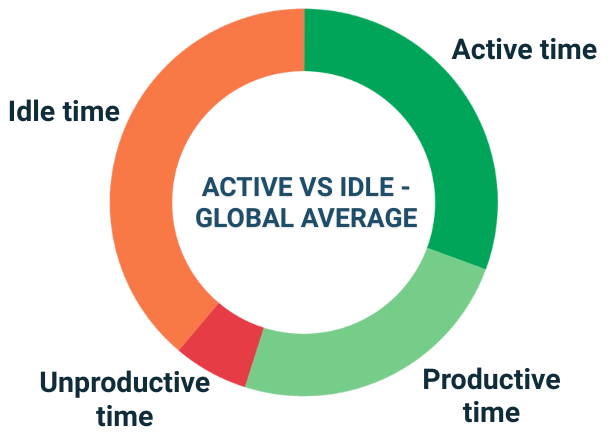
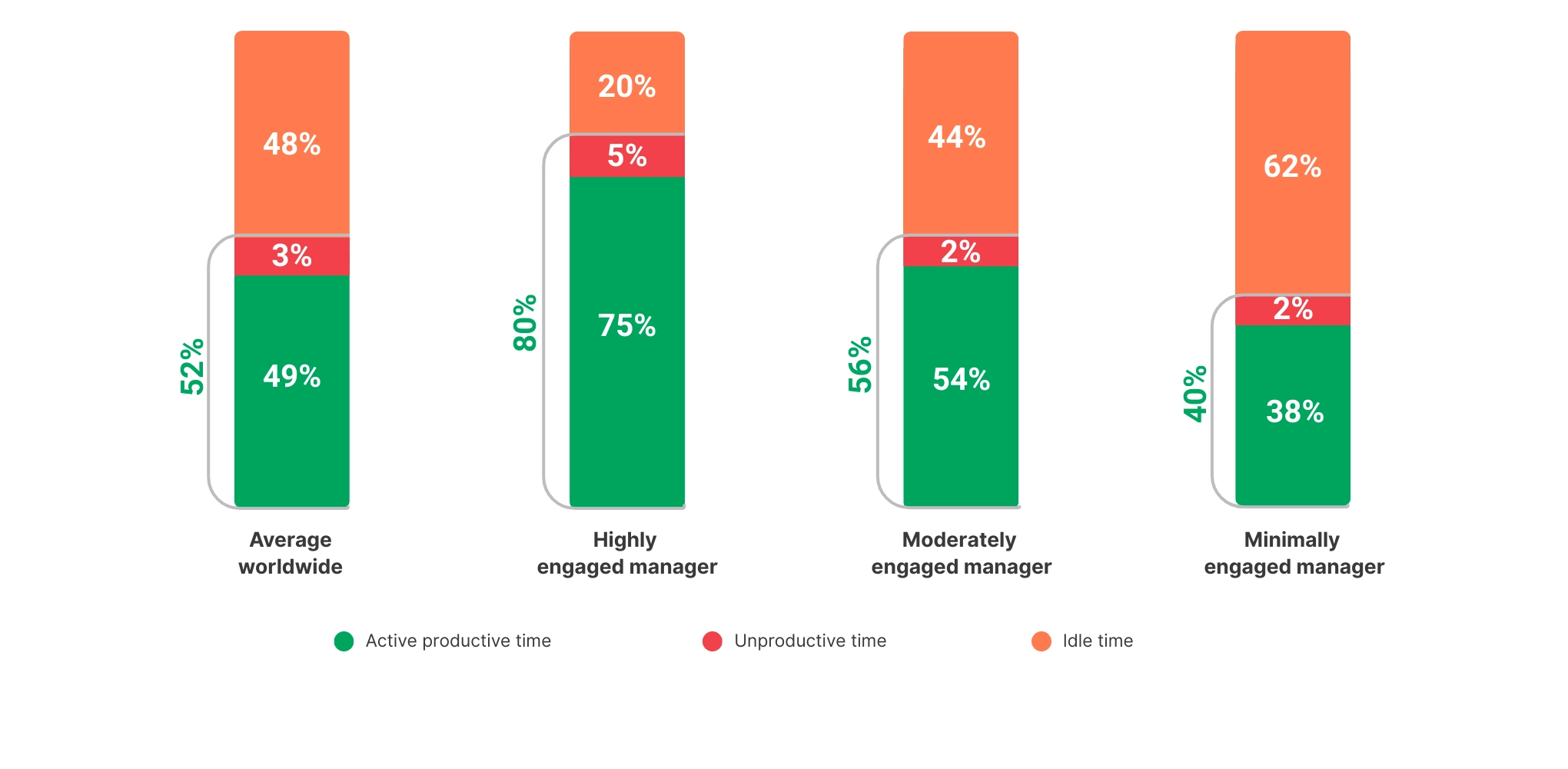
Globally, an average working day is divided as follows:

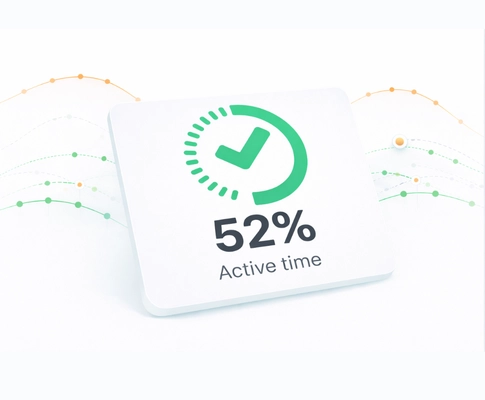
  • Active time: 52%
  • Productive time: 49%
  • Unproductive time: 3%
  • Idle time: 48%

Employees actively use their computers for 52% of the working day on average. This active time is split into 49% spent on productive activities and 3% on unproductive activities.

On average, 48% of the working day is spent with computers on but not in use, known as idle time. This idle time may include breaks, offline meetings, or other on-computer-based activities.

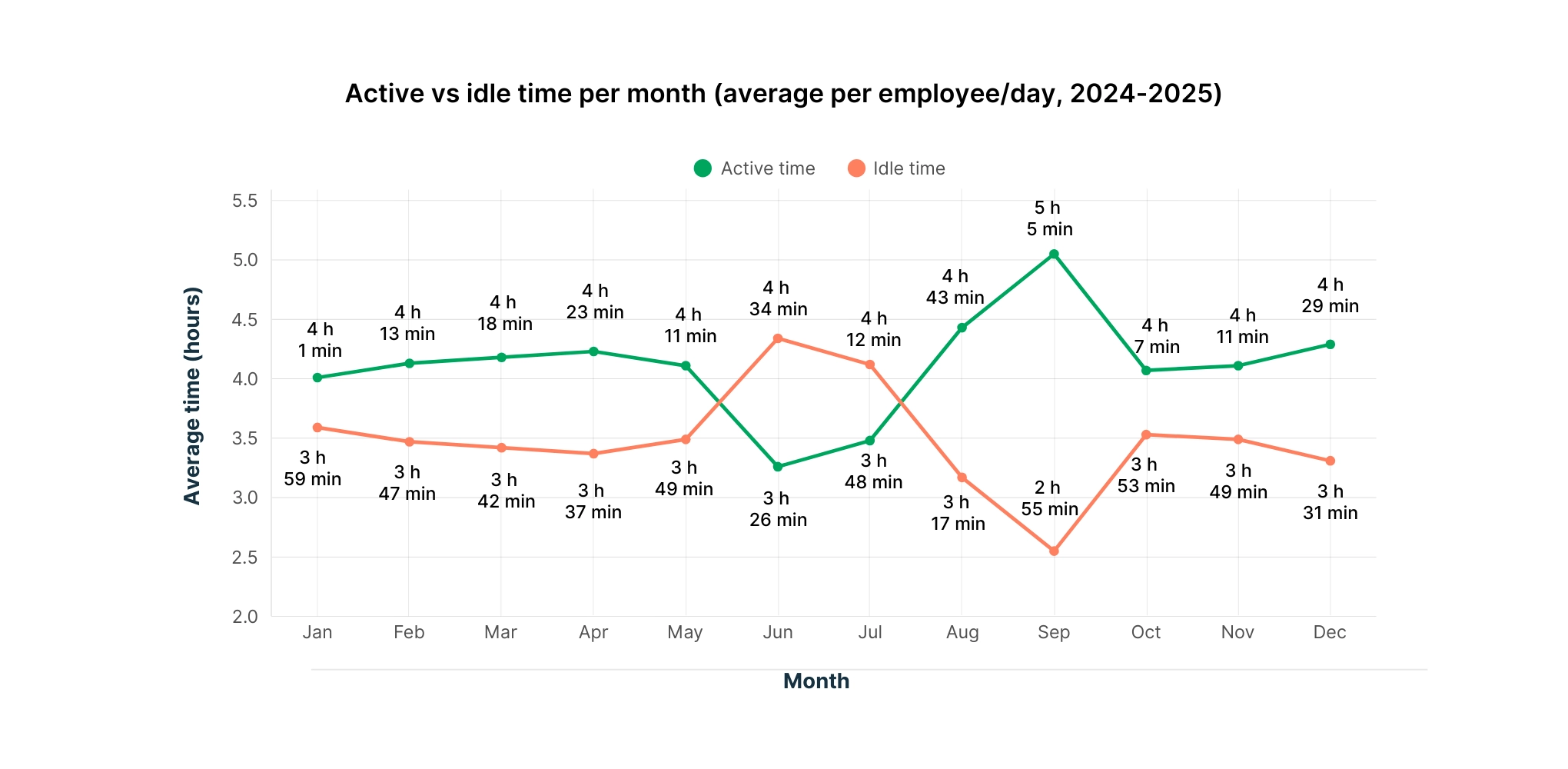
Active/idle per month (average per employee)

This chart illustrates the average active and idle time for employees over an average month during 2024–2025.

Overall, active time remains fairly consistent throughout the year, with a slight dip in December. Employees tend to be more active in October, November, and January, with October being the most active month.

WorkTime

Active/idle per day (average per employee)

This chart shows the average working day across the week, with Friday being the least active day on average during 2024–2025. Tuesday and Wednesday are almost identical in terms of activity, while Monday and Thursday are also nearly equal in terms of employee engagement.

WorkTime

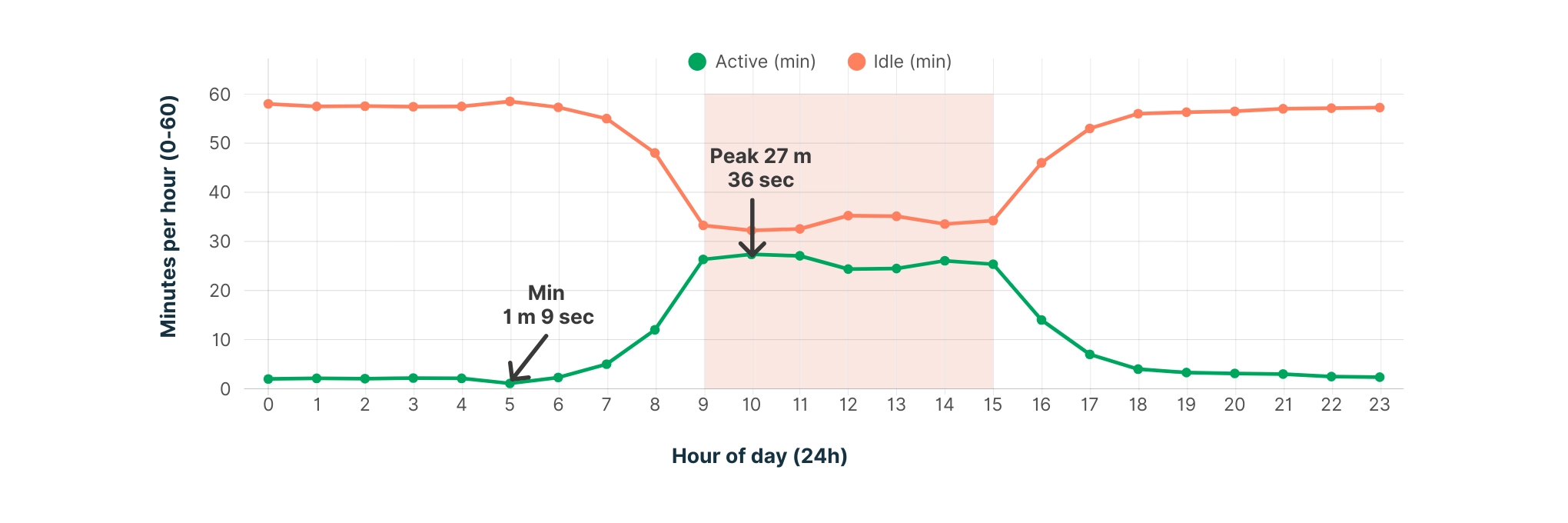
Active/idle per hour (average per employee)

This chart illustrates the average active and idle time per employee, per hour, based on an average working day during 2024–2025. Peak activity hours: employees are most active between 9 AM and 3 PM on average.

WorkTime Active/idle per hour (average per employee) chart.

Top 30 unproductive applications and websites worldwide

WorkTime

TOP 30 APPLICATIONS

  • WhatsApp
  • Spotify
  • Discord
  • Slack
  • Skype
  • Solitaire
  • VLC media player
  • World of Warcraft
  • Roblox Game Client
  • bplus
  • Microsoft Teams
  • VALORANT
  • Windows Media Player
  • Telegram
  • Webex
  • ScreenClippingHost
  • Riot Client
  • Hearthstone
  • Photos
  • TikTok
  • Netflix
  • YouTube (app)
  • Snapchat
  • Steam
  • Epic Games Launcher
  • Facebook Messenger
  • Apple Music
  • iTunes
  • Twitch
  • Audible
WorkTime

TOP 30 WEBSITES

  • youtube.com
  • mail.google.com
  • facebook.com
  • msn.com
  • amazon.com
  • linkedin.com
  • app.qbo.intuit.com
  • outlook.live.com
  • netflix.com
  • web.whatsapp.com
  • yahoo.com
  • nytimes.com
  • meet.google.com
  • mail.yahoo.com
  • cnn.com
  • bbc.co.uk
  • reddit.com
  • instagram.com
  • zillow.com
  • worldofsolitaire.com
  • chess.com
  • discord.com
  • espn.com
  • tiktok.com
  • twitch.tv
  • pinterest.com
  • ebay.com
  • dailymail.co.uk
  • espn.com
  • imdb.com
      
         WorkTime

Per country

Time Australia Canada India South Africa UK USA
Idle

57%

47%

43%

30%

58%

51%

Active

43%

53%

57%

70%

42%

49%

Unproductive

4%

1%

4%

4%

3%

4%

Unproductive websites
Applications
# 1
WorkTime

mahjong-game.com

WorkTime

youtube.com

WorkTime

youtube.com

WorkTime

youtube.com

WorkTime

youtube.com

WorkTime

youtube.com

# 2
WorkTime

youtube.com

WorkTime

facebook.com

WorkTime

web.whatsapp.com

WorkTime

facebook.com

WorkTime

bbc.co.uk

WorkTime

amazon.com

# 3
WorkTime

news.com.au

WorkTime

amazon.ca

WorkTime

amazon.in

WorkTime

netflix.com

WorkTime

facebook.com

WorkTime

facebook.com

# 4
WorkTime

msn.com

WorkTime

netflix.com

WorkTime

irctc.co.in

WorkTime

chess.com

WorkTime

dailymail.co.uk

WorkTime

nytimes.com

# 5
WorkTime

kixeye.com

WorkTime

spotify.com

WorkTime

news.google.com

WorkTime

spotify.com

WorkTime

ebay.co.uko.uk

WorkTime

cnn.com

Key insight YouTube is the leading unproductive website globally. YouTube ranks as the #1 unproductive site in five out of six countries, making it the most common source of digital distraction during work hours.
      
         WorkTime

Per company size

Employees
Rank 1-50 51–200 201–1000 1000+
Idle

30%

46

51%

54%

Active

67%

51%

46%

42%

Unproductive

3%

3%

3%

4%

Unproductive websites
Applications
# 1
WorkTime

youtube.com

WorkTime

youtube.com

WorkTime

youtube.com

WorkTime

youtube.com

# 2
WorkTime

facebook.com

WorkTime

facebook.com

WorkTime

linkedin.com

WorkTime

msn.com

# 3
WorkTime

msn.com

WorkTime

msn.com

WorkTime

msn.com

WorkTime

amazon.com

# 4
WorkTime

linkedin.com

WorkTime

amazon.com

WorkTime

worldofsolitaire.com

WorkTime

nytimes.com

# 5
WorkTime

amazon.com

WorkTime

netflix.com

WorkTime

facebook.com

WorkTime

facebook.com

Key insight Growth doesn’t equal productivity: active time steadily declines as companies scale, hitting its lowest point in large enterprises.
WorkTime

Per management style

As the research shows, an average office employee using computers is active for about 44% of the working day. However, these numbers can vary significantly depending on management style and how managers leverage employee monitoring to optimize productivity and engagement.

Highly engaged managers

Highly engaged managers view productivity monitoring reports as a powerful tool for both communication and continuous improvement. Rather than just analyzing the numbers, these managers actively share the reports with their teams, discussing performance on a regular basis.

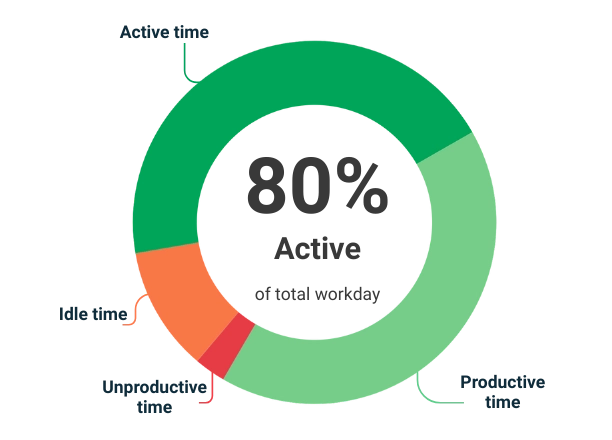
The diagram below illustrates the results achieved by a highly engaged manager.

WorkTime

This company shows performance results way above average because of the manager being highly involved with the team and actively shares performance reports:

  • Active time: 80% (5 h 40 min per employee on average)
  • Productive time: 75%
  • Unproductive time: 5%
  • Idle time: 20%

Employees in this team actively use their computers for 80% of the working day on average. This active time is split into 75% spent on productive activities and 5% on unproductive activities.

On average, 20% of the working day is spent with computers on but not in use, known as idle time. This idle time may include breaks, offline meetings, or other on-computer-based activities.

Moderately engaged managers

Moderately engaged managers might regularly review productivity reports but rarely discuss the results with their teams. In many cases, employees are given access to their own reports to self-assess performance.

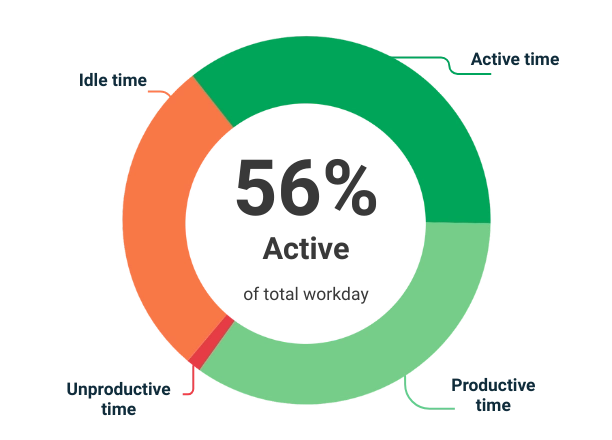
The diagram below illustrates the results achieved by a moderately engaged manager.

WorkTime

This company shows performance results way above average because of the manager being highly involved with the team and actively shares performance reports:

  • Active time: 56% (4 h 30 min per employee on average)
  • Productive time: 54%
  • Unproductive time: 2%
  • Idle time: 44%
WorkTime

Employees in this team actively use their computers for 56% of the working day on average. This active time is split into 54 spent on productive activities and 2% on unproductive activities.

On average, 44% of the working day is spent with computers on but not in use, known as idle time. This idle time may include breaks, offline meetings, or other on-computer-based activities.

Minimally engaged managers

Minimally engaged managers may occasionally review productivity reports but seldom discuss the findings with their teams. Instead, they tend to focus on identifying negative trends and addressing issues only when performance problems arise. In such environments, employees typically do not have access to their own reports for self-assessment.

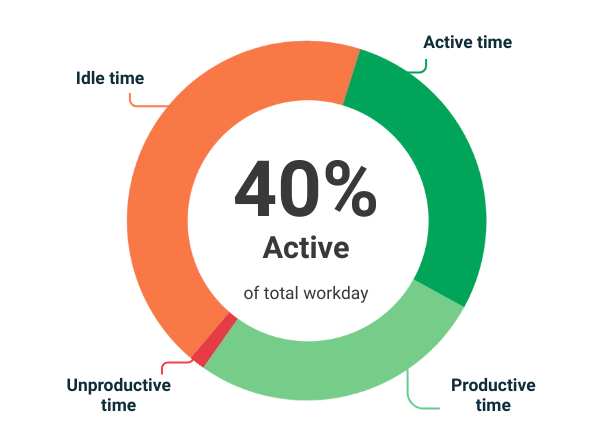
The diagram below illustrates the results achieved by a minimally engaged manager.

WorkTime
  • Active time: 40% (3 h per employee on average)
  • Productive time: 38%
  • Unproductive time: 2%
  • Idle time: 62%

This company shows performance results way above average because of the manager being highly involved with the team and actively shares performance reports:

WorkTime

Employees in this team actively use their computers for 40% of the working day on average. This active time is split into 38% spent on productive activities and 2% on unproductive activities.

On average, 62% of the working day is spent with computers on but not in use, known as idle time. This idle time may include breaks, offline meetings, or other on-computer-based activities.

Comparison

As this chart demonstrates, the more engaged a manager is, the more they communicate with their team. As a result, the team tends to show higher active productive time.

WorkTime
WorkTime

Case studies

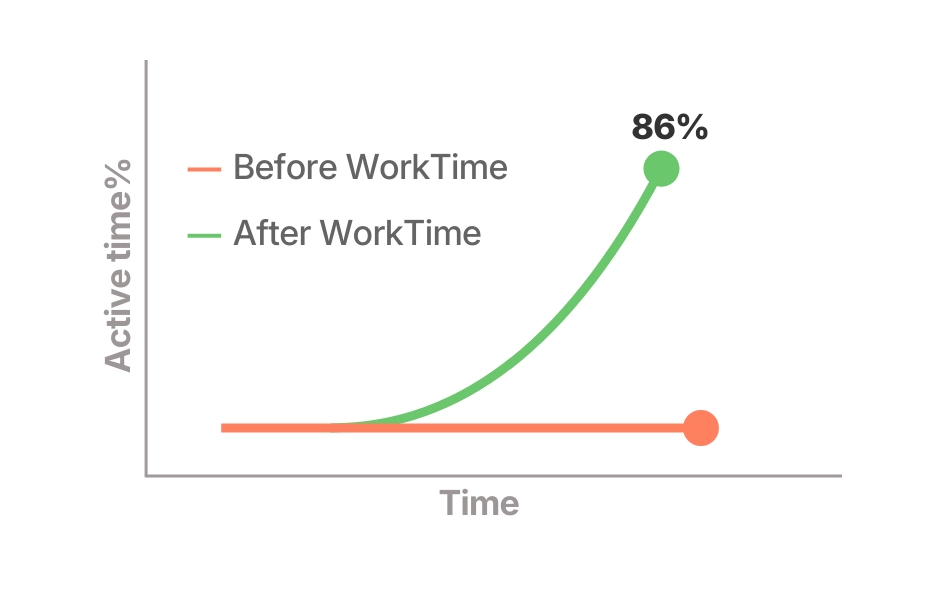
Work-from-home productivity jumped from 30-40% to 86%

+46%

Excellent boost!

WorkTime WorkTime

Country: UK-Japan

Industry: Banking

Size: 170 employees

WorkTime

The challenge: After switching to remote work during COVID, the bank’s customer service productivity and response times dropped. Unlike in the office, managers couldn’t tell if employees were truly active or just away from their computers.

WorkTime

The solution: WorkTime computer active time monitoring software.

GDPR UK: The company uses the WorkTime On-premise edition to ensure GDPR compliance in the UK.

The results: Employee computer active time increased instantly from 30-40% to 86%!

WorkTime boosted active time from 40% to 86% - with full privacy and GDPR compliance.

WorkTime

Why it worked: Privacy-respecting, WorkTime non-invasive monitoring; GDPR-compliant; active vs. idle time reports.


From struggling to thriving: WorkTime lifted productivity to 95%

+45%

Excellent boost!

WorkTime

Country: South Africa

Industry: Telecommunications

Size: 20+ employees

WorkTime

The challenge: Employees getting disengaged and the management gets overloaded.

WorkTime

The solution: WorkTime Cloud

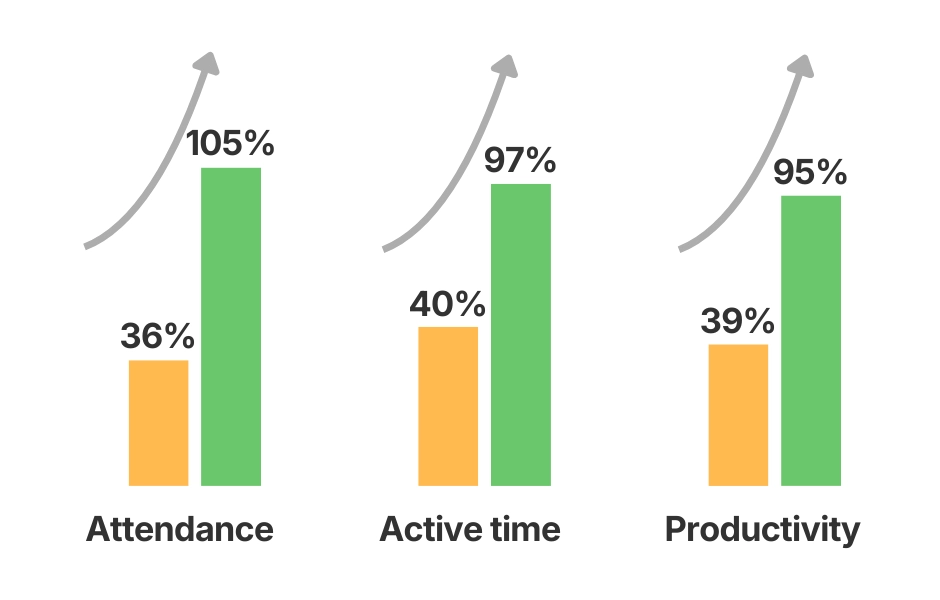
The results: The initial productivity percentage was about 40%, and now it reaches 95%! Clear KPIs provided by WorkTime are keeping employees engaged, and overall employee performance is now very high. Problematic team members are now more visible, and each team member is very clear about the KPI expectations.

2+ yeas of success! This telecommunication company doubled its performance!

WorkTime

Why it worked: WorkTime Non-invasive, feature-rich, great tool for employee engagement.

WorkTime boosts accountability and performance month by month

Productivity
& responsibility
boosted!

WorkTime

Country: South Africa

Industry: Financial services

Size: 200 employees

WorkTime

The challenge: Management wanted to boost employee responsibility, ensure remote work was genuine, and verify overtime claims.

WorkTime

The solution: WorkTime Cloud

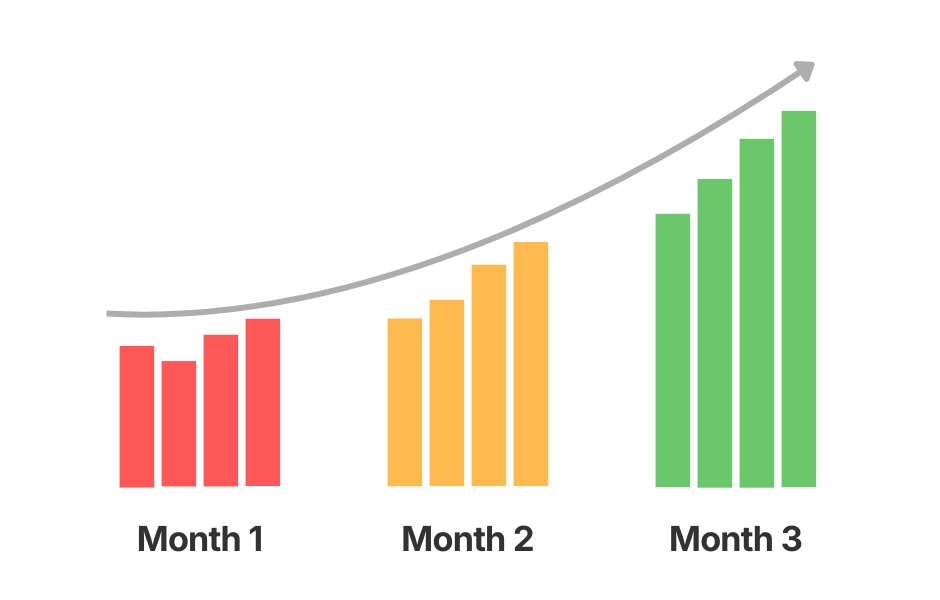
The results: According to IT manager Karin R., since implementation, there has been a monthly increase in productivity. Staff can now manage themselves and take responsibility for their own productivity.

WorkTime

WorkTime drove monthly productivity growth by empowering employees with their own reports.

WorkTime Why it worked: Easy setup, accurate data, and employee access to reports.

WorkTime

Practical insights

Manager’s quick checklist

  • Clearly share your performance expectations with the team.
  • Review productivity reports regularly - automate weekly delivery.
  • Allow employees to view their own reports to encourage self-awareness.
  • Discuss results openly: celebrate achievements, address issues together.
  • Keep monitoring focused on business outcomes, not personal control.
  • Encourage constructive feedback and team-driven improvements.
  • Revisit goals monthly and adjust based on data trends.
  • Track changes over time - use reports to see what works and what doesn’t.
  • Ensure employees understand why monitoring exists - build trust.

Tips for effective use

  • Schedule short monthly reviews - 15–20 minutes are enough to stay aligned.
  • Visualize trends - use charts from WorkTime reports during discussions.
  • Balance data and empathy - numbers show patterns, not the whole story.
  • Involve your team - transparency increases motivation and accountability.
  • Reflect on engagement - consistent idle or unproductive time can signal overload, not laziness.

Mini-Template:
how to set up a corporate time management policy

WorkTime

About WorkTime

Global active time stands at 52%, with WhatsApp and YouTube identified as the leading unproductive applications.
Data indicates that activity levels decrease as company size increases and are significantly influenced by management style.